EasyManua.ls Logo

US Robotics COURIER - Digital Loopback-&T3; Digital Loopback-& T3

US Robotics COURIER
216 pages
Print Icon
To Next Page IconTo Next Page
To Previous Page IconTo Previous Page
Loading...
COURIER HIGH SPEED MODEMS
&T2
resets
the
modem,
ATZ. Both of
the
latter
end
the
test
and
hang
up
the
modem.
The
modem
hangs
up
and
returns
a
three-digit
code,
followed
by
OK
A
code
of 000 indicates
no
errors
were
found.
A
code
of 255 indicates 255
or
more
errors.
An
ERROR
message
indicates
that
you
issued
an
invalid
command.
5.
If
there
were
no
errors, reset
the
modem
to &M4 for
error
control
unless
you
issued
the
ATZ
command.
This
option
is reserved.
DIGITAL
LOOPBACK-&T3
If
your
modem
has
passed
the
AL test, this test
can
help
you
locate a
problem
with
a
remote
modem
or
the
telephone
channel.
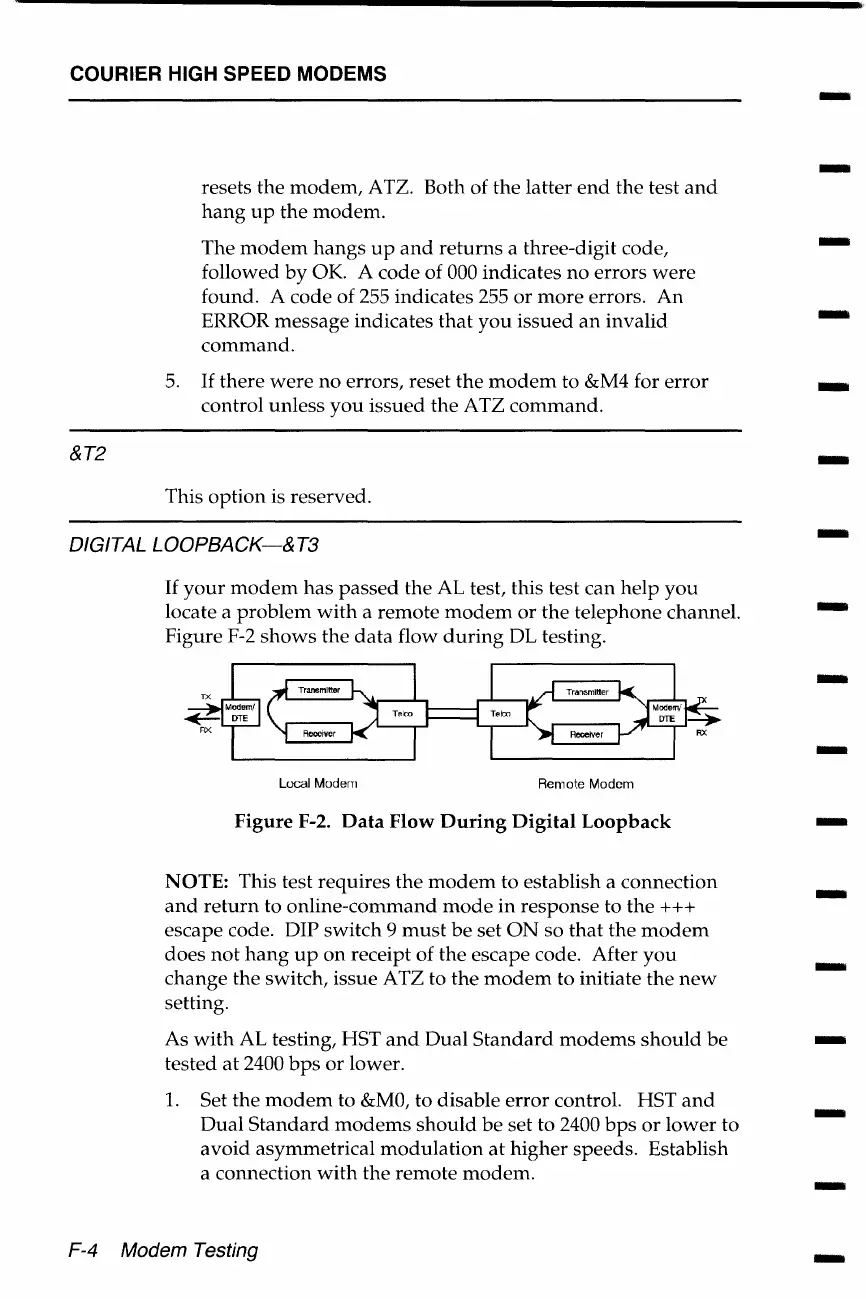
Figure
F-2
shows
the
data
flow
during
DL testing.
Local Modern
Remote Modem
Figure
F-2.
Data
Flow
During
Digital
Loopback
NOTE: This test
requires
the
modem
to establish a
connection
and
return
to
online-command
mode
in
response
to
the
+++
escape code. DIP
switch
9
must
be
set
ON
so
that
the
modem
does
not
hang
up
on
receipt of
the
escape code. After
you
change
the
switch, issue ATZ to
the
modem
to initiate
the
new
setting.
As
with
AL testing, HST
and
Dual
Standard
modems
should
be
tested
at
2400
bps
or
lower.
1.
Set
the
modem
to
&MO,
to
disable
error
control. HST
and
Dual
Standard
modems
should
be
set to 2400
bps
or
lower
to
avoid
asymmetrical
modulation
at
higher
speeds.
Establish
a connection
with
the
remote
modem.
F-4 Modem Testing
-
-
-
-
-
-
-
-
-
-
-
-
-
-
-
-
-

Table of Contents

Related product manuals