EasyManua.ls Logo

US Robotics COURIER - Page 118

US Robotics COURIER
216 pages
Print Icon
To Next Page IconTo Next Page
To Previous Page IconTo Previous Page
Loading...
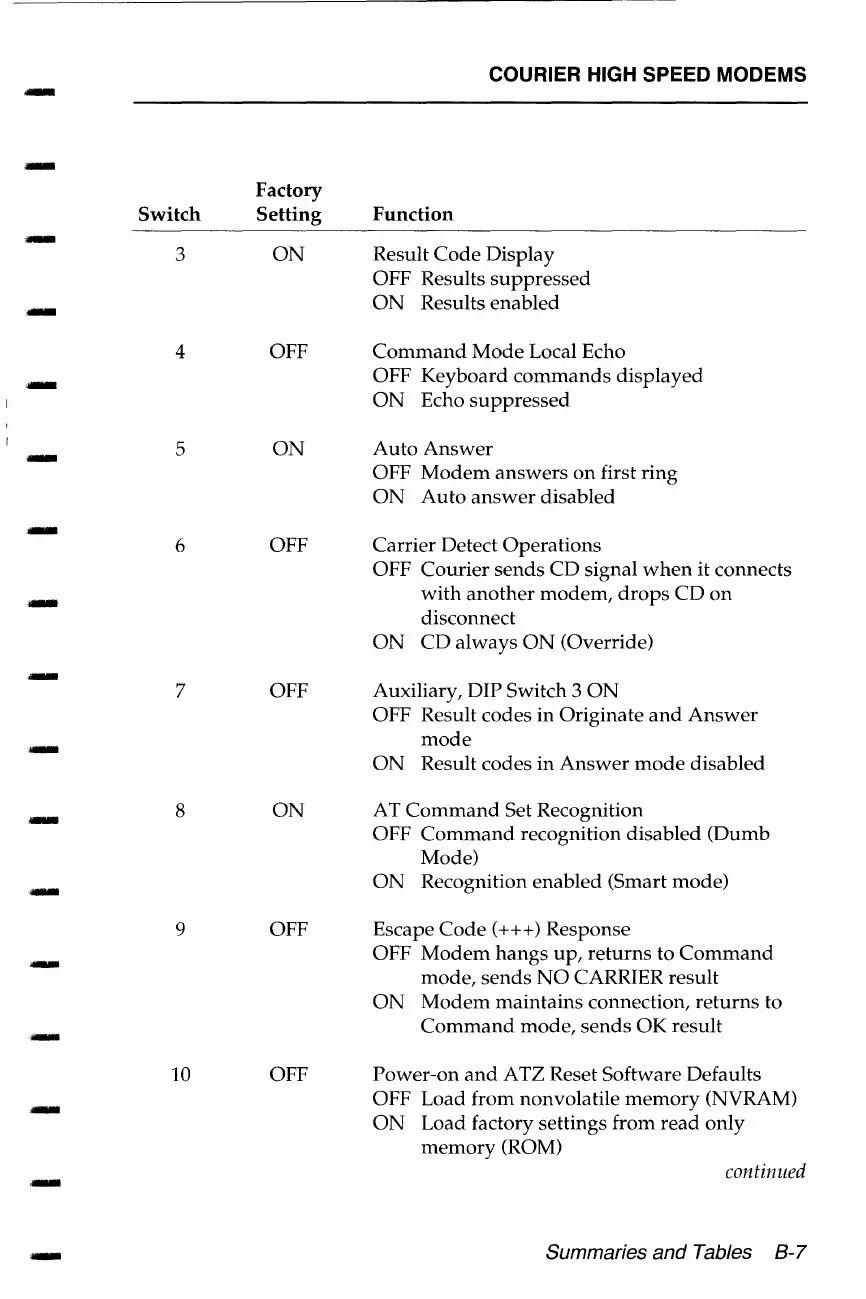
COURIER HIGH SPEED MODEMS
-
Factory
Switch
Setting
Function
.-
3
ON
Result
Code
Display
OFF Results
suppressed
ON
Results
enabled
4 OFF
Command
Mode
Local Echo
,_
OFF
Keyboard
commands
displayed
ON
Echo
suppressed
-
5
ON
Auto
Answer
OFF
Modem
answers
on
first
ring
ON
Auto
answer
disabled
6
OFF
Carrier
Detect
Operations
OFF
Courier
sends
CD
signal
when
it
connects
with
another
modem,
drops
CD
on
disconnect
ON
CD
always
ON
(Override)
7 OFF
Auxiliary, DIP Switch 3
ON
OFF Result codes
in
Originate
and
Answer
-
mode
ON
Result
codes
in
Answer
mode
disabled
-
8
ON
AT
Command
Set Recognition
OFF
Command
recognition
disabled
(Dumb
Mode)
-
ON
Recognition
enabled
(Smart
mode)
9
OFF Escape
Code(+++)
Response
OFF
Modem
hangs
up,
returns
to
Command
mode,
sends
NO
CARRIER
result
ON
Modem
maintains
connection,
returns
to
-
Command
mode,
sends
OK
result
10
OFF
Power-on
and
ATZ Reset
Software
Defaults
OFF
Load
from
nonvolatile
memory
(NVRAM)
ON
Load
factory
settings
from
read
only
memory
(ROM)
continued
-
Summaries and Tables
8-7

Table of Contents

Related product manuals