EasyManua.ls Logo

US Robotics COURIER - Page 138

US Robotics COURIER
216 pages
Print Icon
To Next Page IconTo Next Page
To Previous Page IconTo Previous Page
Loading...
COURIER HIGH SPEED MODEMS
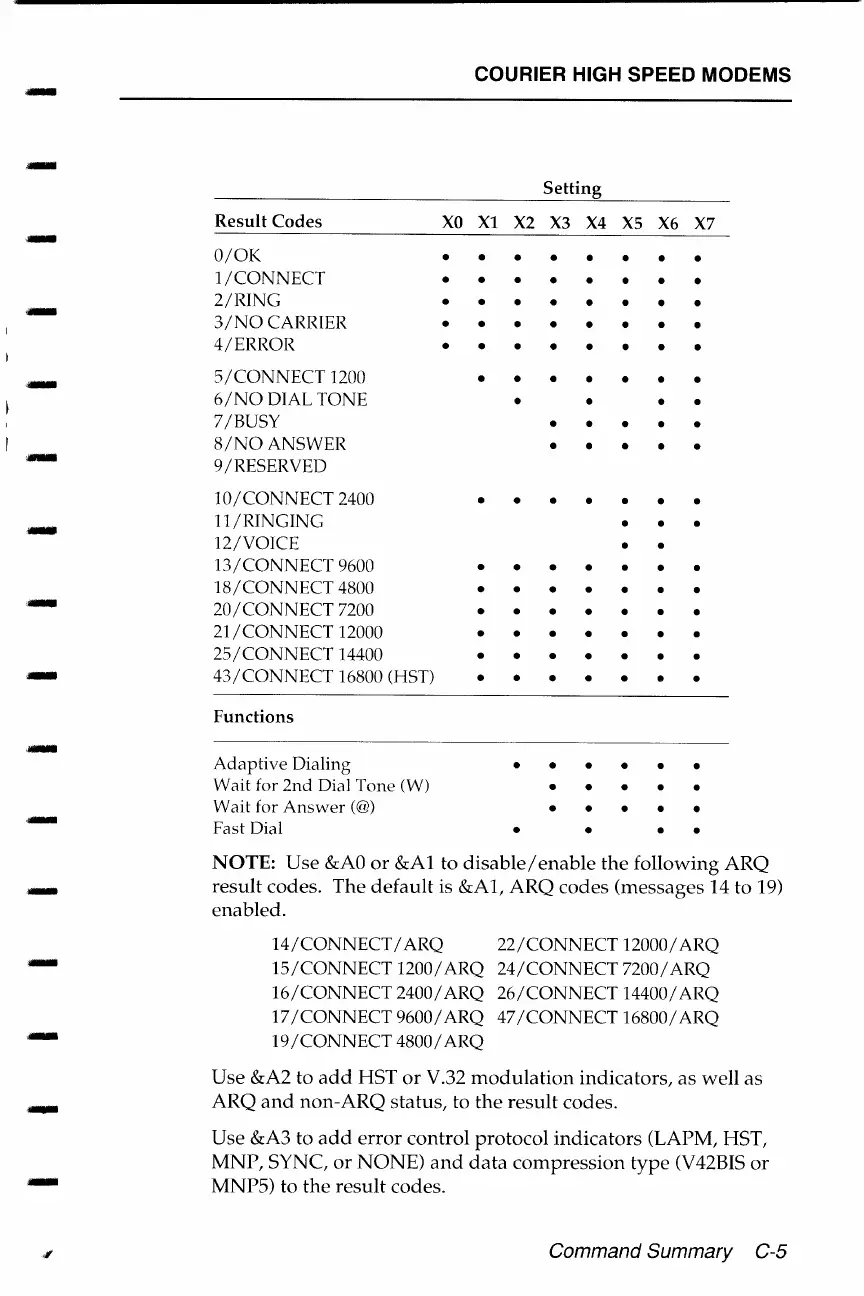
Setting
Result
Codes
XO
Xl
X2
X3 X4
XS
X6
X7
-
O/OK
1/CONNECT
2/RING
.-
3/NO
CARRIER
4/ERROR
~
5/CONNECT
1200
6/NO
DIAL TONE
7 /BUSY
8/NOANSWER
~
9/RESERVED
10
I CONNECT 2400
-
11/RINGING
12/VOICE
13/CONNECT
9600
18/CONNECT
4800
20/CONNECT
7200
21/CONNECT
12000
25/CONNECT
14400
-
43/CONNECT
16800 (HST)
Functions
Adaptive
Dialing
Wait for
2nd
Dial Tone (W)
Wait for Answer(@)
Fast Dial
NOTE: Use
&AO
or
&Al
to
disable/enable
the
following
ARQ
-
result
codes. The
default
is
&Al,
ARQ
codes (messages
14to19)
enabled.
14/CONNECT
I ARQ
22/CONNECT
12000/ ARQ
15/CONNECT
1200/ ARQ
24/CONNECT
7200/ ARQ
16/CONNECT
2400/ ARQ
26/CONNECT
14400/ ARQ
17
I CONNECT 9600 I ARQ
47/CONNECT16800/
ARQ
19
I
CONNECT
4800 I ARQ
Use &A2 to
add
HST
or
V.32
modulation
indicators,
as
well
as
-
ARQ
and
non-ARQ
status,
to
the
result
codes.
Use &A3 to
add
error
control
protocol
indicators
(LAPM, HST,
MNP,
SYNC,
or
NONE)
and
data
compression
type
(V42BIS
or
MNP5) to
the
result
codes.
Command Summary
C-5

Table of Contents

Related product manuals