EasyManua.ls Logo

US Robotics COURIER - Page 4

US Robotics COURIER
216 pages
Print Icon
To Next Page IconTo Next Page
To Previous Page IconTo Previous Page
Loading...
-
-
-
-
-
-
-
COURIER HIGH SPEED MODEMS
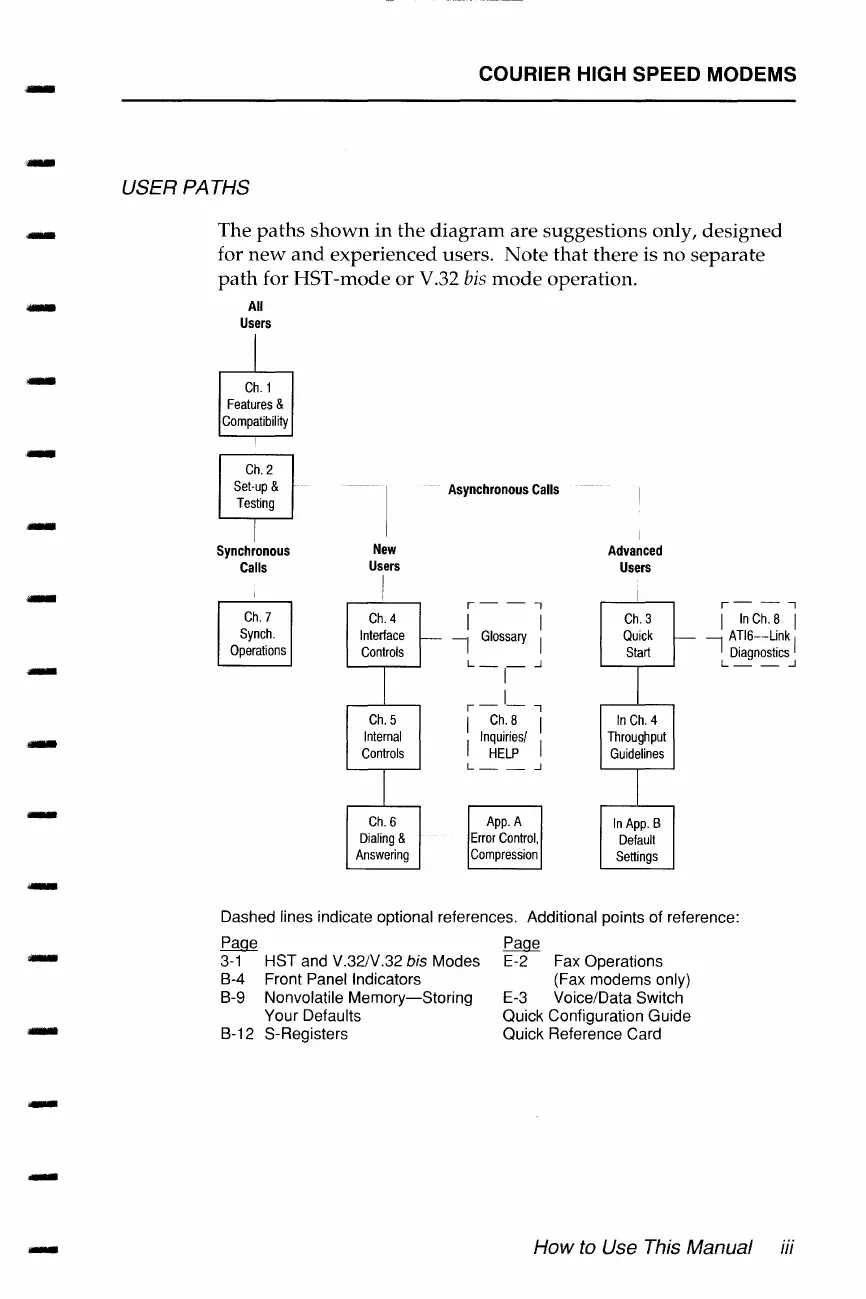
USER PATHS
The
paths
shown
in
the
diagram
are
suggestions
only,
designed
for
new
and
experienced
users.
Note
that
there
is
no
separate
path
for
HST-mode
or
V.32
bis
mode
operation.
All
Users
Ch.1
Features
&
Compatibility
Ch.
2
Set-up
&
Testing
I
Synchronous
Calls
Ch.
7
Synch.
Operations
New
Users
I
Ch.
4
Interface
Controls
I
Ch.
5
Internal
Controls
I
Ch.
6
Dialing
&
Answering
,__
Asynchronous
Calls
r-
- ,
I I
-I
Glossary
I
L-,--1
r-1-,
I
Ch.
8 I
I
Inquiries/
I
HELP
L
__
_j
App.
A
Error
Control,
Compression
I
Advanced
Users
Ch.
3
Quick
Start
In
Ch.
4
Throughput
Guidelines
In
App.
B
Default
Settings
r--,
I
In
Ch.
8 I
ATl6--Link I
I
Diagnostics
L
__
_j
Dashed lines indicate optional references. Additional points of reference:
Page Page
3-1
HST and V.32/V.32 bis Modes E-2
Fax
Operations
(Fax modems only)
B-4 Front Panel Indicators
B-9 Nonvolatile
Memory-Storing
Your Defaults
B-12 S-Registers
E-3
Voice/Data Switch
Quick Configuration Guide
Quick Reference Card
How
to
Use
This
Manual
iii

Table of Contents

Related product manuals