EasyManua.ls Logo

US Robotics COURIER - Page 97

US Robotics COURIER
216 pages
Print Icon
To Next Page IconTo Next Page
To Previous Page IconTo Previous Page
Loading...
COURIER HIGH SPEED MODEMS
Dialing (0$)
HELP,
AMpersand
CoMMands
<ClRL-S
to
Stop,
ClRL-C
to
Cance[)
&An
n=0
Disable
-'ARQ
Result
Codes
&Pn
n~t
Enable
/l:UlO
Result
Codes
n=2
Enable
/Mo
du
Jati
on
Codes
&Rn
n=3
Enab
1 e -'E><tra
Resu
1 t
Codes
&Bn
n~e
Floating
DTE
Speed
n=1 Fi><ed
DTE
Sp.,ed
&Sn
n-2
DTE
Speed
Fixed
When
ARQ
&Cn
n=H
Cll
A I
ways
Un
n=1
ModeM
Controls
CD
n=0
IL
Atterican
Pulse
Dial
n=1
UK
Pulse
Dial
n=0
CTS
Fo
11
ow«
RTS
n=l
Ignore
RTS
n-Z
RX
to
DTEl'RTS
hi
~h
n=0
DSR
Always
On
n-1
ModeH
Contra
Is
DSR
n=L Pu l
«e
llSR,
CTS=CJ)
n=3
Pulse
DSR
&Dn
n-0
I~nore
DTR
n=1
Reserved
&Tn
n-0
Encl
Tes
L
n=2
DTE
Confro
1 s
DTR
&F
Load
~'actory
Configuration
&Gn
n=0
No
Guard
Tone
n=1
550
llz
Guard
Tone
n=2
1800
Hz
Guard
Ton"
&Hn
n=0
Disable
TX
Flow
Control
n=l
crs
n-Z
Xorv'Xoff
Strike
a
key
when
ready
n=l
nna
log
Loopback
<
11LB>
n=3
Digital
Loopback
(DLB)
n='I
Grant
ReHote
DLB
n=S Deny
ReHote
DLB
n=G
Re
Mote
Digital
Loop
back
n=7 ReMote
DLB
IJith
Self
T"sl
n=8
ALB
IJith
Self
Test
&IJ
Store
Configuration
&Xn
n-0
DCE
Synchronous
Clock
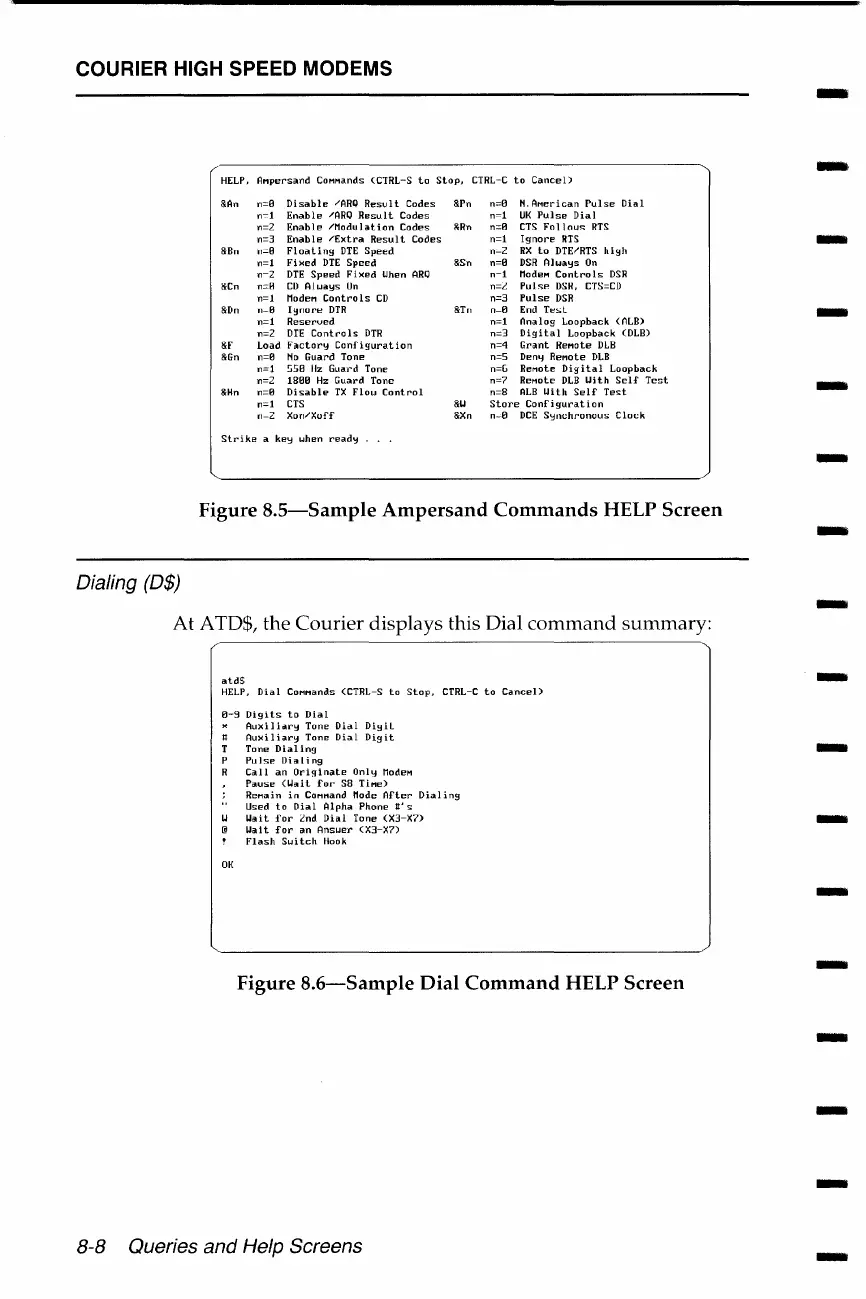
Figure
8.5-Sample
Ampersand
Commands
HELP
Screen
At
ATD$, the
Courier
displays
this Dial
command
summary:
atd$
HELP,
Dial
CoHHands <CTRL-S
to
Stop,
CTRL-C
to
CanceD
0-9
Digits
to
Dial
01{
Auxiliolry
Tone
Didi
Digil
Auxiliary
Tone
Dial
Digit
Tone
Dialing
Pulse
Ilia
ling
Call
an
Ori!finate
Only
ModeM
POluse
(IJail
for·
SB
Ti.,e)
ReHain
in
CoHHand Mode
After
Dialing
Used
to
Dial
Alpha
Phone
tt'
s
IJait
for
Znd
Dial
Tone
<X3-X7>
IJ"
It
for
an
Ansuer
< X3-X7>
Flash
Switch
Hook
Figure
8.6-Sample
Dial
Command
HELP
Screen
8-8 Queries and Help Screens
-
-
-
-
-
-
-
-
-
-
-
-
-
-
-
-
-

Table of Contents

Related product manuals