48
Troubleshooting Guide
Introduction
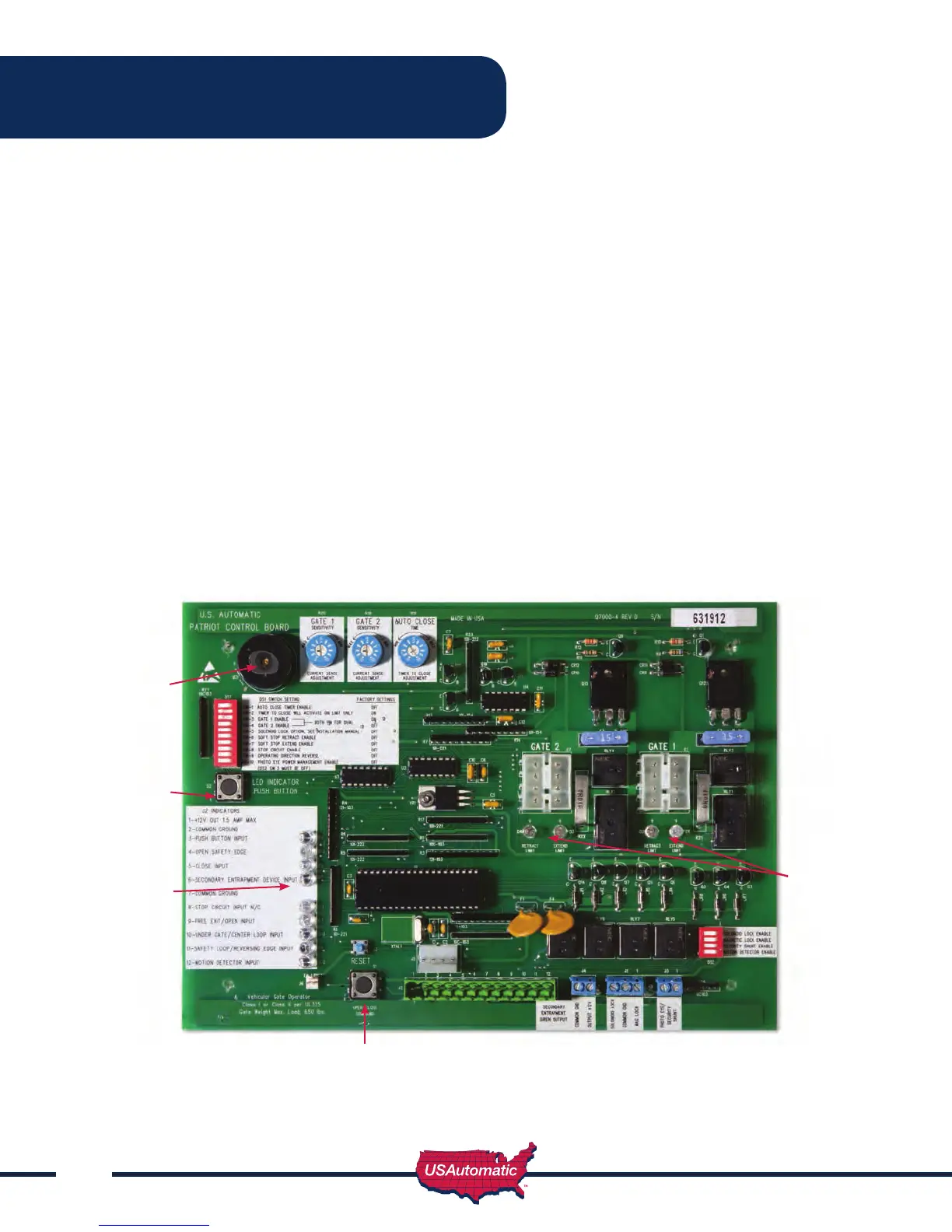
The Patriot control board is equipped with three unique features to assist in troubleshooting a gate
system.
1. The rst and most helpful is the series of LED indicating lights. These lights will help to identify
problems with the actuator limit switches and all control circuits. To use the indicators, press and hold
the “LED Indicator” button on the control board. (The LED’s are not active unless the LED indicator
push button is pressed and held to save battery life). Any circuits or limit switches that are activated
will be obvious by the illumination of the adjacent LED.
2. The second feature to assist in troubleshooting is the current sense beeper. The beeper will sound
anytime the current sense circuit is activated. This is useful in detecting a false reverse due to an
improper or too sensitive current reverse setting, or a gate, which is requiring excessive force to move
3. The third feature to assist in troubleshooting is the on board “Open / Close Command” pushbutton.
This button makes it possible to operate the gate with the twelve terminal wiring plug removed without
having to short across terminal pins.
Patriot Control Board
Current Sense
Beeper
LED Indicator
Button
LED Indicators
LED Indicators
Open / Close
Command



 To Next Page