49
Terms and Definitions
LED -Light Emitting Diode - small red lights on control board.
Control board - Located inside the control box in the upper right corner.
Receiver - Located inside the control box on the left side - coax cable connected to it.
Remote/Transmitter - Hand held unit with 2 buttons, used to operate the gate, sends signal to receiver
when button is pressed.
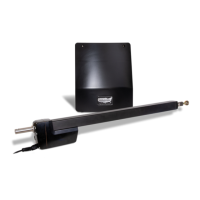
Linear Actuator - Connected to gate and hinge post - contains the motor, gearbox limit switches and
extension tube.
Connector - Control board has three types of connectors. Two white 8-pin connectors labeled Gate 1
and Gate 2 (X1 and X2) are used to connect actuator to control board, and one green 12-
pin connector (J2) (located bottom center of control board) to connect radio receivers and
accessories to control board. All three are plug type and can be disconnected (unplugged from
control board) without disconnecting wires.
Push Buttons - Three are located on the control board. “Open / Close Command” used to operate the
gate, “LED Indicator” used to activate the LED’s and “Reset” used to reset the control board after
current sensing twice before a limit is reached.
Dip Switches - Small switches, which are located on the control board in two places. The primary set
DS1, is located in the upper left corner and the secondary set, DS2, is located in the lower right
corner of the control board with functions listed beside each. See manual (page 32-33) for more
information.
Sensitivity adjustments - Located on the control board (see page 34). These adjustments are
the primary safety feature. If the gate comes in contact with an object it will stop and reverse.
These adjustments control the amount of pressure applied to an object before reversing the gate.
Charge Controller - Located inside the control box in upper left corner (see page 24). This is the battery
charger. The input power for this device can be either from a transformer or from a solar panel.
Transformer - This device connects to a 110 VAC electrical outlet and converts it to a low AC voltage
that can be connected to the charge controller to provide continuous charging of the battery.
Open and Close Limit - This refers to the open or close stop position and are adjusted on the underside
of the actuator.
Entrapment Siren - If the control board sensitivity circuit senses an obstruction it will reverse the gate
and if a second obstruction is detected before the gate reaches a fully open or close limit the
control board will shut down the operator and sound the entrapment alarm for ve minutes or until
the “Reset” button is pressed.
Gate 2 - is dened as the 2nd gate on a dual gate system.
Note: Never run the actuator while it is disconnected from the gate. Damage may
occur. Always have the actuator connected during troubleshooting in case the
operator starts working to prevent damaging internal components.


 To Next Page