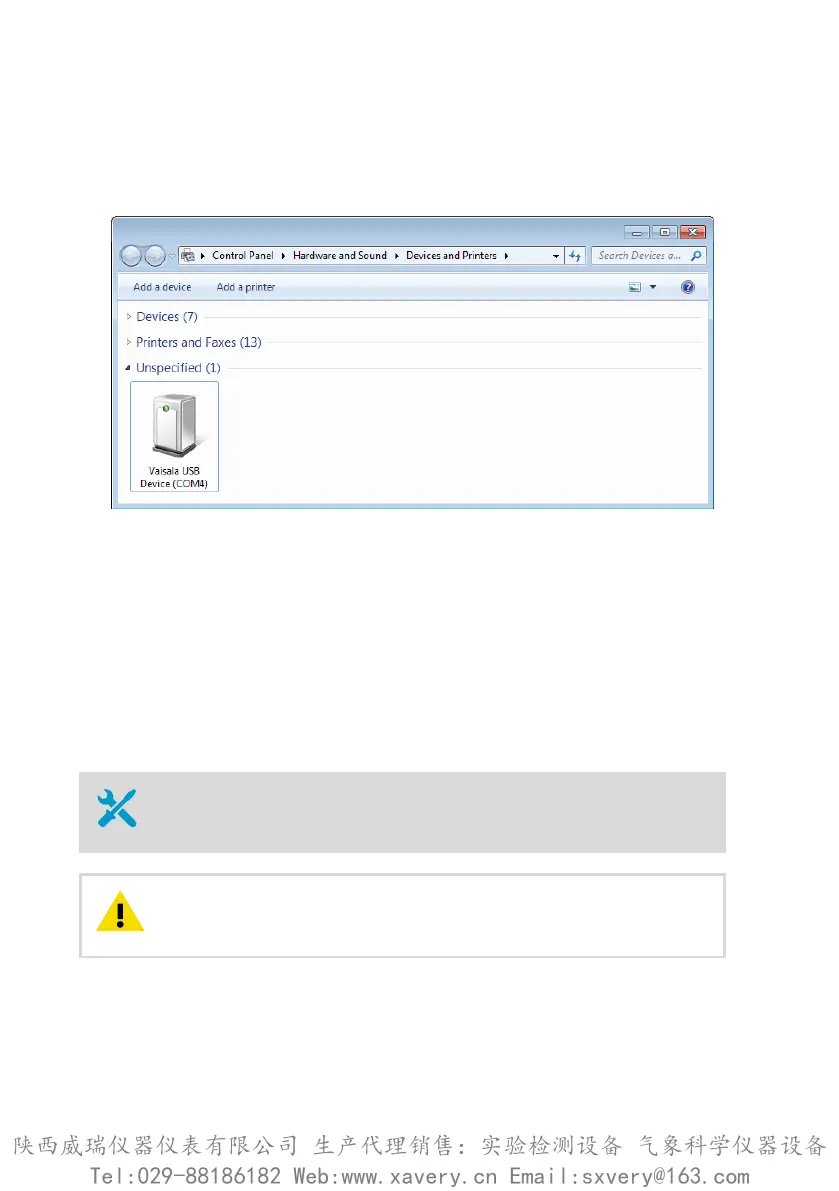
3. Locate the cable in the list of devices:
• If the device is listed as Vaisala USB Device with a COM port number in brackets, the
cable is ready for use. Note the COM port number, you will need it later.
• If the device is listed as Vaisala USB Instrument Cable without a COM port number
listed, you must install the driver manually.
4. To install the driver manually:
a. Disconnect the USB service cable from the computer.
b. Download the Vaisala USB driver at http://www.vaisala.com/software (select the
appropriate USB Instrument Driver Setup for your cable).
c. Run the USB driver installation program Vaisala USB Device Driver
Setup.exe. Accept the installation defaults.
d. Go back to step 1 and verify that the driver installation works as expected.
4.3
Connecting to Insight software
• Computer with Microsoft Windowsâ operating system and Vaisala Insight
software installed
• USB connection cable (no. 242659)
When connecting several devices at the same time, note that your
computer may not be able to supply enough power through its USB ports. Use
an externally powered USB hub that can supply >2 W for each port.
CAUTION!
HMP3, HMP4, HMP5, HMP7, HMP8, HMP9, MMP8, TMP1 User Guide M212022EN-D
28
陕西威瑞仪器仪表有限公司 生产代理销售:实验检测设备 气象科学仪器设备
Tel:029-88186182 Web:www.xavery.cn Email:sxvery@163.com







 To Next Page