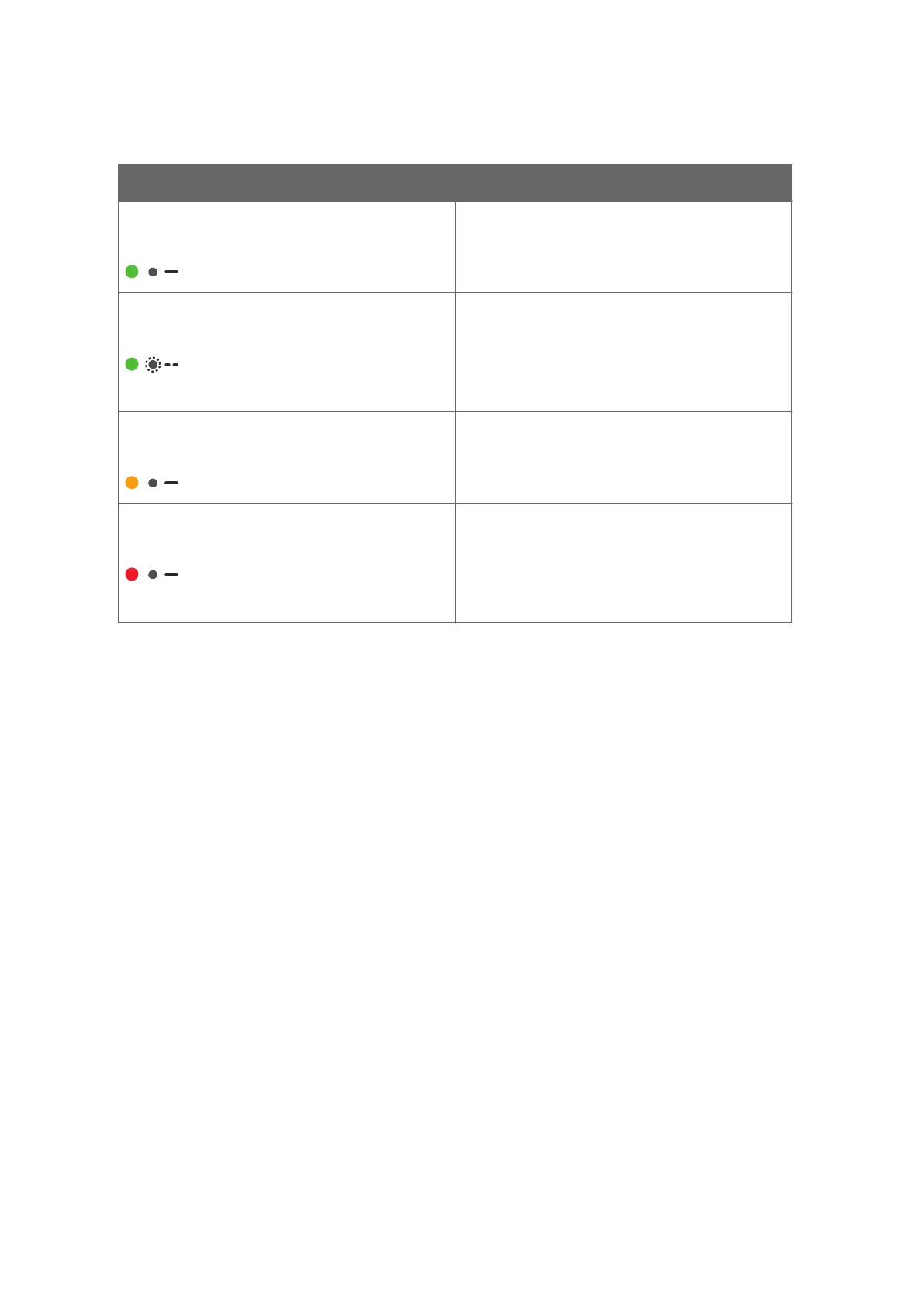
Table 3 LED Indicator States
LED Color and Flashes Description
Solid green LED:
A solid green LED means that the transmitter and
probe are working normally.
Blinking green LED:
The LED blinks green when the transmitter is starting
up, and changes to a steady green when the
transmitter is ready for use.
The LED also blinks green when the wireless
connection is active, and changes to a steady green
when the connection ends.
Solid orange LED:
A solid orange LED is shown when a probe is not
connected to the transmitter (or the probe is not
properly connected and the transmitter does not
recognize it).
Solid red LED:
A solid red LED means that an alarm or a notification
is active, or the probe or the transmitter is in an error
state.
To view information about the alarm or notification,
connect to Indigo's wireless configuration interface
with your web browser and open the Status menu.
More Information
‣
Status View (page 32)
‣
Connecting to Wireless Configuration Interface (page 26)
Indigo 201 User Guide M211877EN-E
14




 To Next Page