7. Calibration and Adjustment
7.1 Calibration Overview
The Calibration menu of the wireless
configuration interface contains options for calibrating
and adjusting the measurement of the probe you have connected to the transmitter. You can
also view the current adjustment and restore the probe's factory adjustments.
The calibration menu interface described in this document is in use from Indigo software
version 1.2.0 onwards. See manual revision M211877EN-C or earlier for instructions on
using the previous version of the interface.
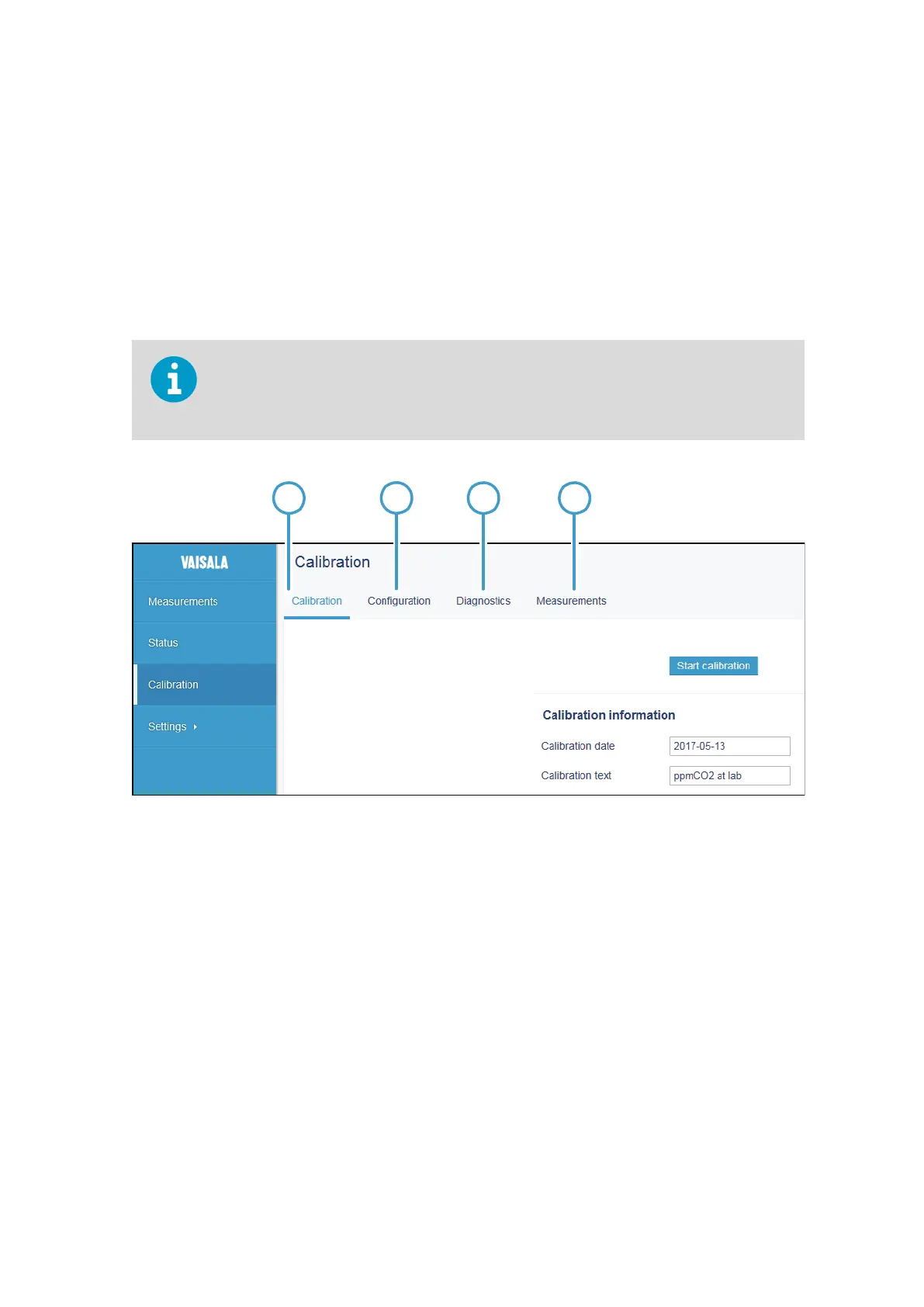
Figure 26 Calibration Menu Main View
1 Calibration tab
2 Configuration tab
3 Diagnostics tab
4 Measurements tab
There are 4 tabs in the Calibration menu:
• Calibration: the main adjustment view with options for making adjustments, viewing
adjustments, and restoring factory adjustments.
•
Configuration: options for using environmental compensations (probe-specific range
of options) that allow compensating for the conditions present in the calibration
environment, for example, pressure, temperature, and background gases. Also includes
probe-specific configuration options that are not mandatory for use with Indigo.
Chapter 7 – Calibration and Adjustment
53








 To Next Page