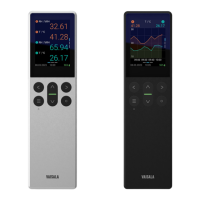
2.3 Indigo80 indicator parts
Figure 2 Indigo80 indicator parts, front and
bottom views
1 Status indicator LED
2 Power on/o and main menu button
3 Magnetic hanger at the back of the
device (optional accessory).
Handle with care.
4 Ambient light sensor (controls display
brightness)
5 Select button for selecting items in the
user interface and opening the
shortcut menu with options to edit
views
6 Battery compartment at the back of
the device
7 Type label located under the battery.
Also shown in the Indigo80 > About
view of the user interface.
8 M12-5F A-coded ports (2 pcs, labeled
and ) for connecting compatible
Vaisala devices
9 USB-C port for charging the battery
and connecting Indigo80 to a
computer to transfer data and
configure Indigo80 settings with
Insight PC software
Take the Getting started tour in the Help menu of Indigo80 to familiarize yourself
with the keypad buttons and menus.
More information
‣
Indigo80 menus and views (page 16)
‣
Indigo80 battery (page 37)
‣
Indigo80 specifications (page 47)
Chapter 2 – Product overview
11






 To Next Page
