75
Appendix B - Remote Control Operation
Temperature Setting:
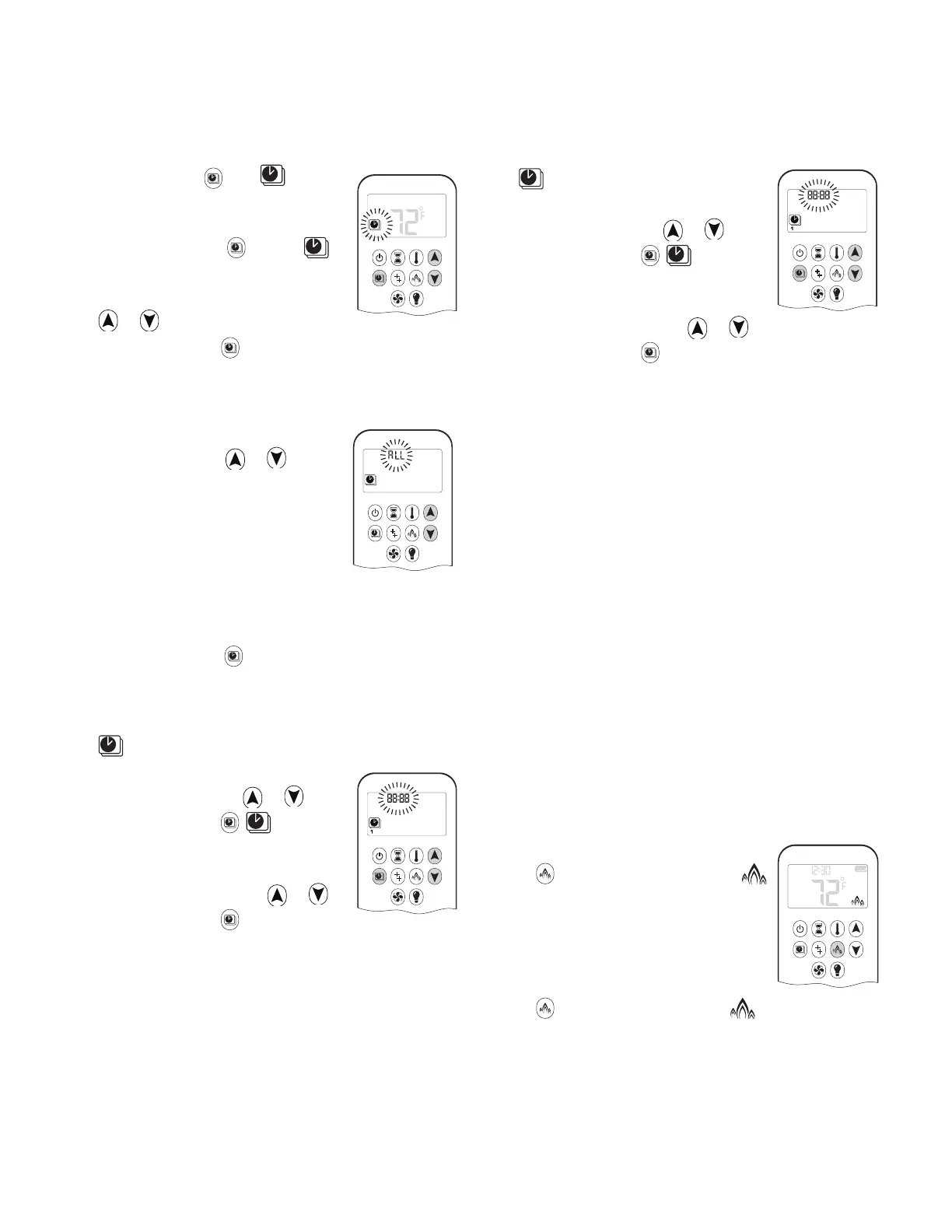
1. Press and hold until ȵ ashes.
ON and set temperature (set in Ther-
mostatic Mode) is displayed.
2. To continue, press
or wait. ,
OFF displayed, temperature ȵ ashes.
3. Select o temperature by pressing
or .
4. To conȴ rm, press
.
Note: The on (Thermostatic) and o set temperatures
are the same for each day.
Day Setting:
1. ALL ȵ ashes. Press or to
choose between:
• ALL = same settinΑs ON-OFF
every day
• SA:SU = same settinΑs ON-
OFF Saturday and Sunday
• 1, 2, 3, 4, 5, 6, 7 = daily timer—unique ON-OFF
settinΑs for a sinΑle day of the week, for multiple
days of the week or for every day of the week.
2. To conȴ rm,
press .
ALL Selected (same settings every day)
On Time Setting (PROGRAM 1)
1.
, 1, ON are displayed. ALL is displayed brieȵ y.
Hour ȵ ashes.
2. To select hour, press
or .
3. To conȴ rm, press
. , 1, ON
are displayed. ALL displayed brieȵ y.
Minutes ȵ ash.
4. To select minutes, press
or .
5. To conȴ rm, press
.
ON
ON
Off Time Setting (PROGRAM 1)
1.
, 1, OFF are displayed. ALL is
displayed brieȵ y. Hour ȵ ashes.
2. To select hour, press
or .
3. To conȴ rm, press
. , 1, OFF
are displayed. ALL displayed brieȵ y.
Minutes ȵ ash.
4. To select minutes, press
or .
5. To conȴ rm, press
.
Note: Either continue to PROGRAM 2 and set ON and
OFF times or stop programming at this point, and
PROGRAM 2 remains deactivated.
Note: PROGRAM 1 and 2 use the same ON
(Thermostatic) and OFF temperatures. Once a new ON
(Thermostatic) and/or OFF temperature has been set,
that temperature becomes the new default setting.
Note: ON and OFF times programmed for PROGRAM 1
and PROGRAM 2 become the new default times.
The batteries must be removed to clear the
PROGRAM 1 and PROGRAM 2 ON and OFF times
and temperatures.
SA:SU (same settings Saturday and Sunday) or
1, 2, 3, 4, 5, 6, 7 (different settings on different
days)
• Set on time and o time using the same procedure as
“ALL Selected” above.
• W
aiting to ȴ nish setting.
Eco Mode
On:
Press button to enter Eco Mode.
is displayed.
Flame height modulates between high
and low every 20 minutes.
Off:
Press button to exit Eco Mode. disappears.
OFF
PM




 To Next Page