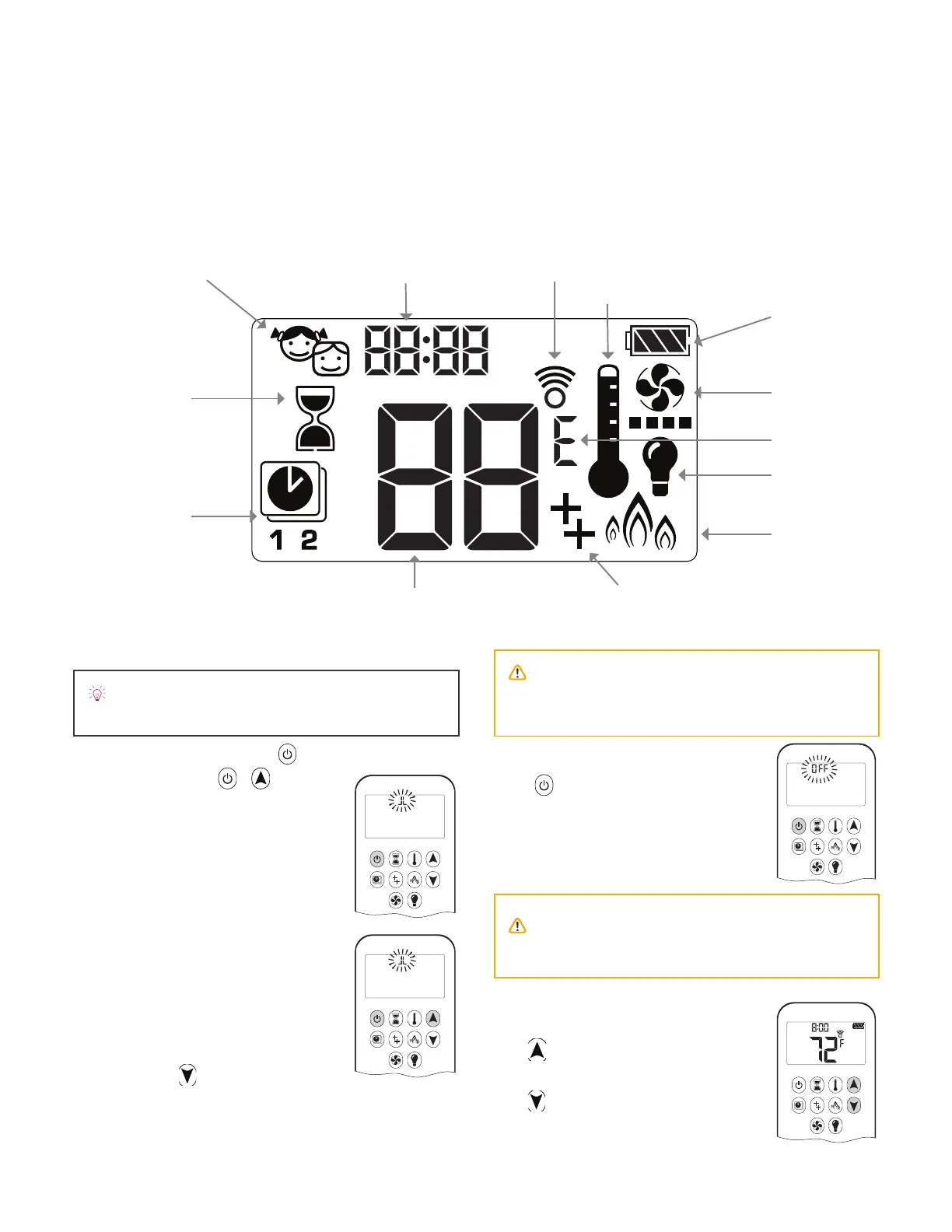
Main Display
To Turn O Fire
Press to turn OFF.
Note: There is a 2 minute delay after
switching o before the next ignition is
possible.
Flame Height Adjustment
To increase ȵ ame height, press and
hold
.
To decrease ȵ ame height, press and
hold
. You may hold the button
down until the ȴ re is set to pilot ȵ ame
only.
CAUTION: Always check the ȴ re and pilot visu-
ally to ensure they are o .
AM
ON
OFF
PM
AM
Thermostatic Mode
Signal IndicatorChild Proof
Light
Fan (if included)
Program Mode
Temperature
Time
Auxiliary Feature (not used)
Countdown Timer
Battery Status
Eco Mode
°F or °C
To Turn On Fire
One-Button lighting (default):
Two-Button lighting: +
simultaneously
Press and hold for 4 seconds, until 8
short beeps and a blinking series of
lines conȴ rms the start sequence has
begun. Release button.
Main gas ȵ ows once pilot ignition is
conȴ rmed.
Handset automatically goes into
manual mode after main burner
ignition.
Standby Mode (Pilot Flame)
Press and hold to set appliance to
pilot ȵ ame.
NOTE: When pilot ignition is conȴ rmed, motor
automatically turns to maximum ȵ ame height.
CAUTION: If the pilot does not stay lit after
several tries call your local service technician or
gas supplier.
Initial Pairing
Before the remote control can be used with the fi replace, it must be paired. See Remote Control Set-Up on page 62.
71
Appendix B - Remote Control Operation




 To Next Page