AIR IN ARC
®
200 SERIES ALL-IN-ONE POWER SYSTEM
®
SECTION 7: TROUBLESHOOTING
090019-OP_r0 PAGE - 105
COMPRESSOR (CONTINUED)
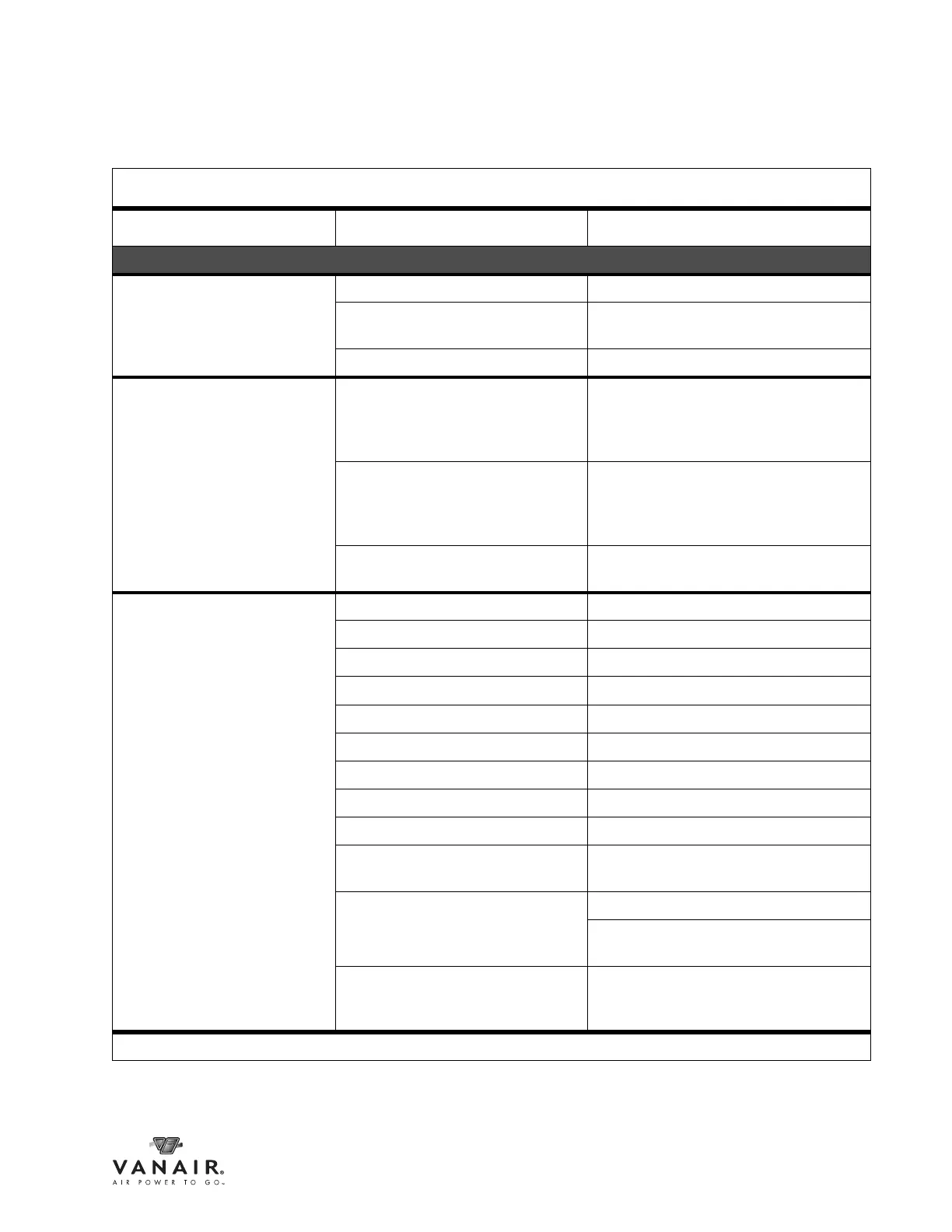
Abnormal noise Loose valve assembly Tighten valve bolt and lock nut.
Piston hits cylinder cover Check piston & rod assembly for excessive
wear.
Worn connecting rod bearing. Replace bearing.
Compressor overheats Low compressor oil level Check oil level and refill to proper level if
necessary. Refer to Section 6.5.2,
Compressor Oil Maintenance. Do not
overfill.
Obstructed or restricted intake air flow Check for obstructions (frame, body, etc.) to
air filter vents. Replace air filter if necessary.
Refer to Section 6.5.1, Compressor Air
Filter.
Unloader valve(s) sticking or faulty Refer to Section 6.5.3, Unloader Valve
Maintenance, to clean or rebuild/replace.
Compressor will not build up
pressure
Worn valve plate Repair or replace valve plate.
Valve springs have lost their temper Replace valve springs.
Dirt on the valve plate Remove and clean it.
Leaks from safety valve Repair or replace safety valve.
Leaks from bolt holes Tighten the nuts even with packing.
Uneven valve seat surface Remove and lap the surface.
Excessive blow by on piston rings Replace with new ones.
Bad packing (gasket too thick) Replace packing (gasket).
Excessive air leaks Eliminate air leaks.
Compressor system is not receiving
enough operating power
If running more than one function
simultaneously, turn off competing function.
Air demand too high Check for leaks and take corrective action.
Check air tools for wear, damage, or
malfunctions. Replace or repair.
Pressure control out of adjustment or
malfunctioning
Pressure settings may need to be reset.
Consult Section 6.5.5, Adjusting the Cut-
in / Cut-out Pressure.
Continued on next page
7.3 TROUBLESHOOTING GUIDE
Fault/Malfunction Possible Cause Corrective Action



 To Next Page