PaX-i3D Green (PHT-60CFO) User Manual
33
3 PaX-i3D Green Imaging System Overview
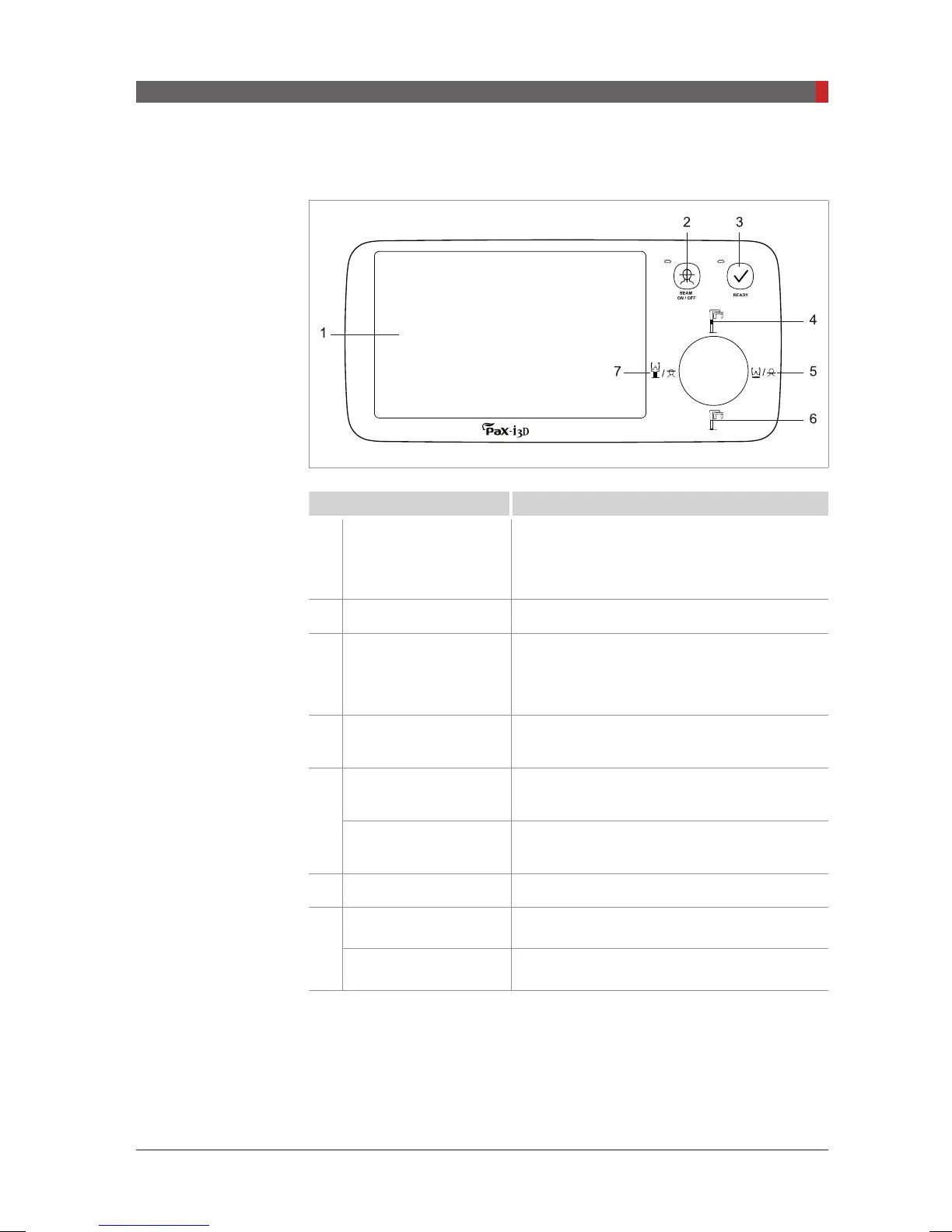
3.3.1 Control Panel
Buttons Functions
1
Touch Screen
Configures the parameter settings in each
imaging mode. For more information on this,
refer to
3.3.2 Touch Screen.
2
Laser Beam ON / OFF Turns ON or OFF the laser beams.
3
READY
Indicates that parameter settings and the
patient alignment are nished and imaging is
ready.
4
Column UP Moves the column up.
5
Chinrest DOWN
Lowers the chinrest.
- Functions only in the CT imaging mode.
Frankfurt plane laser
beam DOWN
Moves Frankfurt plane laser beam down
.
- Functions only in the PANO imaging mode.
6
Column DOWN Lowers the column.
7
Chinrest UP
Moves the chinrest up.
- Functions only in the CT imaging mode.
Frankfurt plane laser
beam UP
Moves Frankfurt plane laser beam up
.
- Functions only in the PANO imaging mode.
[PI3DG_130U_44A_en]User Guide.indd 33 2016-05-24 오후 4:18:31














 To Next Page