PaX-i3D Green (PHT-60CFO) User Manual
92
6 Acquiring PANO Images
Aligning the Laser Beams
RNIN
Be careful not to project the laser beams directly into the
patient’s eyes as this could severely damage the patient’s
vision.
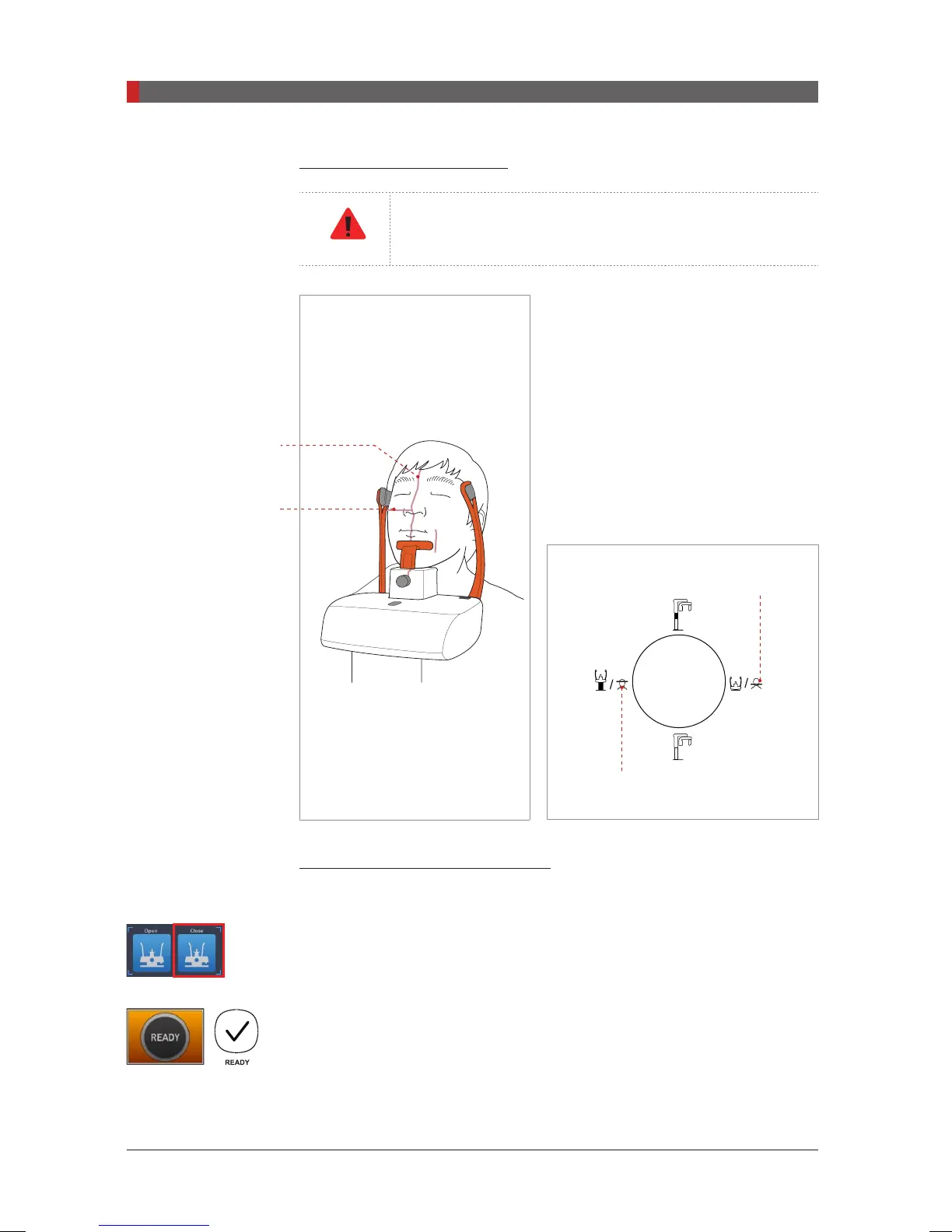
A.
Mid-sagittal plane laser beam
:
Position the Mid-sagittal plane laser
beam at the center of the patient’s face to
prevent magnifications of the left or right
side in the nal image.
B.
Frankfurt plane laser beam
: The
Frankfurt plane laser beam should go from
the top of the ear to the tip of the nose
when the patient’s head is tilted back 10 –
15 °.
Frankfurt plane laser
beam UP button
Frankfurt plane laser
beam DOWN button
Completing Patient Positioning
A. After conrming patient positioning and beam alignment, adjust the temple
supports to t snugly on both sides of the patient’s head by clicking the temple
support adjustment button.
B. Click the
READY
button after the patient has been properly positioned. No
X-ray will be emitted at this point.
C. Proceed to section
6.4 Initiating X-ray Exposure.
Frankfurt plane laser
beam
Mid-sagittal plane
laser beam
[PI3DG_130U_44A_en]User Guide.indd 92 2016-05-24 오후 4:19:01














 To Next Page