73
9 Set up with the display and adjustment module
VEGAPULS 6X • Two-wire 4 … 20 mA/HART
66190-EN-221107
•
Turkish
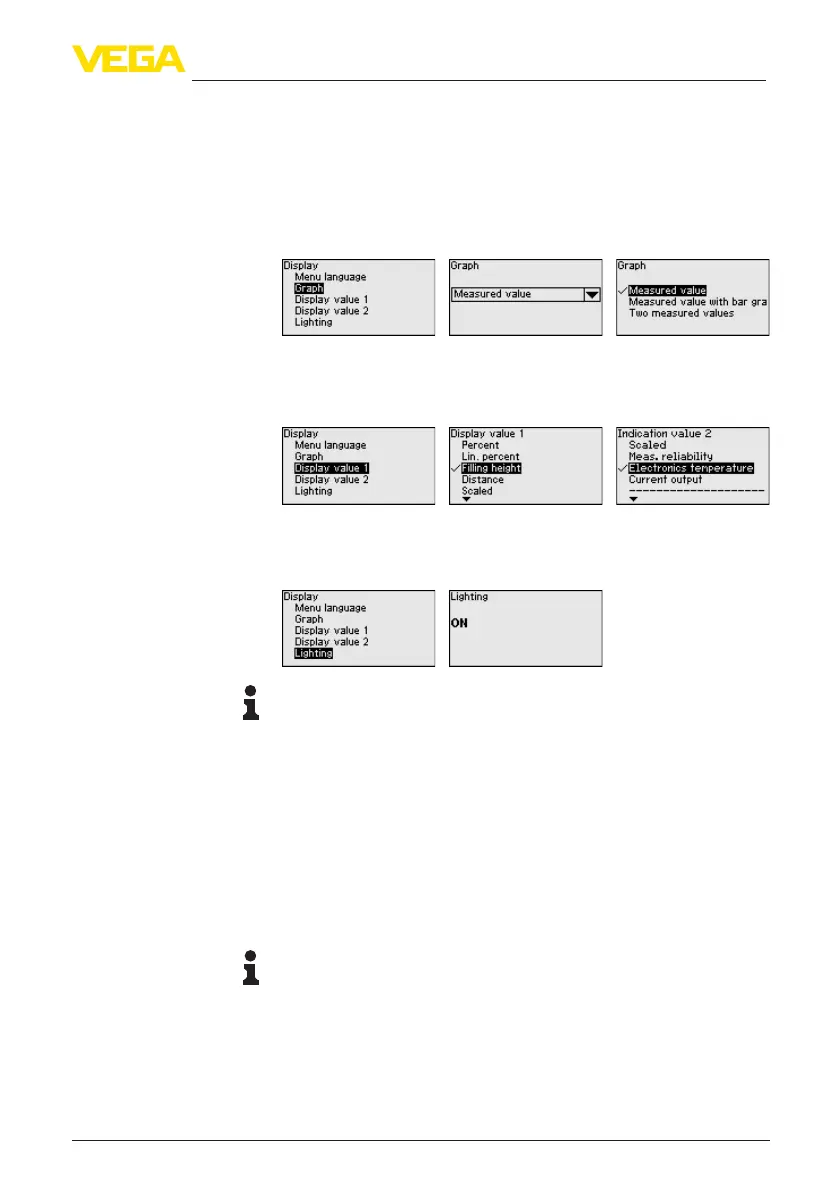
With the [->]keyyoumovebetweenthreedierentindicationmodes:
•
Measured value in large font
•
Measured value and corresponding bargraph presentation
•
Measured value as well as second selectable value, e.g. electron-
ics temperature
During the initial setup of an instrument shipped with factory settings,
use the " OK" key to get to the menu " National language".
In this menu item, you determine which measured values is displayed.
The display and adjustment module has a backlight for the display. In
thismenuitemyoucanswitchthelightingonoro.Youcanndthe
required operating voltage in chapter " Technical data".
Note:
Ifthepowersupplyiscurrentlyinsucient,thelightingistemporarily
switchedo(maintainingthedevicefunction).
Thefollowingcircumstancescauseinterferingreectionsandcan
inuencethemeasurement:
•
High mounting nozzles
•
Vessel internals such as struts
•
Agitators
•
Buildup or welded joints on vessel walls
A false signal suppression detects, marks and saves these false
signals to ensure that they are ignored in the level measurement.
Note:
The false signal suppression should be done with the lowest possible
levelsothatallpotentialinterferingreectionscanbedetected.
Create new:
Proceed as follows:
1. Select with [->] the menu item " False signal suppression" and
conrmwith[OK].
Display - Presentation
Display - Displayed value
1, 2
Display - Lighting
False signal suppression





 To Next Page