37
Operations & Maintenance Manual: Using the System
0900‑5005 REV‑00
USING THE SYSTEM
Read the “Warnings & Cautions” section before performing the following tasks.
MEASURING BLADDER VOLUME
PROCEDURE 1. PREPARE FOR THE EXAM
Make sure you are familiar with the console’s icons and screens. For more information about the system
components and user interface, see the chapter “Introduction” on page9.
1. If a charged battery is inserted in the console and the touchscreen is blank, then the system is turned off.
Press the On/Off button .
If the system has a discharged battery or a battery is not inserted, insert a charged battery.
Note: Before you insert a battery into the console, press the Test button and make sure the battery is
fully charged. If the charge level in the battery is 20% full or less, replace it with a fully charged battery
before proceeding. The system cannot perform an exam while it is connected to external power.
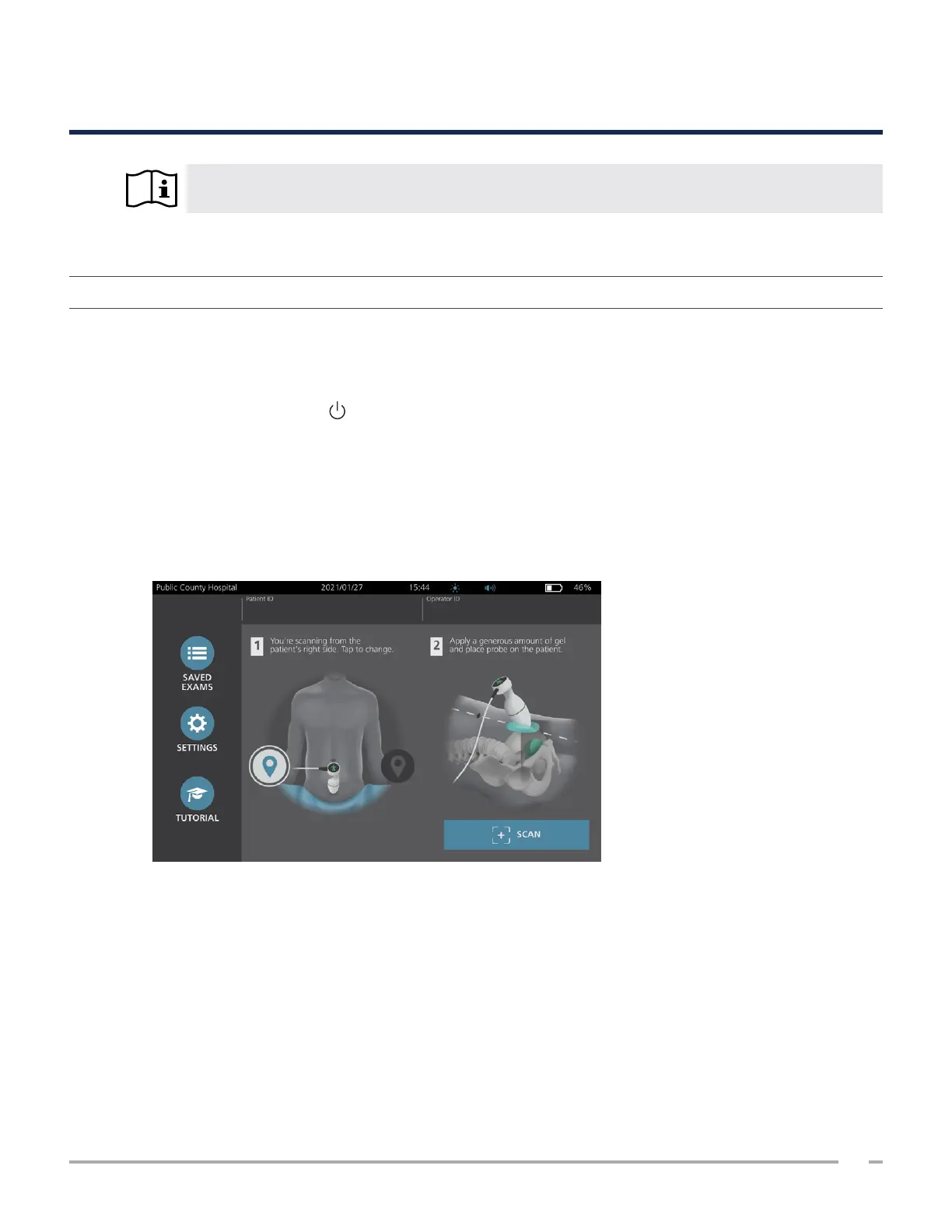
2. Allow the system to start. When the system has started completely, the Home screen appears as shown
in the following figure.
3. Check the battery icon to make sure the battery has sufficient power.
4. Make sure the system has been properly cleaned according to the instructions in the “Reprocessing”
chapter on page50. In particular, make sure that the touchscreen is not contaminated by gel, cleaner,
disinfectant, or any other residue, and that it is completely dry.













 To Next Page