21
Operations & Maintenance Manual: Setting up
PROCEdURE 4. CHARGE THE MONITOR BATTERY
In order to maintain electrical safety, use only the provided, medical‑approved power supply.
WARNING
The GlideScope Video Monitor includes an internal lithium‑ion battery. Verathon
®
recommends that you
charge the battery fully prior to first use.
Under normal operating conditions, a fully charged battery lasts approximately 90minutes or longer before it
needs to be recharged. For optimal battery life, ensure that the battery is fully charged before you try to use
the monitor in battery mode. You should charge the battery at temperatures between 0–35°C (32–95°F).
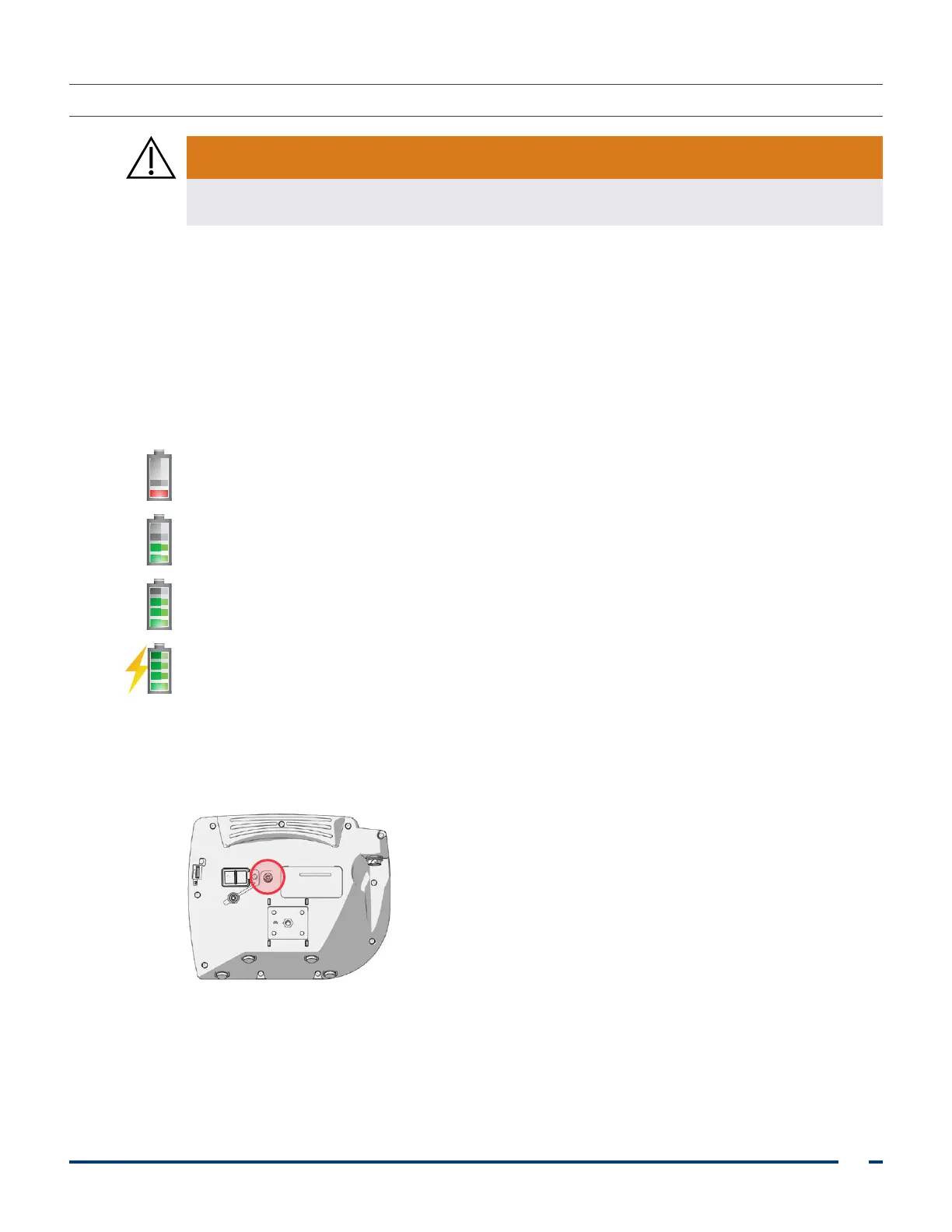
The percentage above the Battery Status icon indicates the remaining battery charge.
Figure 11. Battery Status Icons
19% battery life or less remaining. Battery must be charged.
20% to 50% battery life remaining.
51% to 82% battery life remaining.
Battery is 83% to fully charged. The lightning bolt indicates that the battery is charging.
1. Connect the video monitor 12V DC poweradapter to the power cable.
2. On the back panel of the monitor, remove the power socket cap, and then connect the 12V DC power
adapter to the power socket.
3. Plug the power supply into a hospital‑grade power outlet.
4. Allow the battery to charge. Fully charging the battery may take up to 6hours.













 To Next Page