VX675 MERCHANT OPERATING GUIDE 18
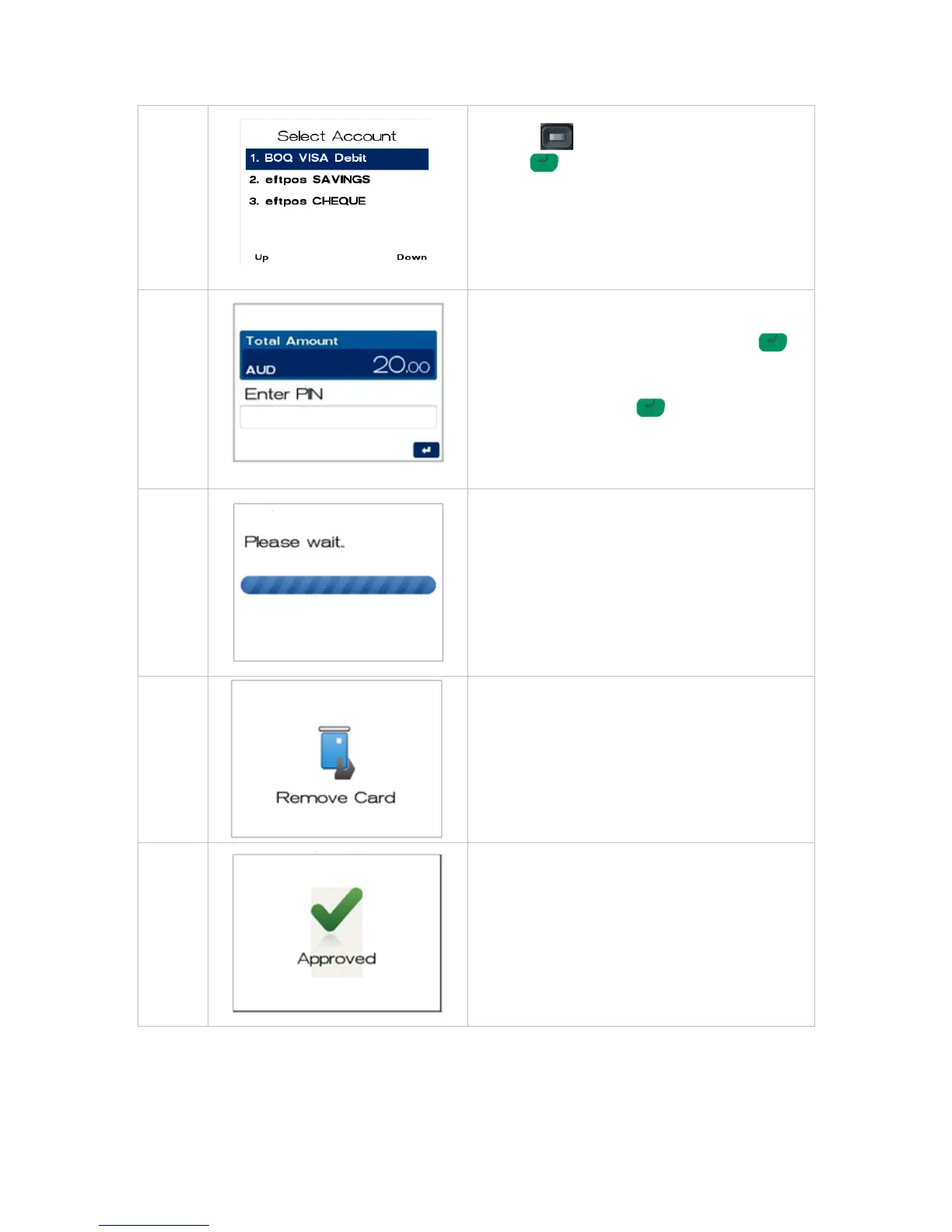
Navigate to the account required by using the
scroll key then push the select button or
ENTER or
Enter the number shown on the display screen by
using the keypad.
NOTE: The accounts offered on this screen are
dynamic and will display all card types enabled on
the card.
The cardholder can now enter their Personal
Identification Number (PIN). Once entry is
complete the cardholder can press ENTER .
NOTE: PIN can be bypassed for certain card types
(i.e. International) by leaving the PIN blank and
pressing the ENTER key . The card type will
determine if a signature is allowed and if so the
screen will be presented.
The terminal will connect to the bank and begin
processing the purchase.
If a chip card was inserted, and is yet to be
removed, this prompt will appear. Remove the
card at this prompt. The terminal will beep as a
reminder if the card is not removed.
The terminal will now begin printing the receipt and
display the transaction result.



 To Next Page