VX675 MERCHANT OPERATING GUIDE 38
PROCESSING A PRE-AUTHORISATION 5.7
The Pre-Authorisation transaction is only available to merchants who have satisfied the Bank’s
specific Terms and Conditions. Please contact the Merchant Helpdesk to discuss your requirements.
Pre-Authorisation is used to preserve a value amount on a cardholder’s account. The funds are not
debited from the cardholder’s account until final payment is processed.
NOTE: A Pre-Authorisation Completion must be performed to process the final payment (see section
5.8).
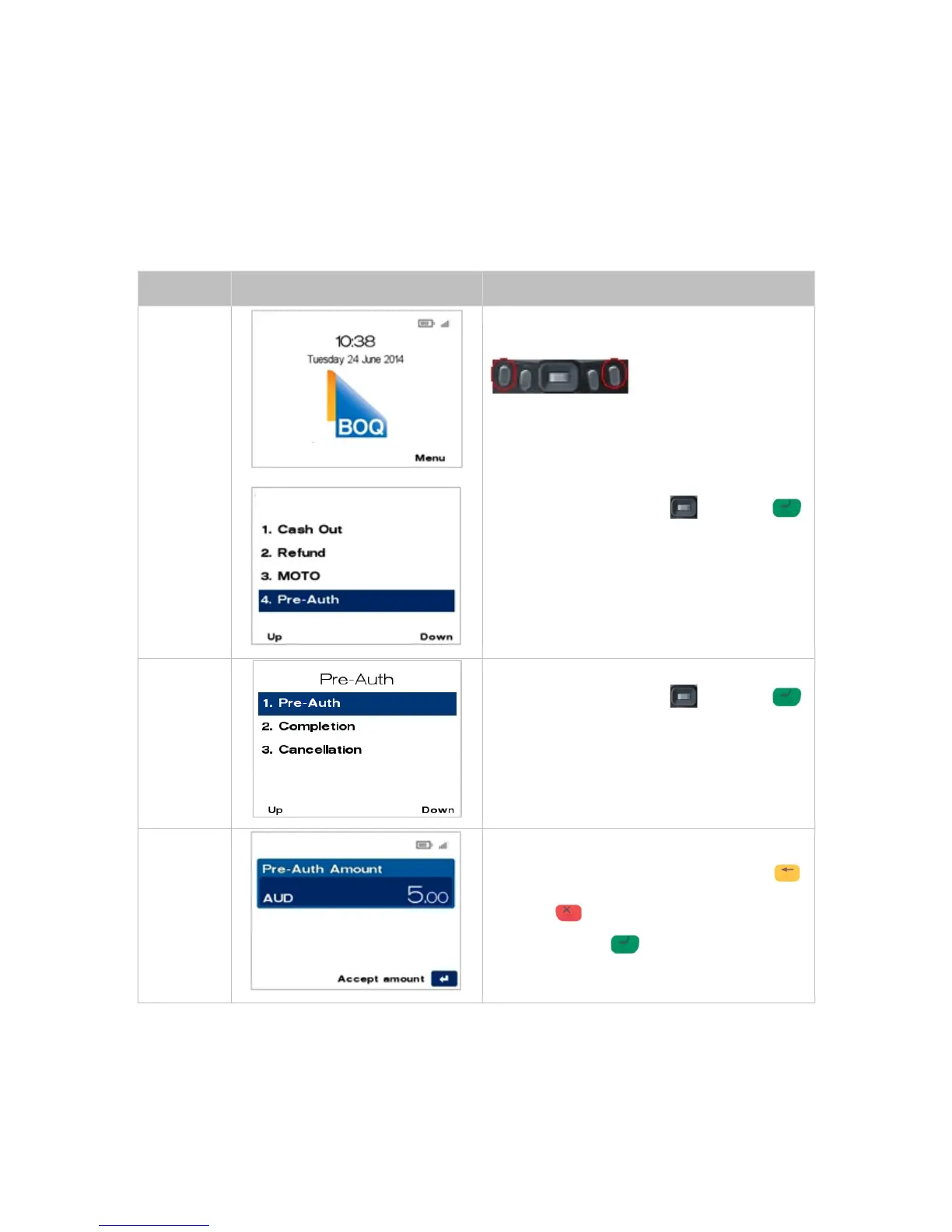
From the main screen, select the Menu key
located on the right-hand side.
Navigate to the menu item using the scroll key
then push the select button or ENTER
or
Enter the number shown on the display screen
by using the keypad.
Navigate to the menu item using the scroll key
then push the select button or ENTER
or
Enter the number shown on the display screen
by using the keypad.
Key in the Pre-Auth amount, i.e. 500 = $5.00
If a correction is required press the CLEAR
key to remove the last number entered or the
CANCEL key to return to the main screen.
Press the ENTER to accept amount and
continue.



 To Next Page