POWER SAVE 7.5
The Power Save feature allows you to control the time before the screen dims due to inactivity on the
terminal. This feature is typically used to conserve battery for portable devices.
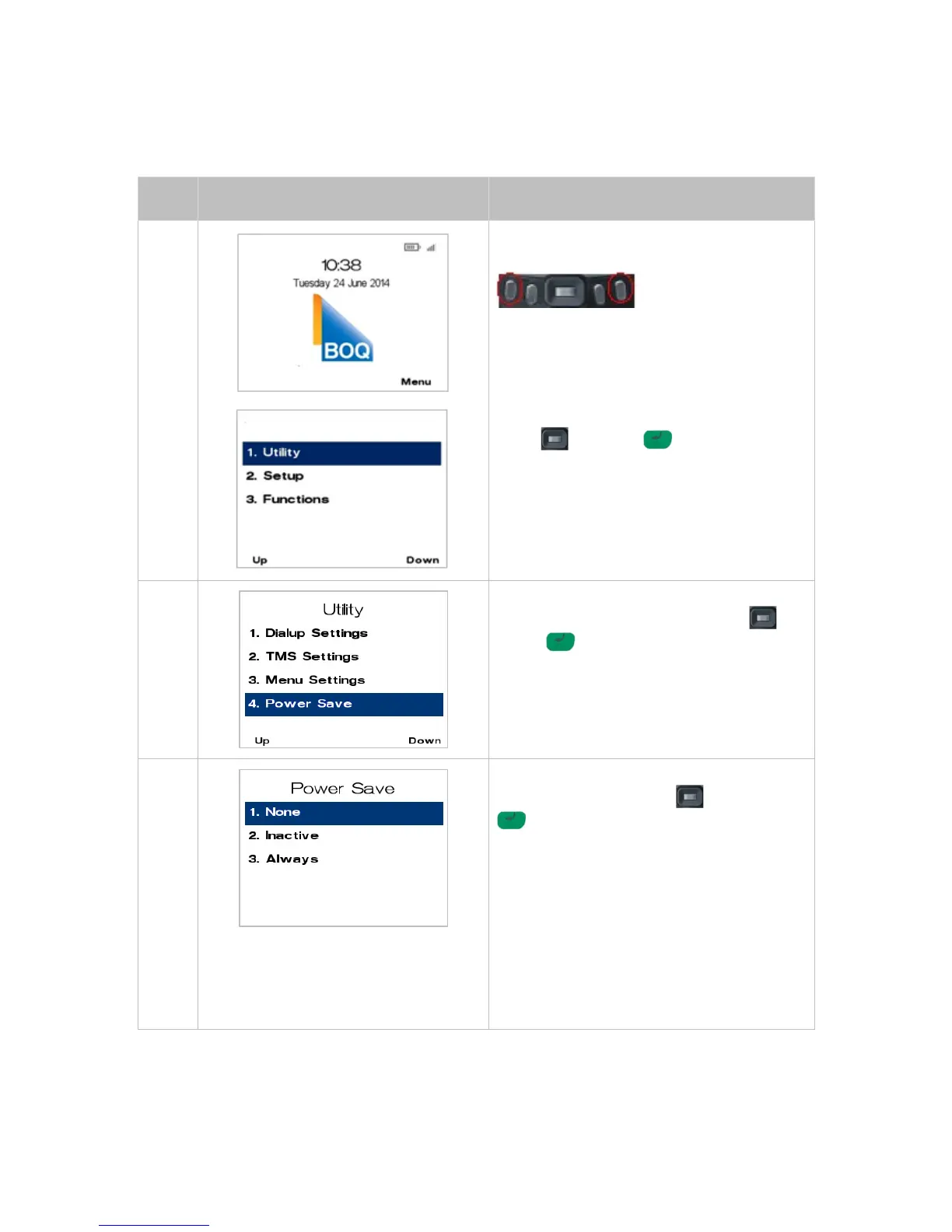
From the main screen, select Menu key on
right-hand side.
Page down twice navigate to the menu item
using the scroll key then push the select
button or ENTER or
Enter the number shown on the display screen
by using the keypad.
Page down navigate to the menu item using the
scroll key then push the select button or
ENTER or
Enter the number shown on the display screen
by using the keypad.
Navigate to the menu item using the scroll key
then push the select button or ENTER
or
Enter the number shown on the display screen
by using the keypad.
1. None - To turn off Power Save select.
2. Inactive - To turn on Power Save and enter
an inactivity time select
3. Always - To turn on Power Save always.
This will automatically adjust the contrast on the
terminal instantly when the terminal is in an idle
state.



 To Next Page