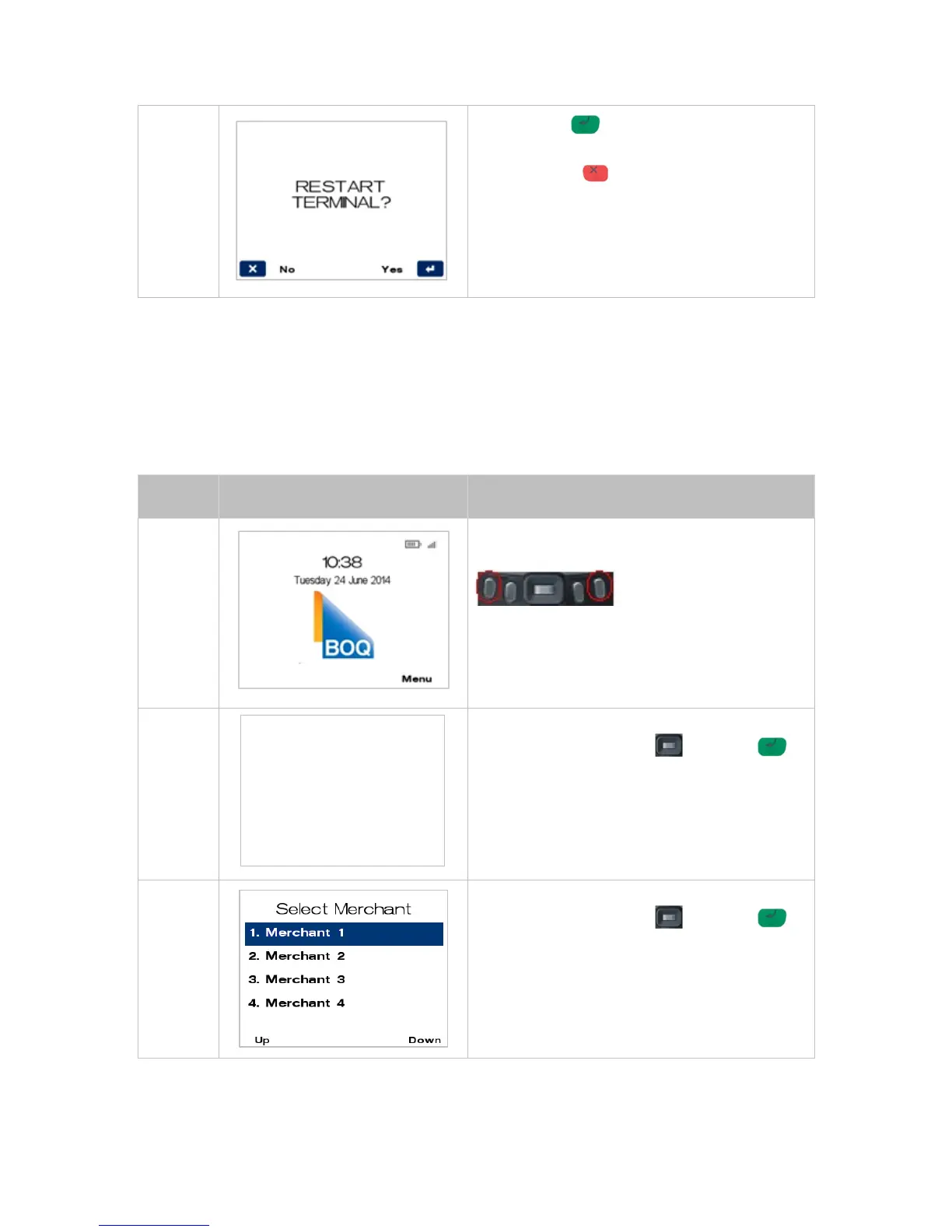
Press ENTER for YES to print Restart
Terminal.
Press CANCEL for NO and this will stop the
Restart Terminal.
8 Multi-Merchant Facility
The Multi-Merchant function will allow up to 8 merchants to accept payments using the same terminal.
If the terminal is configured to support multiple merchants, this means you can switch between
multiple merchants on the same terminal.
MULTI-MERCHANT PURCHASE8.1
To process a multi merchant purchase transaction, follow the steps below:
From the main screen, select Menu key on right-
hand side.
1. Purchase
2. Purchase!/!Cash
3. Cash!Out
4. Refund
Navigate to the menu item using the scroll key
then push the select button or ENTER
or
Enter the number shown on the display screen by
using the keypad.
Navigate to the menu item using the scroll key
then push the select button or ENTER
or
Enter the number shown on the display screen by
using the keypad.



 To Next Page