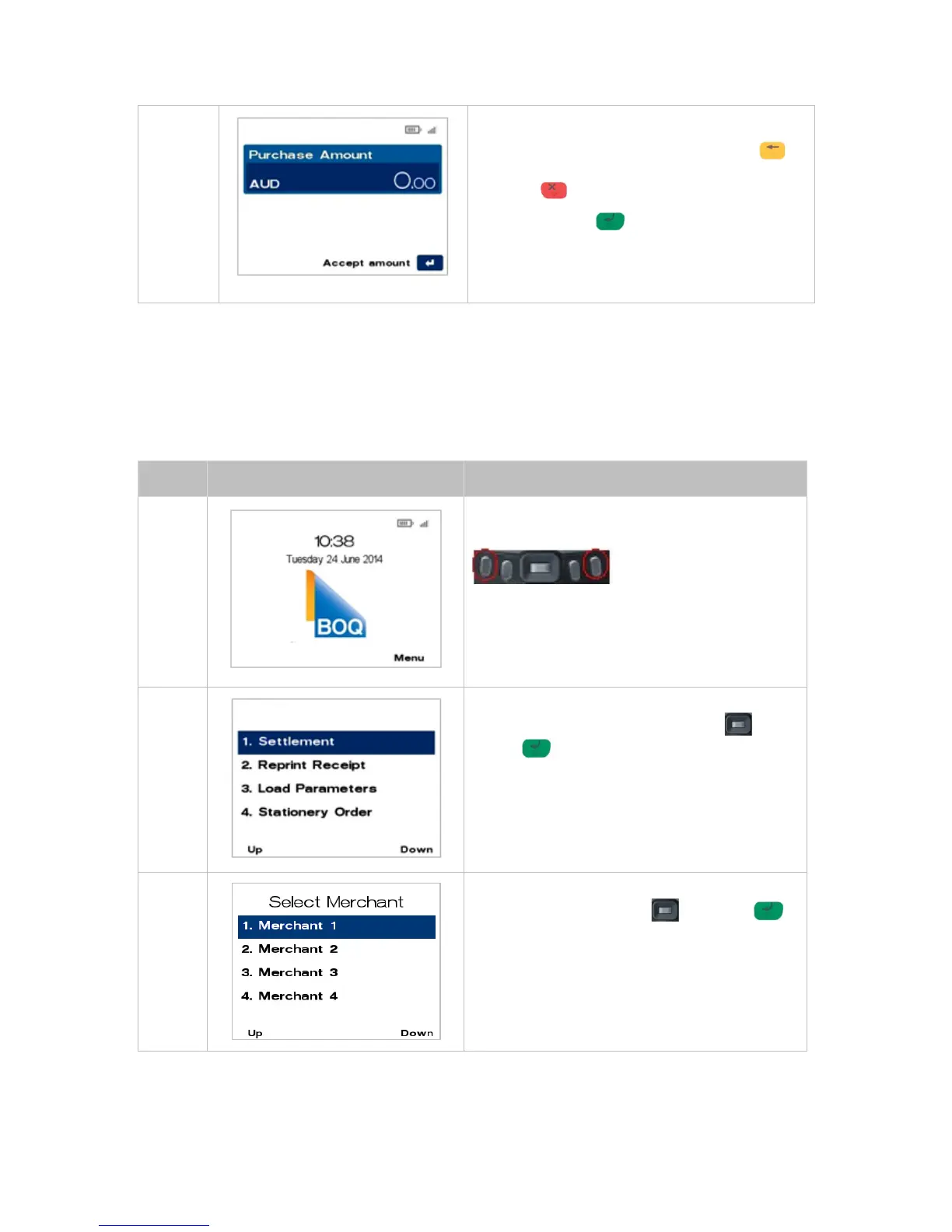
Key in the Purchase amount, i.e. 500 = $5.00
If a correction is required press the CLEAR
key to remove the last number entered or the
CANCEL key to return to the main screen.
Press the ENTER to accept amount and
continue.
Refer to section 5.1 Processing a Purchase to
continue with transaction.
MULTI-MERCHANT SETTLEMENT8.2
There are two types of settlement:
1. Auto Close Batch - will occur from terminal automatically at 6pm AEST. This method of
settlement is always the best option for the majority of Merchants.
2. Manual Close Batch – requires Merchant to follow the below procedure for manual settlement
on the terminal.
From the main screen, select Menu key on right-
hand side.
Page down, navigate to the menu item using the
scroll key then push the select button or
ENTER or
Enter the number shown on the display screen by
using the keypad.
Navigate to the menu item using the scroll key
then push the select button or ENTER
or
Enter the number shown on the display screen by
using the keypad.



 To Next Page