VX675 MERCHANT OPERATING GUIDE 26
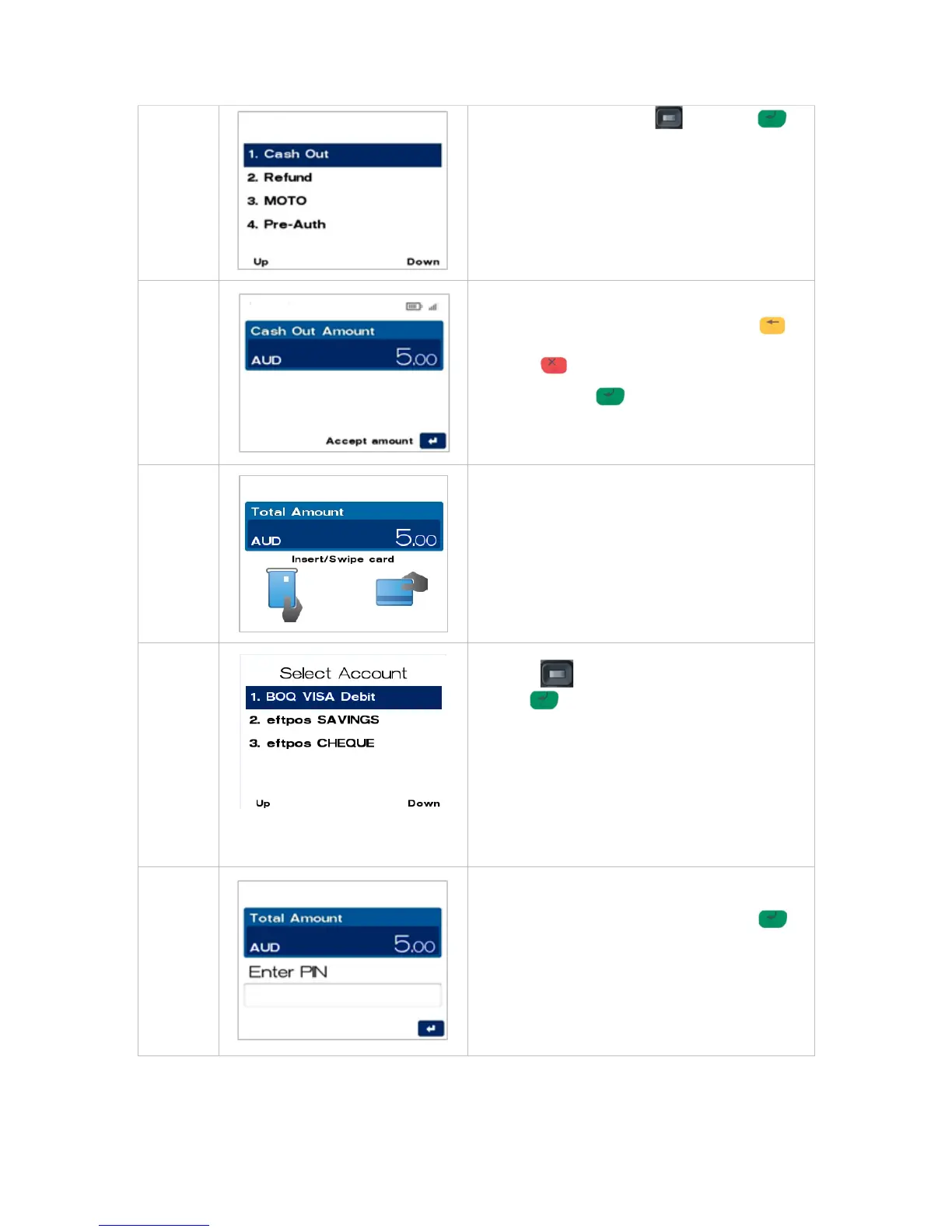
then push the select button or ENTER or
Enter the number shown on the display screen by
using the keypad.
Key in the Cash Out amount, i.e. 500 = $5.00
If a correction is required press the CLEAR
key to remove the last number entered or the
CANCEL key to return to the main screen.
Press the ENTER key to accept amount and
continue.
Insert or swipe the customer’s card (See Section 4
Card Presentation Procedures).
NOTE: Contactless operation is not permitted
when Cash Out transaction is being processed.
Navigate to the account required by using the
scroll key then push the select button or
ENTER or
Enter the number shown on the display screen by
using the keypad.
NOTE: Cash Out is only available on cheque and
savings accounts.
NOTE: The accounts offered on this screen are
dynamic and will display all card types enabled on
the card.
The cardholder can now enter their Personal
Identification Number (PIN). Once entry is
complete the cardholder can press ENTER .



 To Next Page