Vertiv | Liebert® CRV4 | User Manual 70
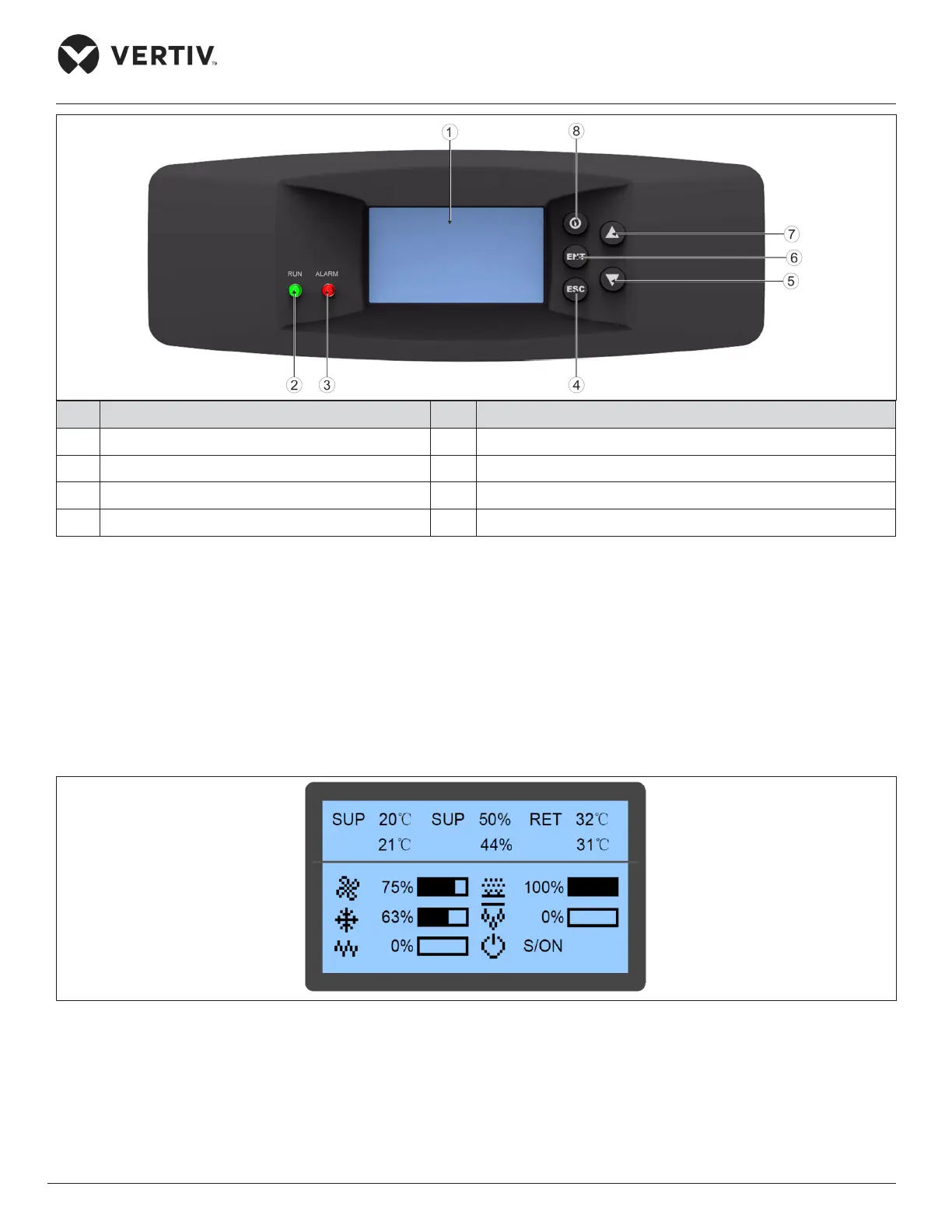
Micro-Controller (Text-screen)
No. Description No. Description
1 LCD screen 5 Down button
2 Run indicator 6 ENT button
3 Alarm indicator 7 Up botton
4 ESC button 8 On/O button
Figure 7-1 Appearance of the Micro Controller
7.3. Graphic Color Screen
The LCD screen default language setting is English, white backlight. It displays the current air supply
temperature in the rst queue, humidity in the second queue, and air return temperature in the third queue.
When the compressor mode or fan mode is set to Remote, the queue displays the remote temperature.
In the lower part of the screen, it displays the unit output status (fan, cooling, heating, dehumidifying, and
humidifying) and unit operation status (o, running, standby, and locked). The icons on the main screen indicate
the unit output status, unit properties, and unit operating status. Refer Figure 7-2 for better understanding.
Figure 7-2 Main Screen
More detailed information such as the operating status of a component and temperature/humidity can be
obtained from the main menu. When browsing the menu, the current menu item is highlighted; when the setting
is modied, the current modication bit is highlighted.








 To Next Page