LaserCOMPACT Product Guide VESDA
®
26
After installing the LaserCOMPACT detector it is necessary to power up the system. The system
takes approximately 15 seconds to power up. If the system fails to power up, check all power
wires are secured to its terminals and the polarities of the power wires are correctly terminated.
On power up:
• The aspirator starts up
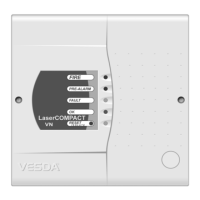
• The LED indicators on the LaserCOMPACT front cover:
- Will light up and cycle on and off
- If a fault has been detected the FAULT LED indicator will remain lit
- If the system is functioning normally the OK LED indicator will remain lit
• If a Remote Display Module is connected the following indicators are lit:
- Fire alarm threshold indicators
- Smoke threshold levels on bar graph
- Two digit numerical display
- Various fault indicators if there are any faults
- System OK indicator if there are no faults
If any of the above does not happen, contact your commissioning engineer or distributor to
troubleshoot.
Note: It is normal for the detector to display troubles immediately after power up. Reset
the detector by pressing the reset button on the front cover of the detector to unlatch
the relays and fault LEDs. The fault LEDs on the front cover will illuminate. Proceed
with the preliminary systems check.











 To Next Page