14
VOX Lil' Looper Owner's manual
Connect your instrument and
turn on the power
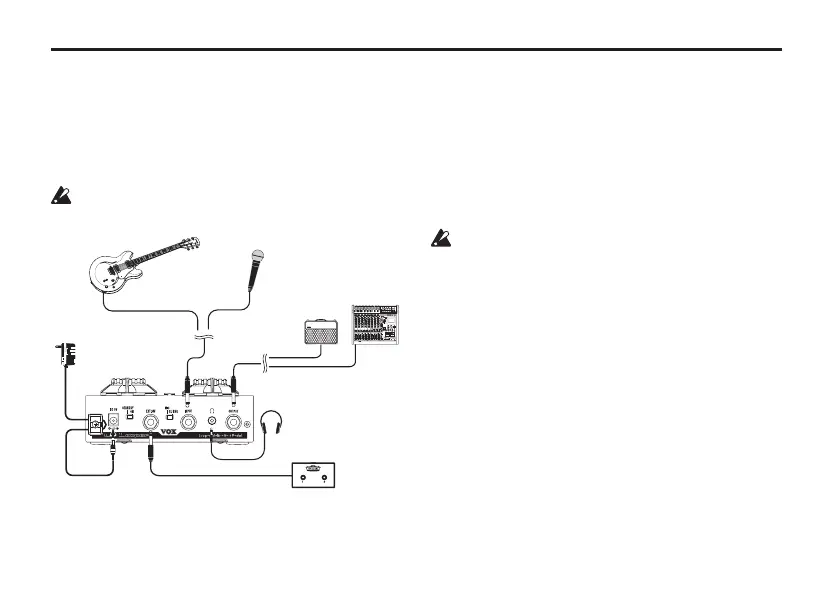
Let’s connect your guitar and amp to the Lil' Looper,
and turn on the power.
Minimize the volume of all your equipment before
you turn on the power.
AC adapter
(separatelay sold)
Guitar
Mic
Headphones
VOX VFS2 (option)
Guitar amp, mixer,
recorder, etc.
Connections
1.
MakesurethattheLil'Looper’sPOWERswitchis
intheSTANDBYposition.
2.
UseacabletoconnecttheOUTPUTjacktoyour
guitarampormixer.
Note: The Lil' Looper’s output is monaural.
Do not connect headphones to the OUTPUT jack.
Doing so may damage your headphones.
3.
UseaguitarcabletoconnectaguitartotheINPUT
jack.Or,connectamicrophonetothejackwitha
1/4"cable.
4. SettheINPUTSELECTswitch.
Select GUITAR when connecting a guitar to
the INPUT jack, and MIC when connecting a
microphone to the jack.


 To Next Page