EasyManua.ls Logo

Wansview W1 - Time Setting; FTP Setting; E-Mail Setting

Wansview W1
61 pages
Print Icon
To Next Page IconTo Next Page
To Previous Page IconTo Previous Page
Loading...
Support Email/ Skype: service2@wansview.com 19
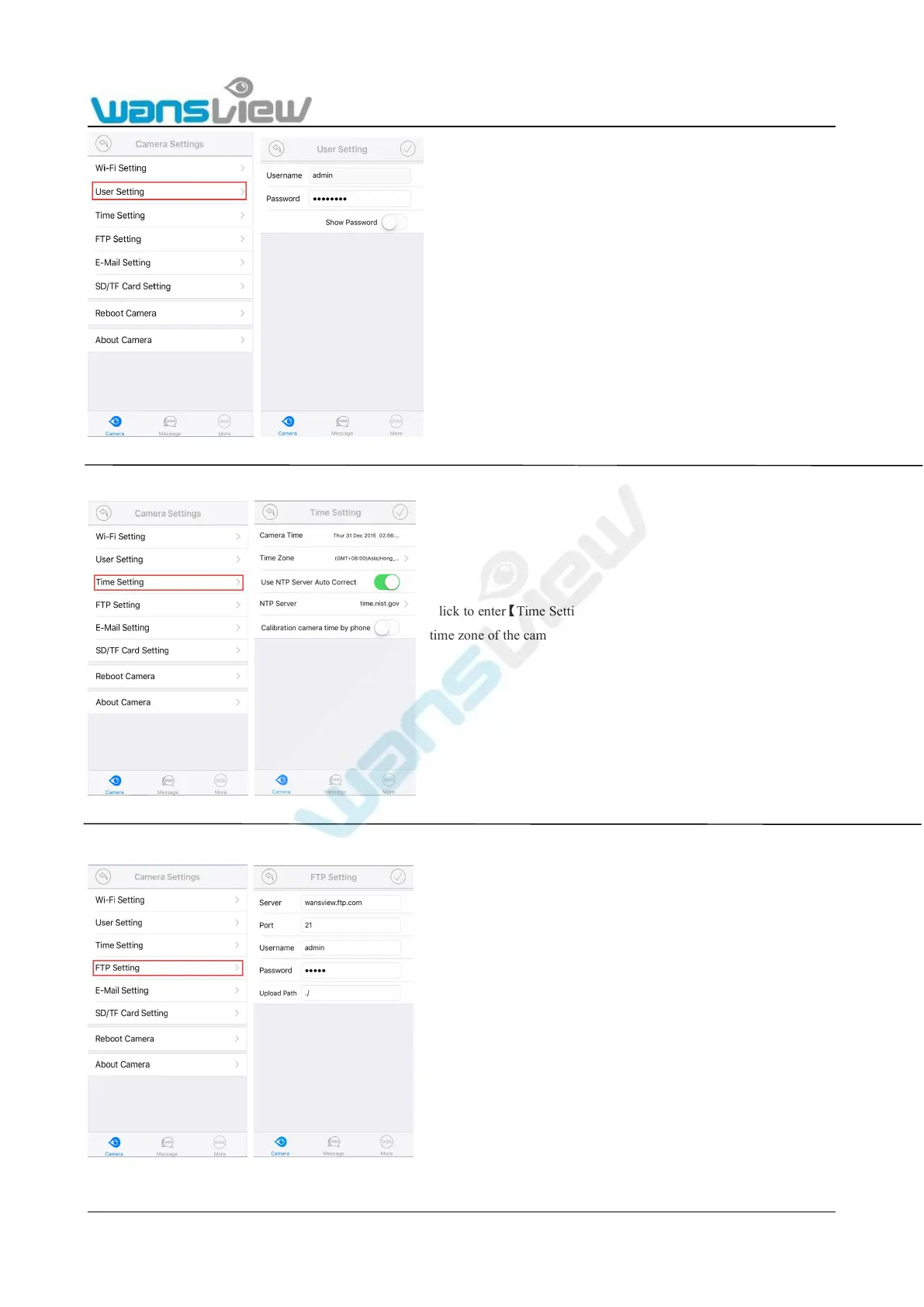
3.4.4.3 Time Setting
3.4.4.4 FTP Setting
3.4.4.5 E-Mail Setting
Click to enterUser Setting, the password of the camera
can be modified and Username cannot be modified at
present
Note: the password shall be not longer than 20 characters
Click to enterTime SettingThe user can auto correct the local
time zone of the camera to set the camera in the correct time zone.
Click to enterFTP Setting, when the user is using the FTP
alarm, user parameters of FTP servers can be set. It is
recommended to fill in ./” for Upload Path. Please refer to
5.2.3.8 for settings.

Table of Contents

Related product manuals