Support Email/ Skype: service2@wansview.com 56
8.1 Compatibility Settings for Internet Explorer
8.2 Plugin Issues
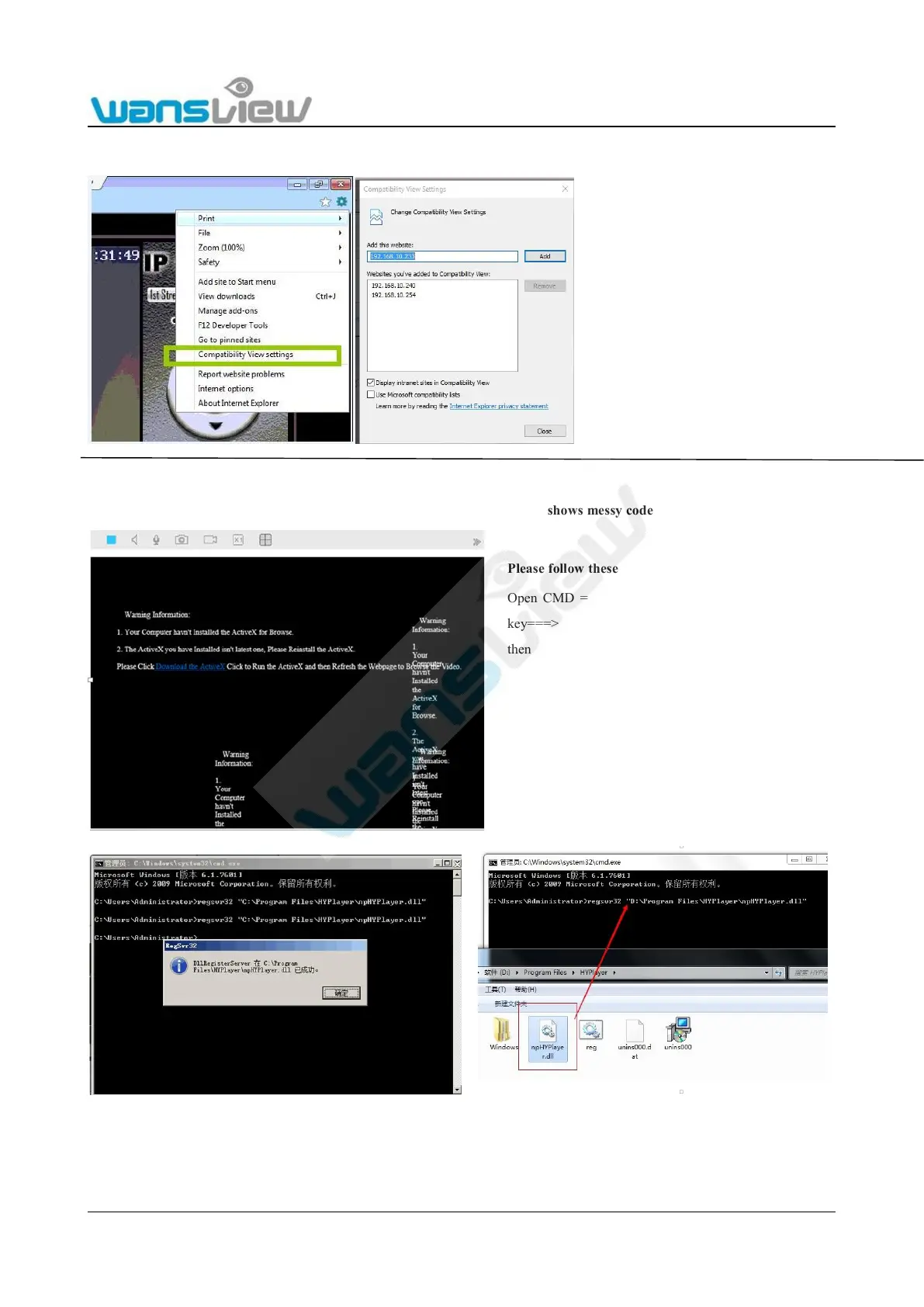
Question: I’ve already installed a Plug-in for the browser, but the live stream shows messy code like the image below:
When using Internet Explorer 9 and higher to
view the camera, if you already downloaded a
plug-in for camera, but still have no live
video, please perform the following
operations:
Click Compatibility View Setting (Figure 1)
----- you will see Figure 2, click Add, then
click Close.
Please follow these steps to fix this issue:
Open CMD ===> input command "regsvr32", press the space
key===> find the installation package for "npHYplayer.dll",
then drag "npHYplyaer.dll" into the CMD window after
“regsvr32” (as shown in Figure 8.4) ====> Press Enter, a
dialog box will pop up (Figure 8.5) that says that the
npHYPlayer.dll has been installed successfully. Click to
confirm====>You can refresh or re-open the web page to view
camera in real time.



 To Next Page