Support Email/ Skype: service2@wansview.com 37
5.3.2 Network
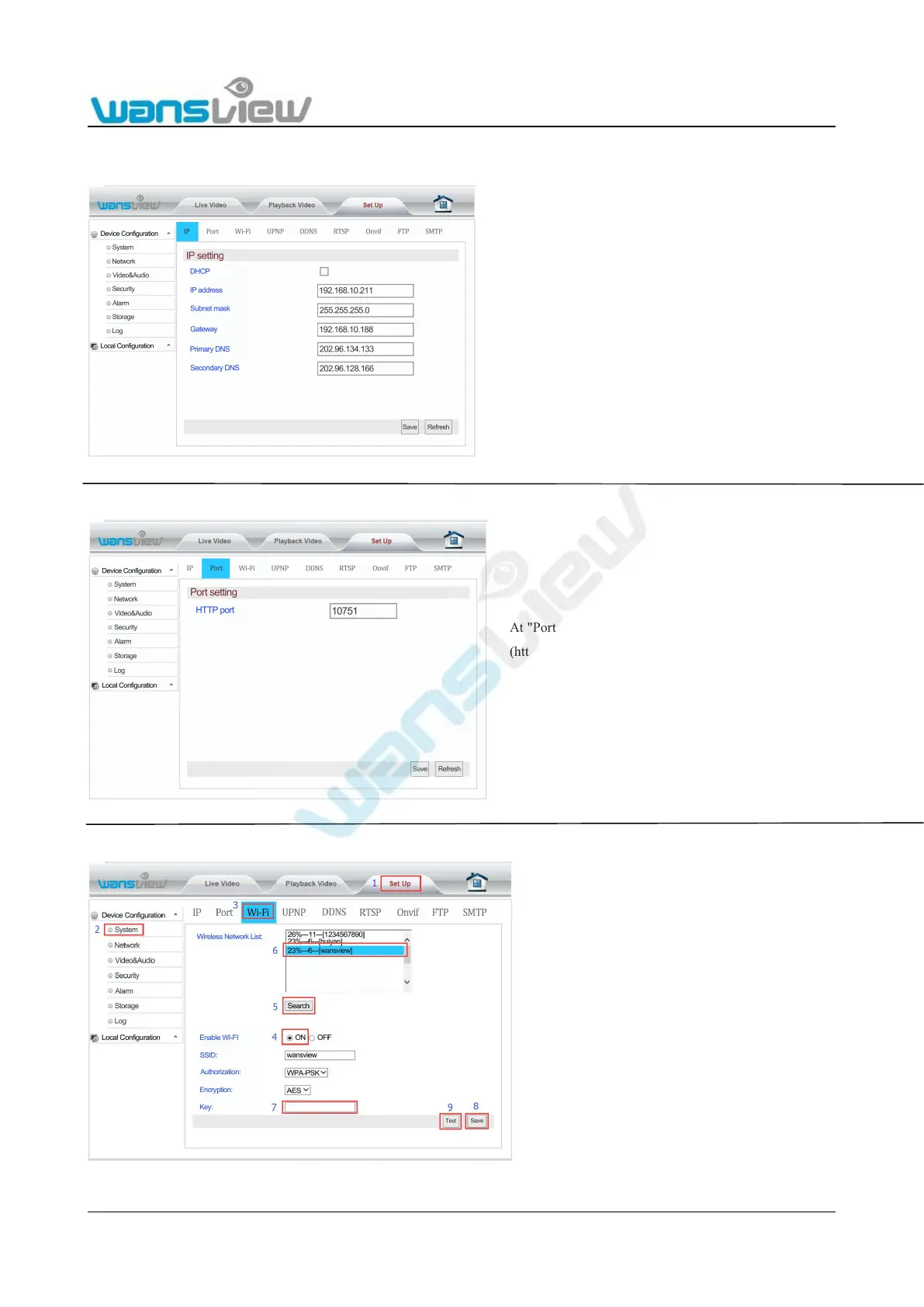
5.3.2.1 IP Address Setting
5.3.2.2 Port Setting
5.3.2.3 Wi-Fi Set Up
You can set whether the camera will be assigned an IP
address by your router(DHCP) or you want to
manually set a fixed address.
-IP address (for example 192.168.x.x)
-Subnet mask(for example 255.255.255.0)
-Gateway(IP address of your router; for example
-Primary DNS(IP address of your router; for
-Secondary DNS(IP address of your router; for
At "Port Setting", the user can change web access port
(http port). Port setting range: 80-65535. Pay attention
not to conflict with other port values.
At "Wi-Fi Set Up", click "Search" and start up "Wi-Fi".
Choose the wireless router to be connected. Input the
password to connect to the router. Click Save to
complete Wi-Fi Configuration. After completing the
configuration, click Test to confirm whether it is
connected to the wireless router.



 To Next Page