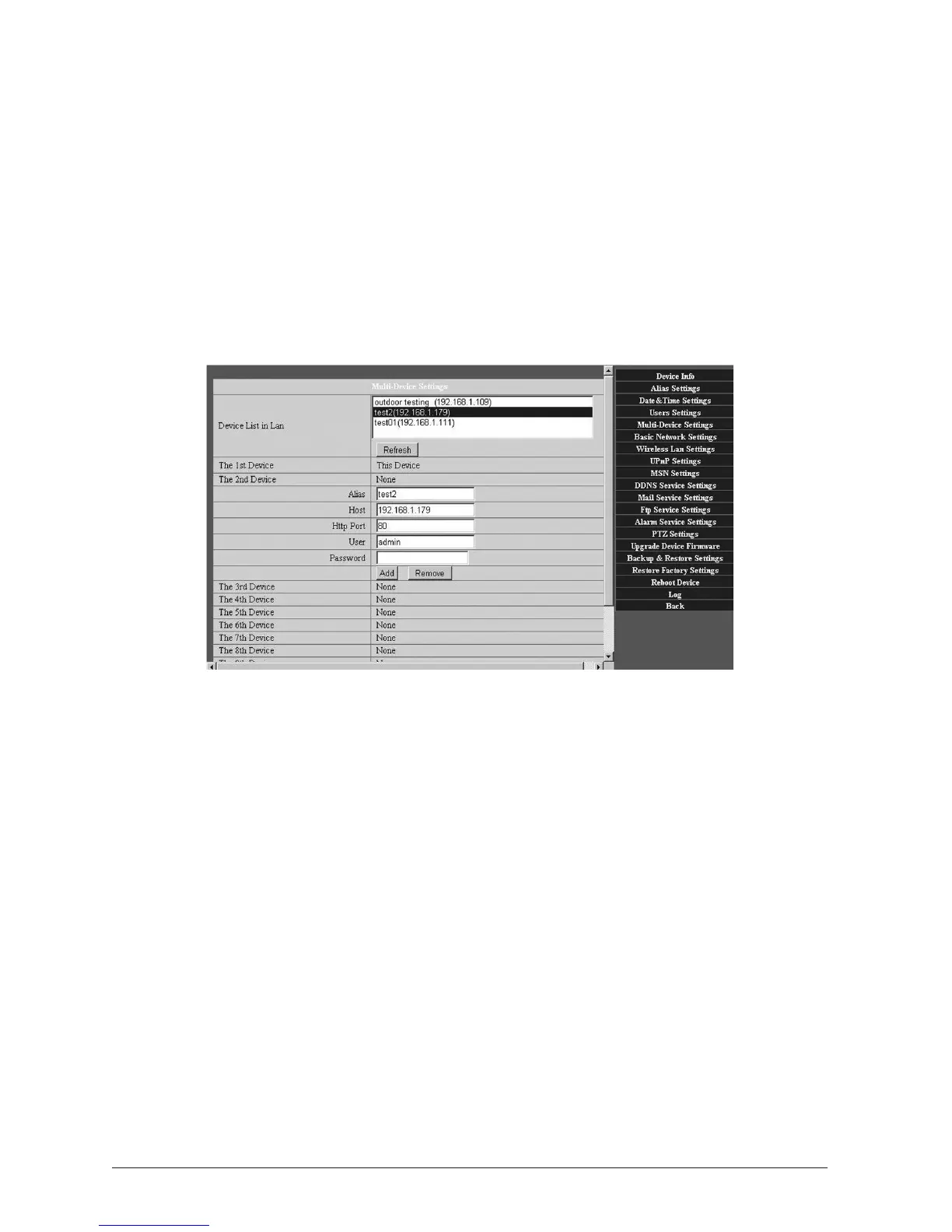
3.1.5 Mul-DeviceSengs
This screen provides an overview of your connected cameras and their IP addresses. It also
allows eding of the IP addresses, providing the ability to access a wider network of WatchBot
cameras anywhere in the world, via the Internet. Up to nine devices can be added, four of
which can be online at any one me
AddcameraswithintheLocalNetwork(LAN)
Here, you can see all devices searched in LAN. The 1st Device is your rst camera. You can add
more cameras in the LAN for monitoring. The Web soware supports up to 4 Cameras online
simultaneously. Click ‘The 2nd Device’ and Double click the item in the ‘Device List in LAN’.
‘Host’ and ‘Hp Port’ will ll in automacally. Enter the correct username and password then
click ‘add’. Add more cameras in the same way.
AddcamerasviatheInternet
Firstly, make sure the camera added can access the Internet with the IP address or DDNS
domain. For example: hp://219.133.200.165: 81 or hp://wbot[XXXXX].watch-bot.net. Enter
these details in ‘Host’ along with the ‘Alias’ and ‘Hp Port’ seng. Enter the correct username
and password then click ‘add’. Add more cameras in the same way.



 To Next Page