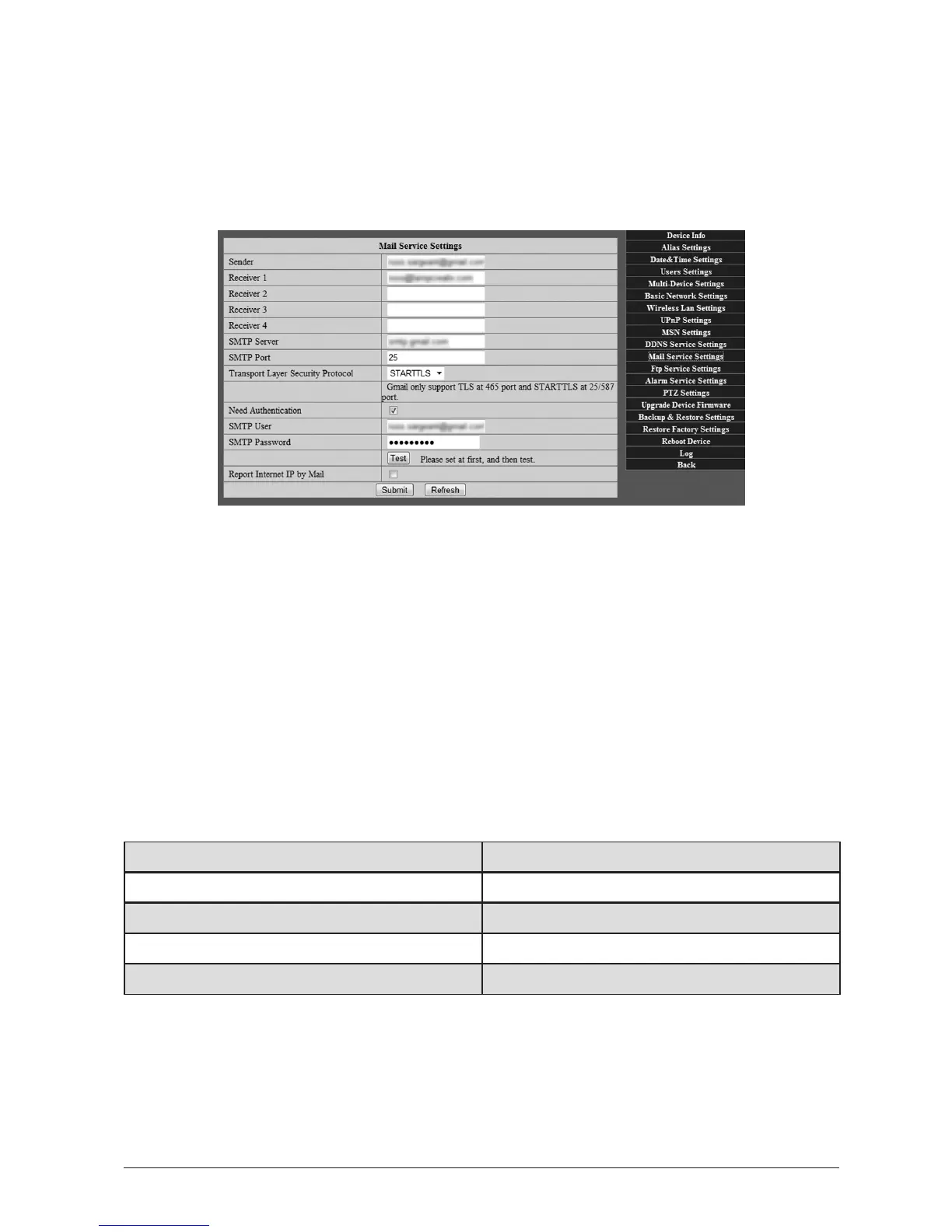
3.4MailServiceSengs
Your WatchBot camera can send email nocaons if moon is detected (also see Secon
3.6 - Alarm Service Sengs). These emails contain me and date informaon along with
images automacally snapped by the camera at the moment of detecon. To set up email
nocaons, follow the steps below:
3.4.1 Enterthesenderemailsengs
In ‘Sender’ enter the email address you want the messages to come from. This must be a real
email address.
3.4.2 Enterthereceivingemailaddress(s)
Enter email addresses by which you want to receive emails from the camera.
3.4.3 Mailserversengs
Enter the SMTP sengs for the sending account. If you do not know these, they can be
obtained from your Email Provider.
Commonly used is Google’s ‘Gmail’. SengsforGmailappearbelowasaguide:
SMTPServer: smtp.gmail.com
TransportLayerSecurityProtocol: STARTTLS
NeedAuthencaon: [Checked]
SMTPUser: [Your full Gmail email address]
SMTPPassword: [Your regular Gmail account password]
3.4.4 SaveandTest
Once sengs are entered, you must click on ‘Submit’ rst, then click on ‘Test’.



 To Next Page