5
Powering up and Startup
5-2 | CFW-11 RB
5.2 START-UP
The start-up procedure is described in three simple steps by using the existing parameter groups, Oriented
Start-up routine and the Basic Application group.
Steps:
1. Set the password for parameter modification.
2. Execute the Oriented Start-up routine.
3. Set the parameters of the Basic Application group.
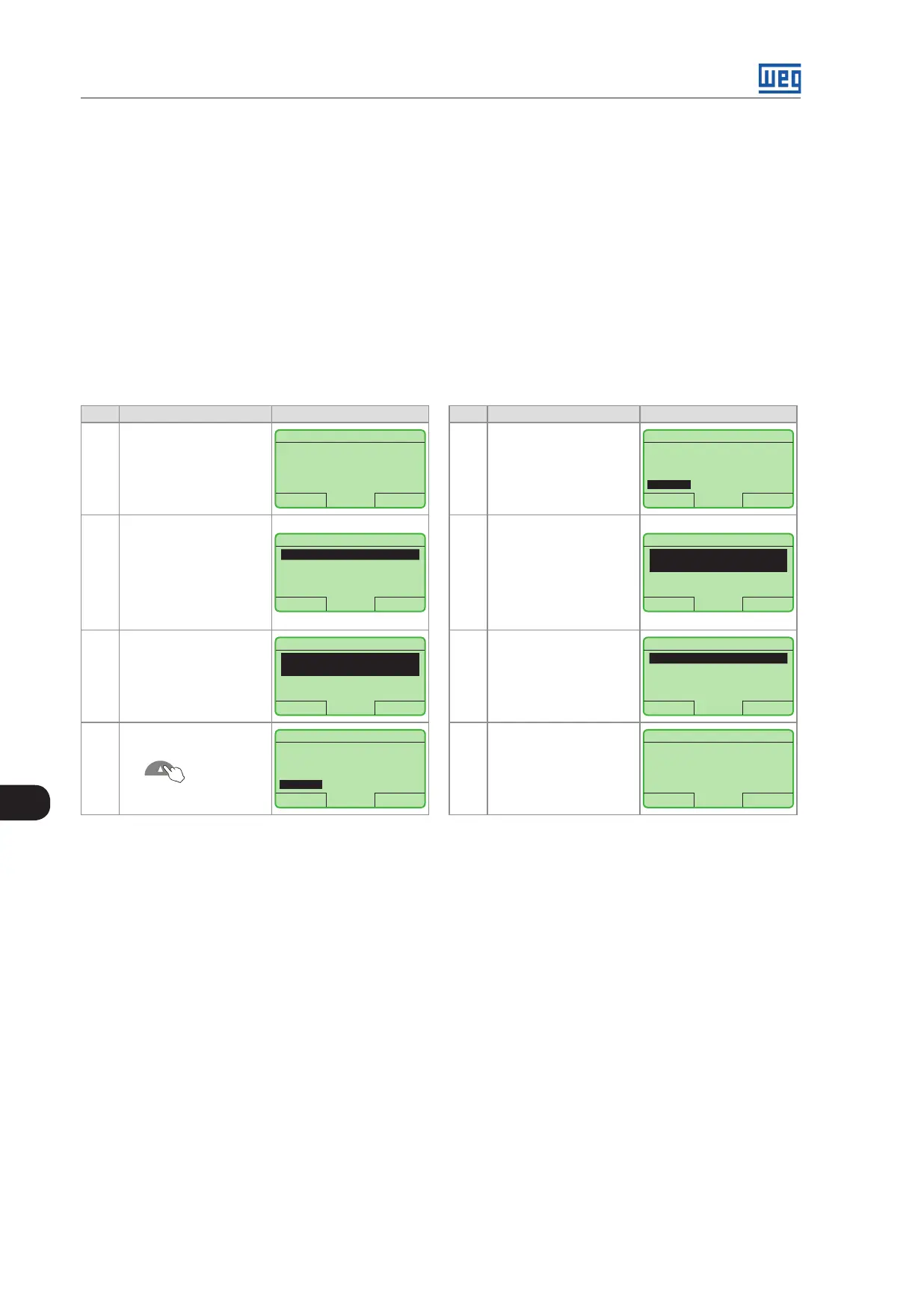
5.2.1 Password Setting in P0000
Step Action/Result Display Indication Step Action/Result Display Indication
1
Monitoring Mode
Press "Menu" (right
soft key)
Run RB + LOC 618 V
15:45 Menu
400 A
618 V
380 V
5
When number 5
is displayed in the
keypad, press "Save"
Run RB + LOC 618V
Return 15:45 Salvar
P0000
Access to Parameters
5
2
Group "00 ALL
PARAMETERS" is
already selected
Press "Select"
Run RB + LOC 618V
Return 15:45 Select
00 ALL PARAMETERS
01 PARAMETER GROUPS
02 ORIENTED START-UP
03 CHANGED PARAMETERS
6
If the setting has been
properly performed,
the keypad should
display "Access to
Parameters P0000: 5"
Press "Return" (left
soft key)
Run RB + LOC 618V
Return 15:45 Select
Access to Parameters
P0000: 5
Line Voltage
P0002: 380V
3
Parameter "Access to
Parameters P0000:
0" is already selected
Pressione "Select"
Run RB + LOC 618V
Return 15:45 Select
Access to Parameters
P0000: 0
Line Voltage
P0002: 380 V
7 Press "Return"
Run RB + LOC 618V
Return 15:45 Select
00 ALL PARAMETERS
01 PARAMETER GROUPS
02 ORIENTED START-UP
03 CHANGED PARAMETERS
4
To set the password,
press the Up Arrow
until number
5 is displayed in the
keypad
Run RB + LOC 618V
Return 15:45 Save
P0000
Access to Parameters
0
8
The display returns to
the Monitoring Mode
Run RB + LOC 618V
15:45 Menu
400 A
618 V
380 V
Figure 5.1: Steps for allowing parameters modification via P0000
5.2.2 Oriented Start-Up
There is a group of parameters named "Oriented Start-up" that makes the converter settings easier. Within this
group there is a parameter P0317, through which it is possible to enter the Oriented Start-Up routine.
The Oriented Start-Up routine presents the main parameters on the HMI in a logical sequence, so that their setting,
according to the operation conditions, prepares the converter for the operation with the used line and motor.
In order to enter into the Oriented Start-up routine, follow the steps presented in Figure 5.2 on page 5-3, first
modifying parameter P0317 to 1 and then, setting all remaining parameters as they are prompted in the display.
The use of the Oriented Start-up routine for setting the converter parameters may lead to the automatic modification
of other internal parameters and/or variables of the converter.
During the Oriented Start-up routine, the message "Config" will be displayed at the left top corner of the keypad.



 To Next Page