1
QUICK REFERENCE OF ALARMS AND FAULTS
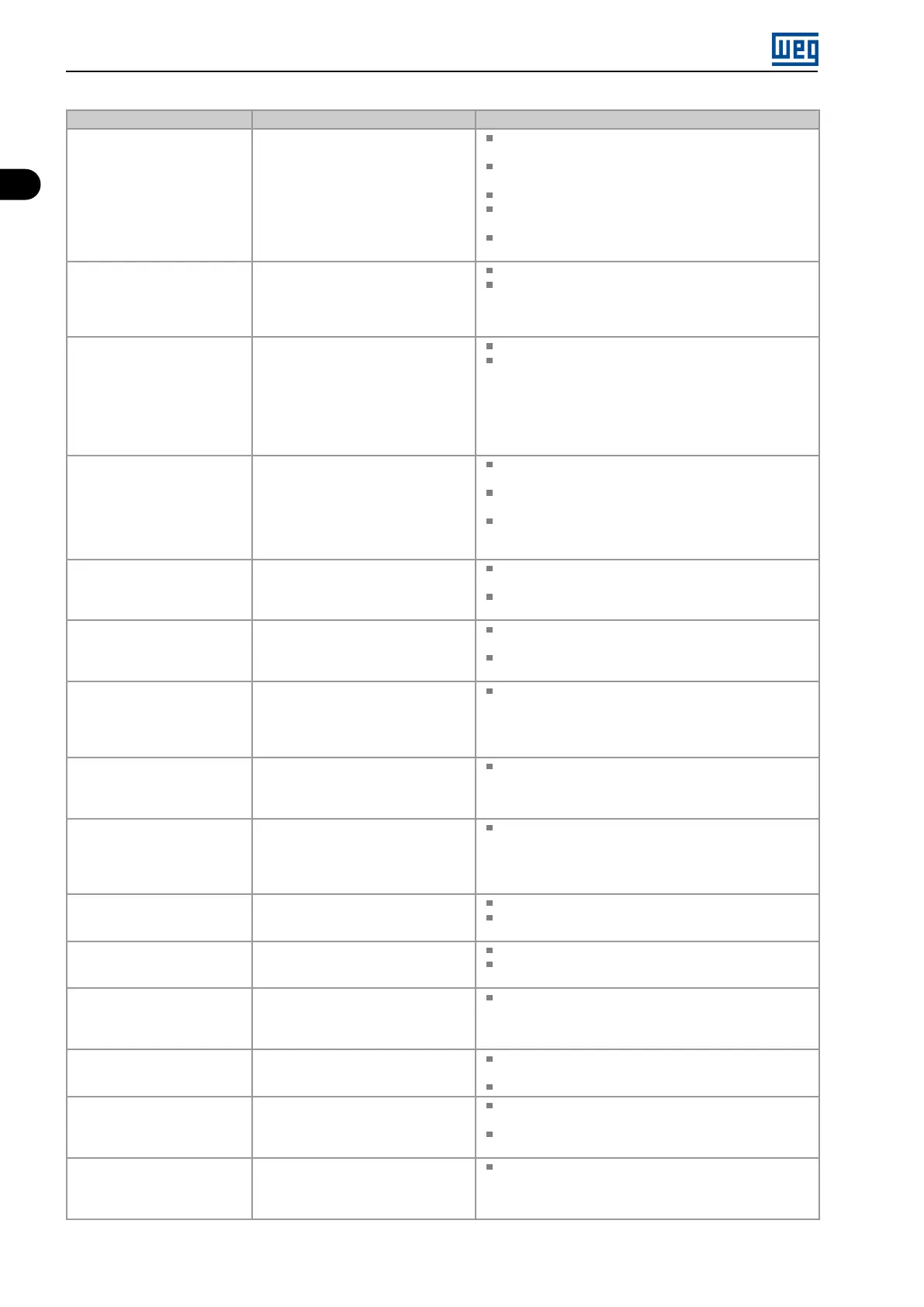
Fault / Alarm Description Possible Causes
F239
Offline Profibus DP Interface
It indicates an interruption in the
communication between the Profibus
DP network master and the inverter.
The Profibus DP communication
interface went into offline status.
Check if the network master is correctly configured and
operating properly.
Check for short-circuit or poor contact on the
communication cables.
Check if the cables are not misconnected or inverted.
Check if the termination resistors with the right value were
installed only at the end of the main bus.
Check the network installation in general - cabling,
grounding.
F240
Profibus DP Module Access
Fault
It indicates fault in the access to the
Profibus DP communication module
data.
Check if the Profibus DP module is correctly fitted.
Hardware errors due to improper handling or installation
of the accessory, for instance, may cause this fault. If
possible, carry out tests by replacing the communication
accessory.
F247
EtherNet/IP Communication
Offline
It indicates interruption in the cyclic
communication with EtherNet/IP
master.
It occurs when, for any reason, after
the cyclic communication of the master
with the product is started, this
communication is interrupted.
Check the status of the network master.
Check the network installation, broken cable or failed/bad
contact in the network connections.
F249
Timeout Modbus TCP
It indicates that the device stopped
receiving valid telegrams for a period
longer than the setting in P868.
The time counting starts as soon as
it receives the first valid telegram, with
correct IP address and TCP port.
Check network installation, broken cable or fault/poor
contact on the connections with the network, grounding.
Ensure the master always sends telegrams to the
equipment in a time shorter than the setting in P868.
Disable this function in P868.
A700
Remote HMI Communication
No communication with remote HMI,
but there is no frequency command or
reference for this source.
Check if the communication interface with the HMI is
properly configured in parameter P312.
HMI cable disconnected.
F701
Remote HMI Communication
Fault
No communication with the remote
HMI; however, there is command or
frequency reference for this source.
Check that the HMI communication interface is properly
configured in parameter P312.
HMI cable disconnected.
A702
Inverter Disabled
This failure occurs when there is a
SoftPLC movement block active and
the “General Enable” command is
disabled.
Check if the drive General Enable command is active.
A704
Two Movem. Enabled
It occurs when 2 or more SoftPLC
movement blocks are enabled at the
same time.
Check the user’s program logic.
A706
Refer. Not Progr. SPLC
This failure occurs when a SoftPLC
movement block is enabled and the
speed reference is not programmed for
the SoftPLC.
Check the programming of the references in the Local
and/or Remote mode (P221 and P222).
A708
SoftPLC Application Stopped
SoftPLC Application not running. SoftPLC Application is stopped (P901 = 0 and P900 = 3).
SoftPLC state presents application incompatible with the
firmware version of the frequency inverter.
F709
SPLC Application Stopped
SoftPLC application not running. SoftPLC application stopped (P901 = 0 and P900 = 3).
SoftPLC state presents incompatible application with the
firmware version of the frequency inverter.
F710
Size of the SoftPLC Application
The size of the SoftPLC user’s
program exceeded the maximum
memory capacity.
The logic implemented on the SoftPLC is too large. Check
project size.
F711
Fault on SoftPLC Application
Fault found in SoftPLC user’s
program.
SoftPLC user’s program stored on flash memory is
corrupted.
Timeout during execution of SoftPLC scan cycle.
A712
SPLC Protected Against Copy
It occurs when there is an attempt
to copy the SoftPLC application
protected against copies.
Attempt to copy SoftPLC application protected against
copies (“never permit copies”).
Attempt to copy SoftPLC from a copy protected against
copies (“no permission to copy from a copy”).
F750/A750 to
F799/A799
User’s Faults/Alarms for
SoftPLC
Fault/Alarm range intended for the
user’s application developed in the
SoftPLC function.
Defined by the user’s application developed in the SoftPLC
function.
1-4 | Micro Mini Drives





 To Next Page