9
I/O
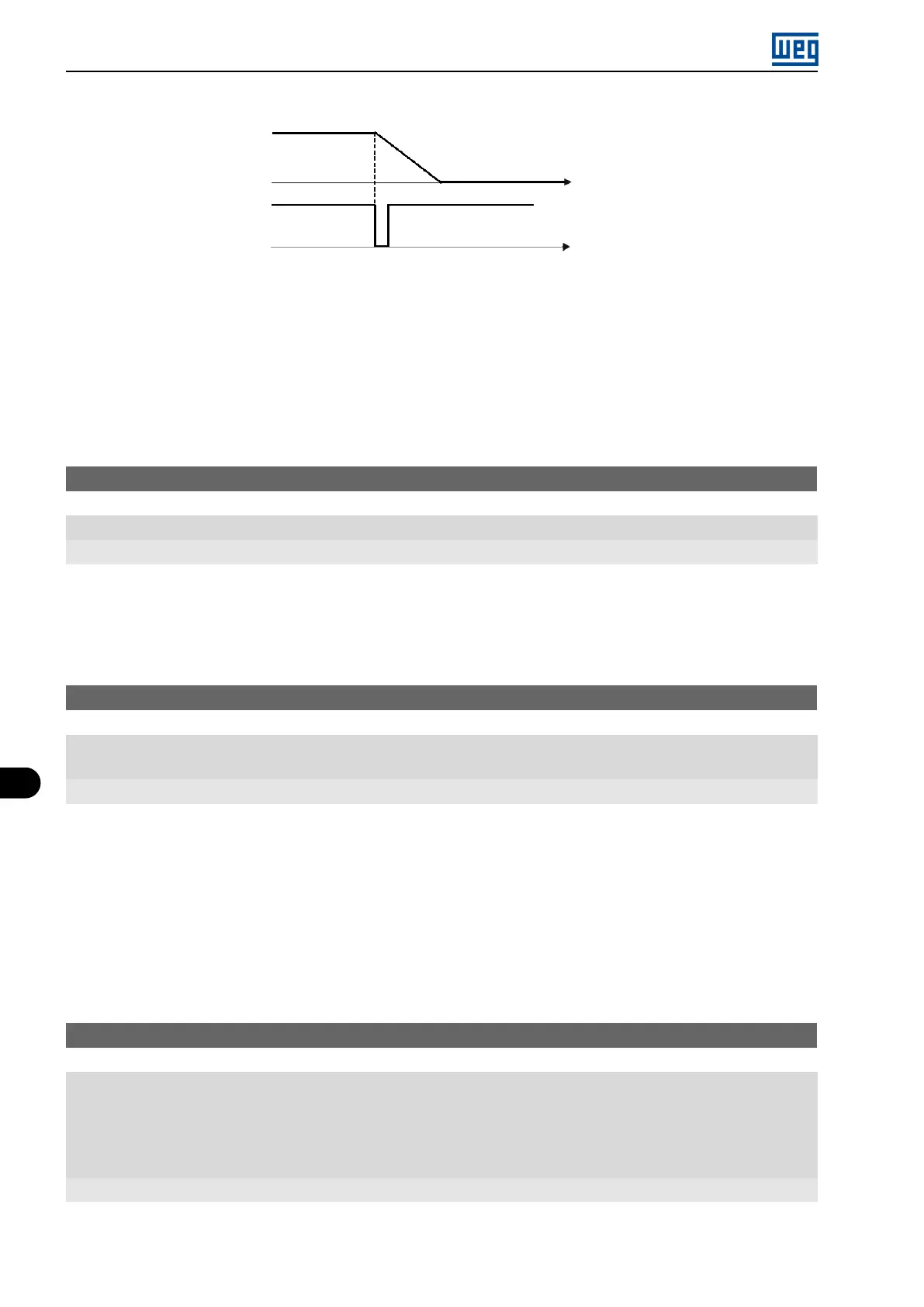
Output
frequency
Time
Time
Deceleration
ramp
DIx - Safety
switch
Inactive
Active
Figure 9.17: Example of the Emergency function
9.7 INPUT FOR INFRARED RECEIVER
The IOADR accessory uses an infrared remote control to control the inverter. The RC-5 protocol (Philips) was used
for the communication of the control with the accessory. The information on the control/selection of remote control
is available in the parameters below.
P840 - IR Control Command
Range: 0 to FFFF (hexa)
Properties: ro
Description:
By means of this parameter it is possible to check if the frequency inverter is receiving any valid command from
the infrared control. The use of the remote control depends on the logic implanted on the LADDER of the WPS
software via system markers (bits). For further details, refer to the help menu of the WPS software.
P841 - IR Controle Selection
Range: 0 = Without Display
1 = With Display
Properties: cfg
Description:
Through this parameter it is possible to select which infrared remote control will be used. For further details, refer
to the installation, configuration, and operation guide of the I/O IOADR expansion module .
9.8 DIGITAL OUTPUTS
The frequency inverter can activate up to four relay digital outputs (DO1 to DO4) according to the IO expansion
accessory connected to the product. The parameter configuration of the digital outputs behaves as described in
detail below.
P013 - DO4 to DO1 Status
Range: 0 to F (hexa)
Bit 0 = DO1
Bit 1 = DO2
Bit 2 = DO3
Bit 3 = DO4
Properties: ro
Description:
Using this parameter, it is possible to view the inveter digital outputs status.
9-20 | Micro Mini Drives





 To Next Page