5
HMI
5 HMI
✓
NOTE!
The inverter comes from the factory with the frequency (V/f 50/60 Hz mode) and voltage adjusted
according to the market.
The reset to factory default may change the content of the parameters related to frequency.
5.1 ACCESS
Whenever the inverter is powered up, the HMI display goes to the start-up mode if no faults, alarms or undervoltages
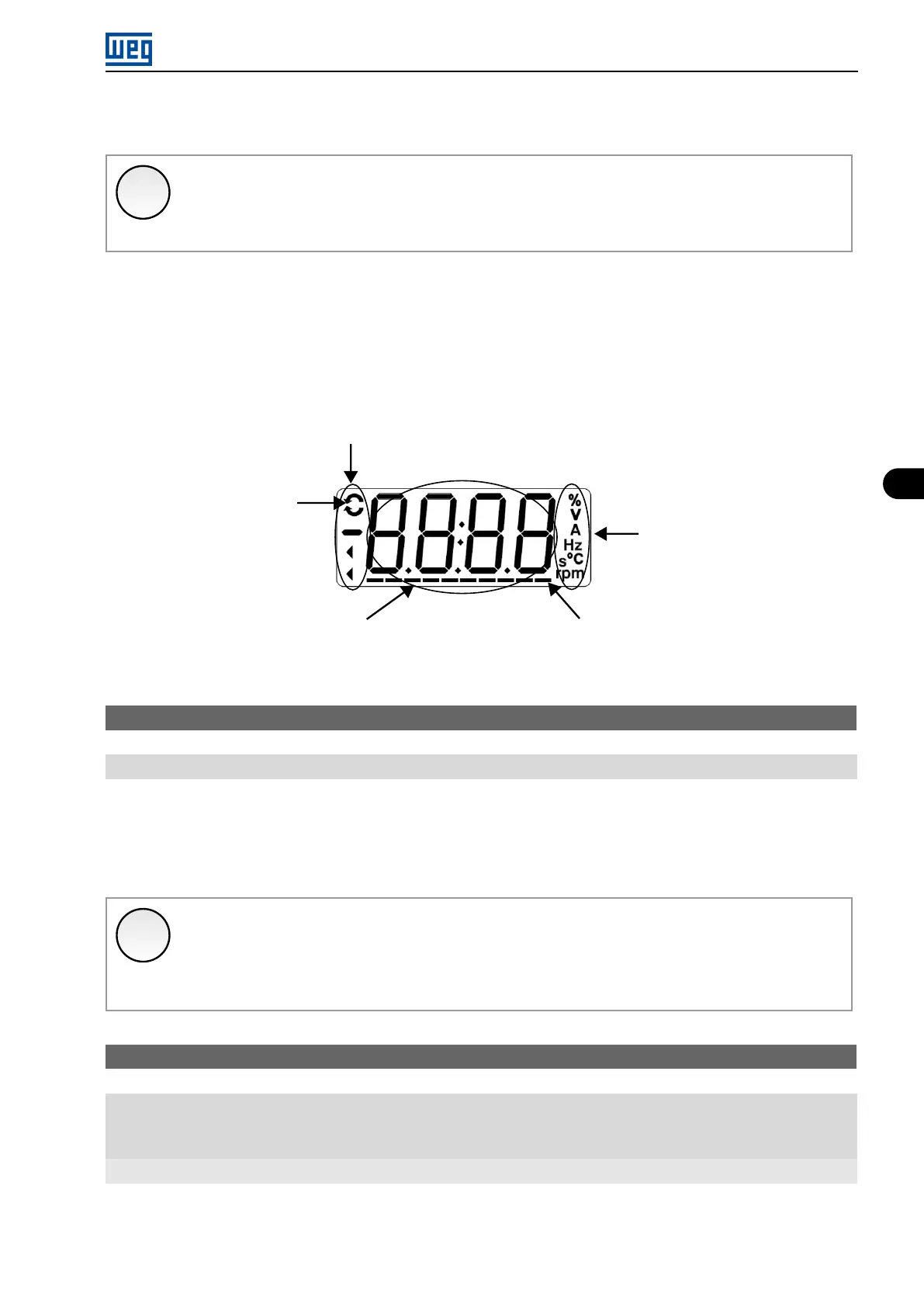
are present. In order to simplify the reading of the inverter parameters, the display was designed to show two
parameters simultaneously, at the user’s discretion. One of those parameters (main display) is shown in the numeric
form and the other parameter as a bar graph. The parameter monitored by the bar graph is selected via P207, as
indicated in Figure 5.1 on page 5-1.
Inverter status
Direction of rotation
Unit of measurement
(it refers to the value
of the main display)
Bar Graph to monitor the variable
Main display
Figure 5.1: Screen on initialization and display fields
P000 - Access to Parameters
Range: 0 to 9999
Description:
Password input to release the access to the parameters. Once a password is saved in P200, the access to the
parameters is only allowed if this password is set in P000. After setting P000 with a password value, P000 will
show ”1” or ”0”, keeping the set password value hidden. Where ”1” releases the access to parameters and ”0”
locks the access to the parameters.
✓
NOTE!
The view of parameter P000 on the HMI will only be available when the password is active (P200 =
1).
To release the access to the parameters, it is necessary to set P000 after each inverter energization,
as such information is not retained.
P200 - Password
Range: 0 = Inactive
1 = Active
2 to 9999 = New Password
Properties: cfg
Description:
It allows activating the password (by inserting a new value) or disabling it. For further details regarding the use of
this parameter, refer to Table 5.1 on page 5-2.
Micro Mini Drives | 5-1





 To Next Page