8
MOTOR CONTROL
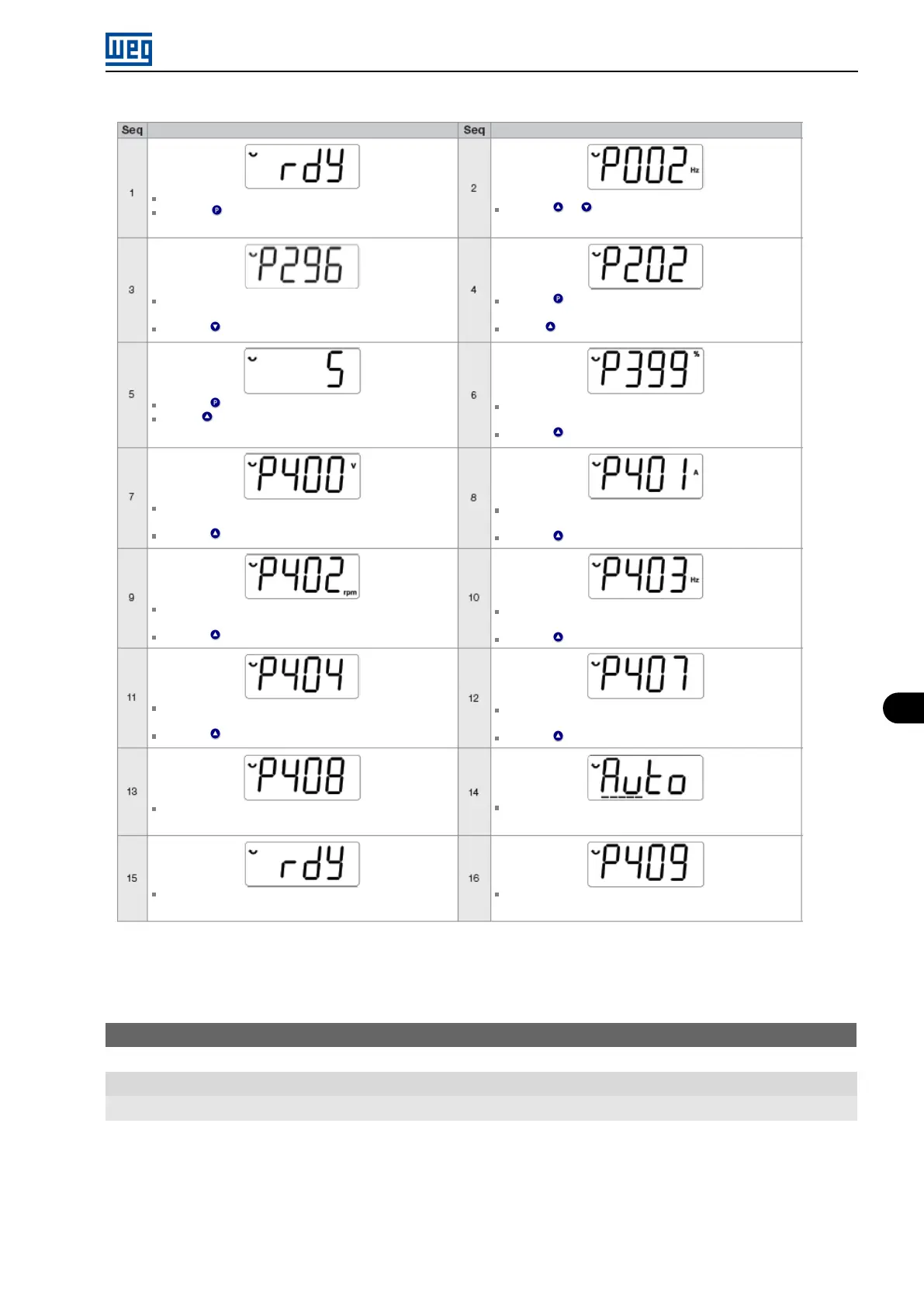
Indication on the Display / Action
Initialization mode
Press this key to enter the first level of the setting
mode
If necessary, change the content of “P296 - Line Rated
Voltage” (only for 400 V line)
Press the key until selecting parameter P202
Press the key to save the change of P202
Use the key until selecting parameter P399
If necessary, change the content of “P400 - Motor
Rated Voltage”
Press the key for the next parameter
If necessary, change the content of “P402 - Motor
Rated Speed”
Press the key for the next parameter
If necessary, change the content of “P404 - Motor
Rated Output”
Press the key for the next parameter
If necessary to make the self-tuning, change the value of
P408 to “1”
When the self-tuning is completed, it will return to the
Initialization Mode
Indication on the Display / Action
Press the or keys until selecting parameter P296
Press the key to change the content of “P202 -
Control Type”” to P202 = 5 (VVW)
Use the key
If necessary, change the content of “P399 - Motor
Rated Efficiency” according to data on the nameplate
Press the key for the next parameter
If necessary, change the content of “P401 - Motor
Rated Current”
Press the key for the next parameter
If necessary, change the content of “P403 - Motor
Rated Frequency”
Press the key for the next parameter
If necessary, change the content of “P407 - Motor
Rated Power Factor”
Press the key for the next parameter
During the self-tuning, the HMI will show “Auto” and the
bar will indicate the operation progress
If necessary, change the content of “P409 - Stator
Resistance”
Figure 8.21: Start-up of the VVW mode
P140 - Slip Com. Filter
Range: 0.000 to 9.999 s
Properties: VVW
Description:
Time constant of the filter for slip compensation in the output frequency. You must consider a filter response time
equal to three times the time constant set in P140.
Micro Mini Drives | 8-31





 To Next Page