EasyManua.ls Logo

Weinmann VENTIlogic plus - User Manual

Default Icon
128 pages
Print Icon
To Next Page IconTo Next Page
Loading...
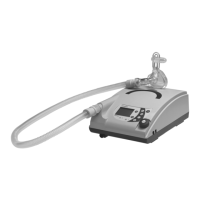
Ventilation device
Description of device and instructions for use
for devices from serial number 20,000
VENTIlogic LS
VENTIlogic plus

Table of Contents

Questions and Answers

  • G
    ghickmanSep 3, 2025
    Why is SpO measurement 2 disconnected on Weinmann VENTIlogic plus?
    • K
      kirsten26Sep 3, 2025
      If the Weinmann Medical Equipment displays 'SpO measurement 2 disconnection', it means the SpO sensor has slipped out of place or come loose from the fingertip. Reattach the SpO sensor to the fingertip properly.
  • R
    Richard PetersonSep 2, 2025
    What to do if Weinmann VENTIlogic plus Medical Equipment doesn't detect replaceable battery?
    • Z
      zwilliamsSep 2, 2025
      If your Weinmann Medical Equipment is not detecting the replaceable battery, it could be due to several reasons: the battery may be defective, a non-approved battery is in use, or you are using the WM 27998 battery with a firmware version below 2.9.0. Have the device repaired if the battery is defective. Use a genuine Weinmann battery. Update the firmware to version 2.9.0 or above if using the WM 27998 battery.
  • A
    Anthony JordanSep 1, 2025
    Why Weinmann Medical Equipment cannot be switched on battery?
    • R
      Robert WarnerSep 2, 2025
      If the Weinmann Medical Equipment cannot be switched on during battery operation, it might be because the transport securing device for the battery is active. Connect the power supply and charge the battery before using it for the first time.
  • J
    Jose JimenezAug 31, 2025
    Why is the SpO signal weak on Weinmann Medical Equipment?
    • S
      Stephen JonesSep 1, 2025
      If the SpO signal is weak on your Weinmann Medical Equipment, check the SpO sensor and fingertip and clean if necessary.
  • J
    jramosAug 31, 2025
    Why is Weinmann VENTIlogic plus Medical Equipment internal battery not charging?
    • D
      Dylan BrownAug 31, 2025
      If the internal battery of your Weinmann Medical Equipment is not charging due to overtemperature, protect the device from direct sunlight and do not operate it near a radiator. If the battery is too cold, ensure that the device is operated within the permitted temperature range.
  • J
    John MckayAug 30, 2025
    What does filter change indicator mean on Weinmann VENTIlogic plus?
    • D
      Daniel WestAug 30, 2025
      If the filter change indicator appears on the Weinmann Medical Equipment, clean or change the filter as soon as possible.
  • J
    Jonathan HensleyAug 29, 2025
    How to turn on Weinmann VENTIlogic plus Medical Equipment by breath?
    • M
      Mackenzie BrownAug 29, 2025
      If your Weinmann Medical Equipment cannot be switched on by taking a breath, it may be because the auto switch-on feature is not activated. Activate the Auto switch-on feature (only leakage ventilation).
  • J
    Jennifer GuzmanAug 28, 2025
    How to set clock on Weinmann VENTIlogic plus Medical Equipment?
    • S
      Samuel NguyenAug 28, 2025
      If the clock is not set on your Weinmann Medical Equipment, press the alarm acknowledgement key and have the clock set by a specialist dealer to ensure the therapy data is correctly recorded.
  • W
    williamadkinsAug 27, 2025
    What causes IPAP low on Weinmann VENTIlogic plus Medical Equipment?
    • J
      Joseph Johnson DVMAug 27, 2025
      If your Weinmann Medical Equipment displays 'IPAP low' (pressure-controlled only), this could be due to a dirty filter or a leak in the patient/ventilator interface, or the interface may be defective. Clean or change the filter. Adjust the headgear/headband to ensure the patient/ventilator interface seals properly; if necessary, replace it.
  • E
    Eric AndersonAug 26, 2025
    What to do if Weinmann Medical Equipment internal battery is exhausted?
    • J
      Jonathan RossAug 27, 2025
      If the internal battery of your Weinmann Medical Equipment is exhausted, press the alarm acknowledgement key. Then, have the battery replaced by a specialist dealer to ensure the therapy data is correctly recorded.

Summary

2. Description of device

Intended Use of the Device

Details the applications and patient suitability for VENTIlogic LS and VENTIlogic plus devices.

Description of Device Function

Explains how the device operates, including pressure delivery, display, and modes.

3. Safety instructions

General Safety Information

General safety advice, warnings, and cautions for using the device safely.

Life-Support Ventilation Safety

Critical safety warnings regarding resistance and potential alarm failures in life-support modes.

Safety Guidelines for Device Operation

Safety guidelines for device operation, environment, and patient interface use.

Contraindications for Device Use

Lists diseases or conditions where the device should not be used or used with caution.

4. Set up device

Setting Up and Connecting the Device

Instructions for physically setting up the device and making initial connections.

Connecting Valve Ventilation

Steps for connecting the patient circuit for valve ventilation modes.

Connecting Leakage Ventilation

Instructions for connecting the patient circuit for leakage ventilation.

Connecting the Bacteria Filter

Instructions for connecting bacteria filters to prevent contamination.

Therapy with Oxygen Supply

Procedures for supplying and monitoring oxygen therapy with the device.

Operation During Power Failure

How the device operates and what to do during a power outage.

5. Operation

Device Controls Overview

Overview of the device's controls and their functions.

Starting Up the Device

Steps for starting up the therapy device and its operating states.

Handling Device Batteries

Information on internal and replaceable batteries, charging, and status.

Accessing the Alarm List

How to access and understand the stored alarm history.

Selecting a Therapy Program

How to choose and set pre-configured therapy programs.

Post-Operation Procedures

Steps to take after therapy, including device shutdown and cleaning.

6. Hygiene treatment

Cleaning for Leakage Ventilation

Detailed steps for cleaning patient circuits used in leakage ventilation.

Cleaning the Device Housing

Instructions for cleaning the exterior of the therapy device safely.

Coarse Dust Filter Cleaning and Fine Filter Change

Procedure for cleaning the coarse dust filter and changing the fine filter.

Disinfection and Sterilization Guidelines

Guidelines for disinfecting device components and accessories.

7. Function check

Function Check Method

General method for performing function checks on various device modes.

Check Flow;Pressure Sensors (Leakage Ventilation)

Procedure to check flow and pressure sensors in leakage ventilation mode.

Calibrating the Oxygen Sensor

Step-by-step guide for calibrating the oxygen sensor.

8. Troubleshooting

Device Faults and Remedies

Table of common device faults, their causes, and recommended remedies.

9. Maintenance and safety checks

Weinmann VENTIlogic plus Specifications

General IconGeneral
BrandWeinmann
ModelVENTIlogic plus
CategoryMedical Equipment
LanguageEnglish

Related product manuals