Manual R06-2016108 / 172
ROTARY INDEXING TABLE CONTROLLER EF2...B
OPERATION / DESCRIPTION OF WEISS SOFTWARE | 8.3 Machine configuration
8.3.7 I/O mapping
Inputs and outputs can be changed later during operation. A new configuration of the rotary indexing table is not
necessary.
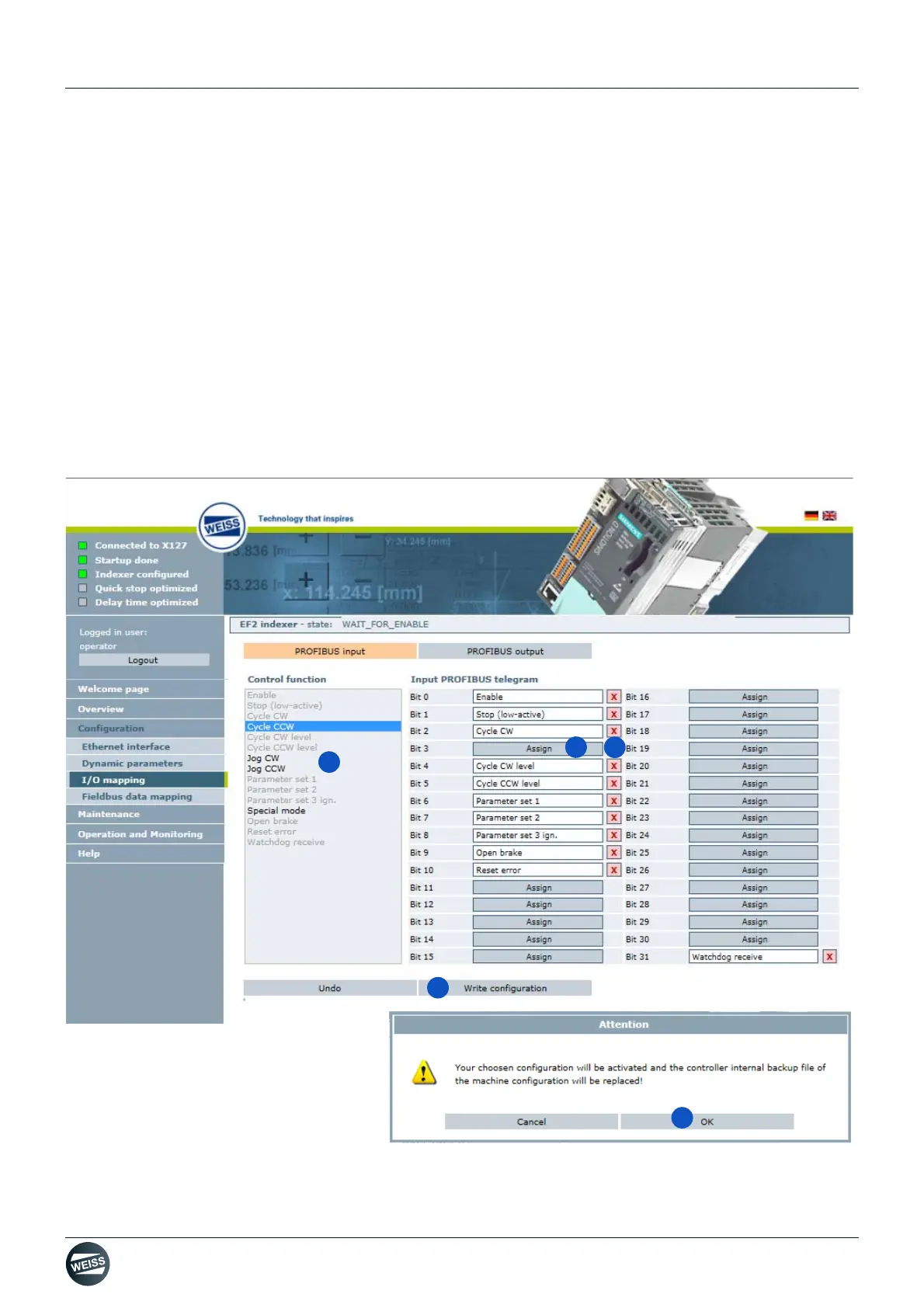
1. Click the red cross behind a terminal to delete the current terminal configuration.
The red cross will be hidden.
The "Assign" button that appears indicates that this terminal can be assigned to a controller function.
2. Choose an available control function.
3. Assign the selected control function to the telegram / the terminal.
4. Write configuration.
5. Confirm the message with OK.
The selected configuration will be activated and the controller internal backup file of the machine configuration
will be replaced.
Fig. 59: I/O mapping


 To Next Page