7.4 Configuring a printer
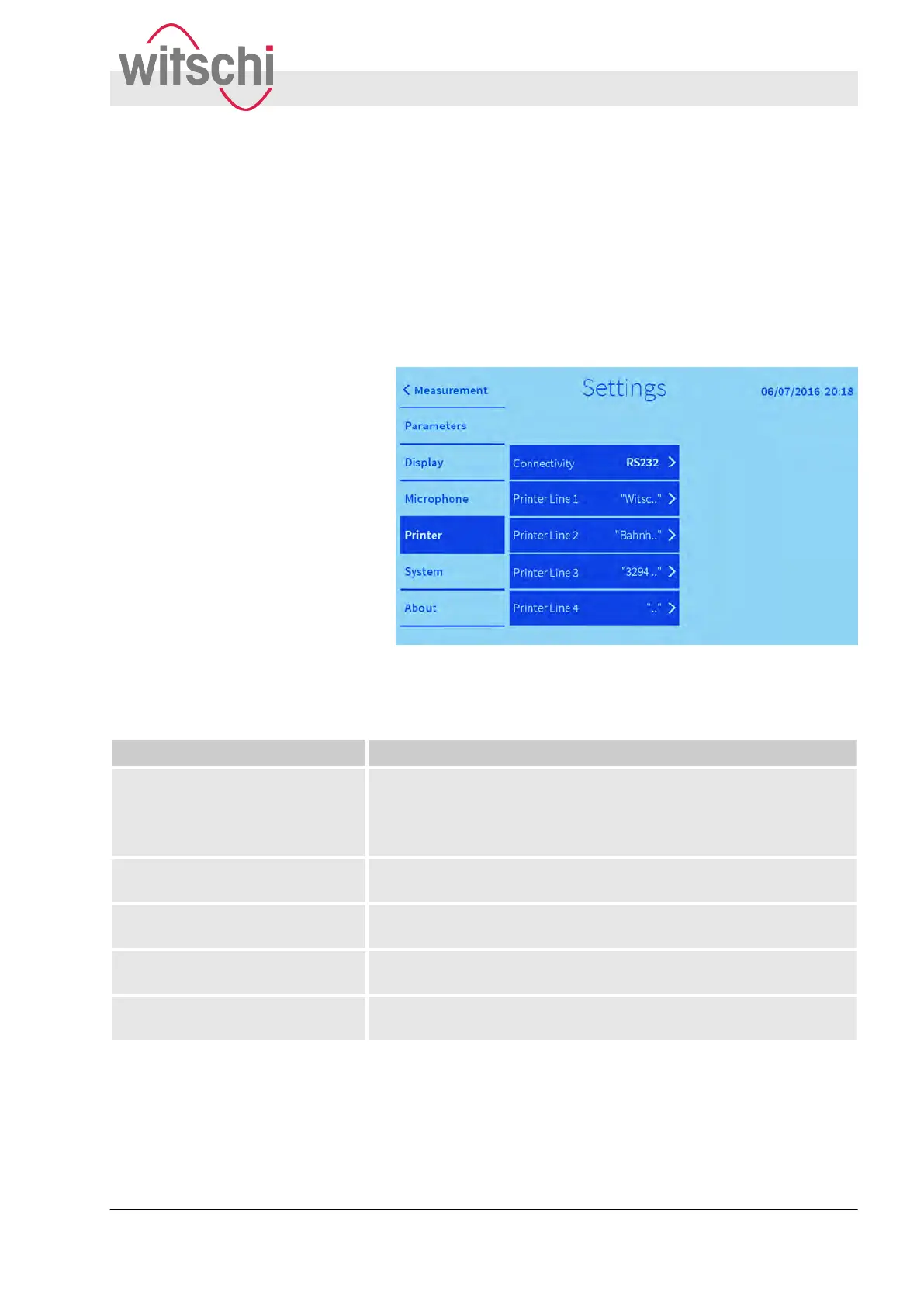
The printer that is to be used can be selected using the “Printer”
tab. The printout with the measured results can be assigned a
header of up to 4 individual lines of text.
Fig. 38: Printer settings
The following settings can be adjusted:
Function Additional information
Displaying the connected printer. A printer that is connected to the Watch Expert via the printer port
(RS232) is displayed.
If a Bluetooth connection is selected, then all Witschi Bluetooth
printers within range are listed.
Enter the first line of the printout
header
.
You can enter up to 20 characters.
Enter the second line of the printout
header
.
You can enter up to 20 characters.
Enter the third line of the printout
header
.
You can enter up to 20 characters.
Enter the fourth line of the printout
header
.
You can enter up to 20 characters.
Editing headers for print logs
Adjusting printer settings
Configuring the user interface
Configuring a printer
27.02.2018 Precision measuring device Watch ... 61


 To Next Page