Home
WTC
Scales
200
Page 24
WTC 200 - Page 24
47 pages
Manual
Save Page as PDF
To Next Page
To Next Page
To Previous Page
To Previous Page
Loading...
24
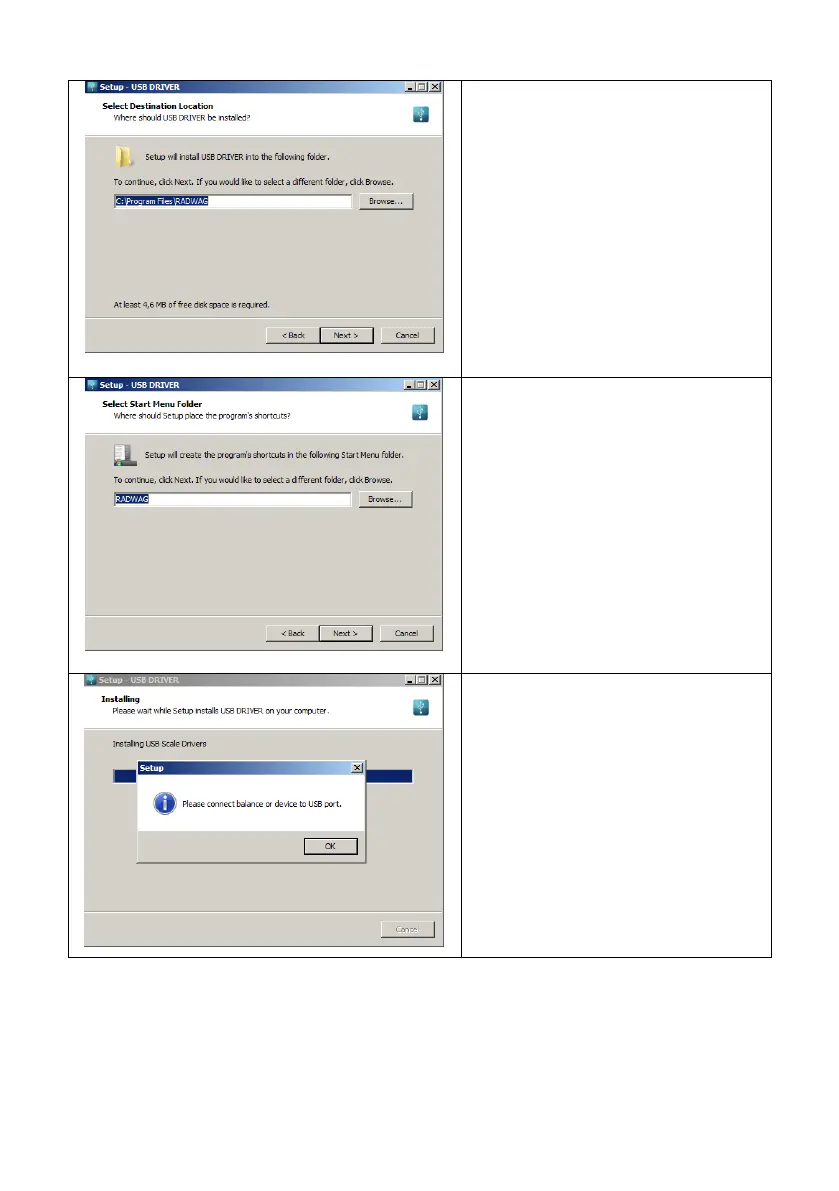
Se
lect
dire
ctory
and
pre
ss
„Nex
t
”
button.
In
order
to
s
tart
instal
l
a
tion
process
press
„Nex
t”
button
.
Conne
ct
the sca
le to a co
mpute
r, use
1.8-me
ter
long
USB
A/B
cab
le
maxi
mum
(in
c
ase
of
alread
y
conne
cted
sca
le,
i
t
is
ne
cessa
ry
to
disconne
ct
it
and
reconne
ct
us
ing
USB
cable).
Re
spe
cti
ve
m
e
ssage
box
is
disp
layed,
pre
ss
OK
b
utton
for con
firma
ti
o
n.
23
25
Table of Contents
Main Page
Default Chapter
3
Table of Contents
3
1 General Information
5
2 Precautions
5
Operation
5
Battery Power Supply
5
3 Warranty Conditions
6
4 Design
6
Dimensions
6
Connectors Arrangement
7
Connectors Description
7
5 Unpacking and Installation
8
6 Start-Up and Operation
8
Levelling
8
Connecting the Scale to the Mains
8
Warm-Up Time
9
Battery Charge Status
9
Battery Charge Status Check
10
7 Maintenance Activities
10
Cleaning ABS Components
10
Cleaning Stainless Steel Components
10
8 Operation Panel
11
9 Keys
11
10 Program Structure
12
Function Groups
12
Operating the Menu
12
Return to the Weighing Mode
13
11 Weighing Operation
13
Good Weighing Practice
13
Zeroing
14
Taring
14
Entering Tare Value Manually
14
Dual Range Devices
15
Units
15
Start Unit
15
Temporary Unit
16
12 Adjustment
16
External Adjustment
17
User Adjustment
17
Adjustment Report
18
13 Scale Parameters
18
Filter
18
Value Release
19
Ambient Conditions
19
Autozero Function
19
Tare Function
20
Tare: Enter Mode
20
Tare: Values Memory
21
Entering Tare Value to the Weighing Device Memory
21
Selecting Tare Value from the Weighing Device Memory
21
Last Digit
22
14 Communication
22
RS232 Port
22
USB a Port
23
USB B Port
23
Wireless Communication Module
25
15 Peripheral Devices
26
Computer
26
Computer Port
27
Continuous Transmission
27
Printout Interval for Continuous Transmission
27
Printer
27
Printer Port
27
Additional Display
28
Additional Display Port
28
16 Printouts
28
Adjustment Report
28
GLP Printout
29
17 Miscellaneous Parameters
30
Automatic Backlight Switch-Off
30
Display Brightness
30
Beep' Sound
31
Automatic Shutdown
31
Date and Time
32
Default User Settings
32
18 Scale Data
32
19 WORKING MODES - General Information
33
Running Working Mode
33
Working Modes Local Settings
33
Working Mode Accessibility
34
Save Mode
34
Automatic Printout Time Interval
34
Lo Threshold
35
20 Working Mode - Weighing
35
Local Settings
35
21 Working Mode - Parts Counting
35
Local Settings
36
Selecting Operation Mode
36
Setting Sample Mass by Entering Mass of a Single Part
36
Setting Sample Mass by Determining Mass of a Single Part
37
22 Working Mode - +/- Control
37
Local Settings
38
Declaring Checkweighing Thresholds
38
23 Working Mode - Percent Weighing
38
Local Settings
39
Selecting Operation Mode
39
Reference Sample Mass Determined by Weighing
39
Reference Sample Mass Determined by Entering the Mass Value
39
24 Working Mode - Peak Hold
40
Local Settings
40
Peak Hold Operation
40
25 Working Mode - Totalizing
40
Local Settings
41
Totalizing Operation
41
26 Working Mode - Animal Weighing
42
Local Settings
42
Animal Weighing Operation
42
27 Import / Export
43
Weighing Records Export
43
ALIBI Weighings Export
43
Parameters Export / Import
44
28 Diagrams of Connection Cables
44
29 Technical Specifications
45
30 Troubleshooting
45
31 Error Messages
46



 To Next Page