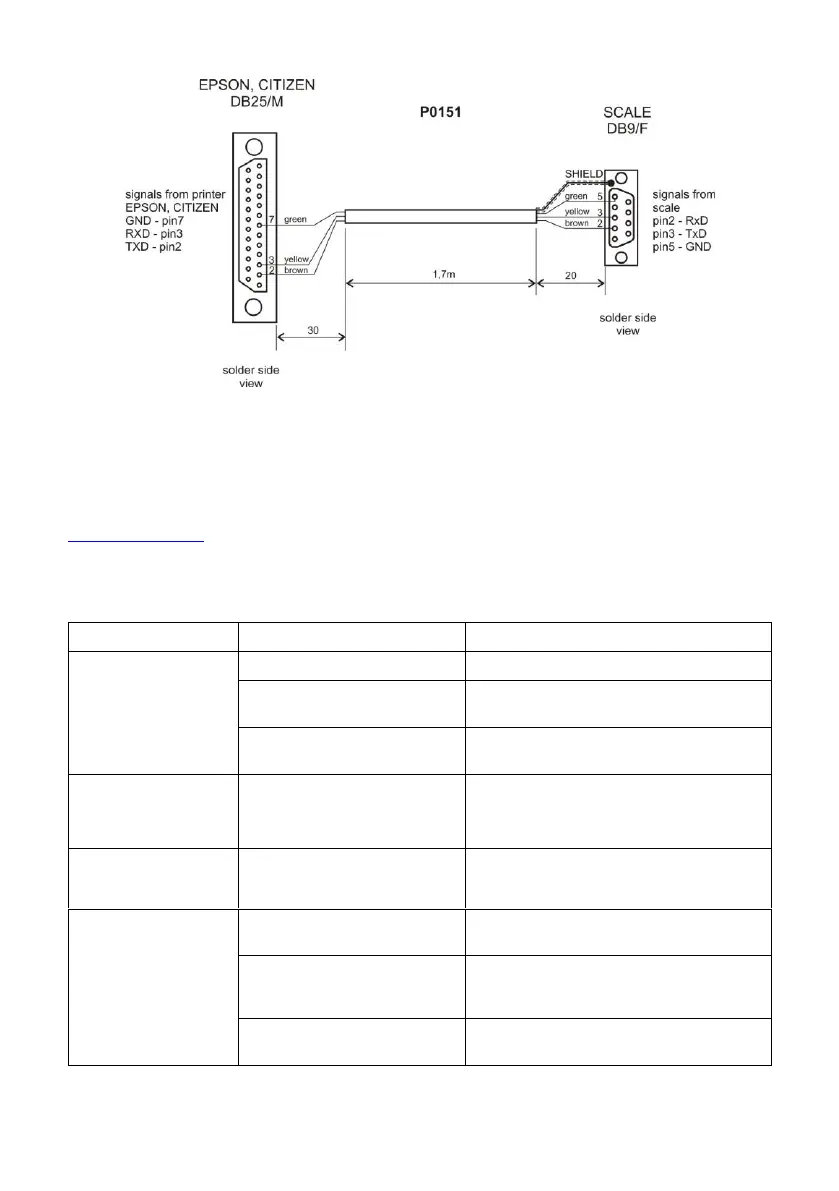
scale - printer cable (EPSON)
29. TECHNICAL SPECIFICATIONS
For technical specifications of respective scales go to RADWAG website
www.radwag.pl.
30. TROUBLESHOOTING
Power supply disconnected.
Connect the power supply to the scale.
Connect the power supply to the mains,
charge the battery.
No battery (not installed or
installed incorrectly).
Check if the battery is installed correctly
(polarization).
The scale switches
off automatically.
<7.4.t1> parameter set to
value enforcing scale shut-
down after particular time
interval.
Go to <P7.Othr> menu, set <7.4.t1>
parameter to 'nonE' value.
During the start-up,
message 'LH' is
displayed.
Weighing pan loaded during
the start-up.
Unload the weighing pan. Zero indication
is displayed.
Communication with
the computer not
established.
Incorrect computer port set in
parameter <5.1.1.Prt>.
Enter < P5.ducE / 5.1.PC> submenu and
set correct <5.1.1.Prt> parameter value.
Incorrect transmission
parameters for the selected
computer port.
Enter <P4.Conn> menu and set correct
transmission parameters for the selected
computer port.
Incorrect printout frequency
for continuous transmission.
Enter < P5.ducE / 5.1.PC> submenu and
set correct <5.1.3.Int> parameter value.



 To Next Page