Procedure:
Connect the USB flash drive to USB A port.
Enter <IE / IE2.ALE> submenu.
The program automatically saves exported data to a USB flash drive file.
File name and extension: xxxxxx.ali, where xxxxxx – serial number.
27.3. Parameters Export / Import
Export / import of all user parameters between weighing devices of the same
series carried out using USB flash drive.
Export procedure:
Connect the USB flash drive to USB A port.
Enter <IE / IE3.SPE> submenu.
The program automatically saves exported data to a USB flash drive file.
File name and extension: xxxxxx.par, where xxxxxx – serial number.
Import procedure:
Connect the USB flash drive to USB A port, make sure that the drive
stores parameters file in the main directory (file name: xxxxxx.par, where
xxxxxx – serial number).
Enter <IE / IE4.SPI> submenu.
User parameters are automatically imported from xxxxxx.par file.
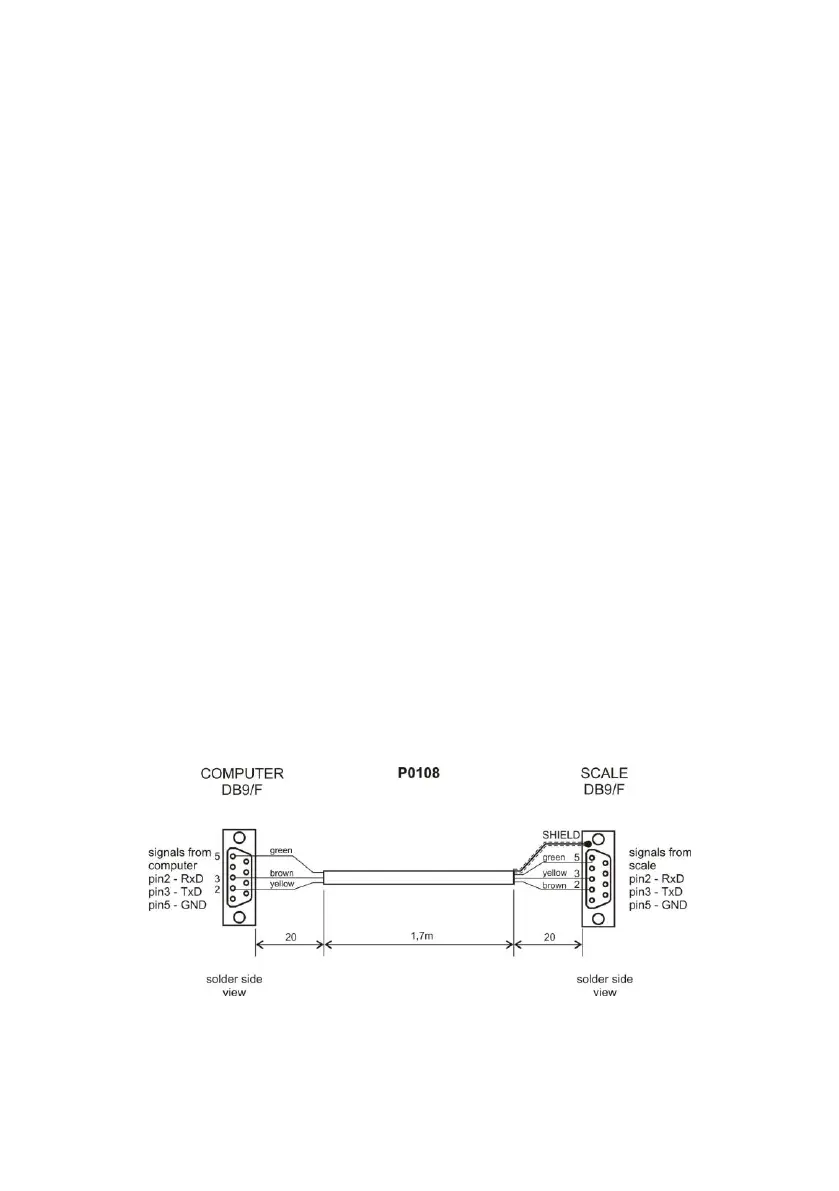
28. DIAGRAMS OF CONNECTION CABLES
scale – computer cable



 To Next Page