83
XAG AUSTRALIA
DATUM SETUP
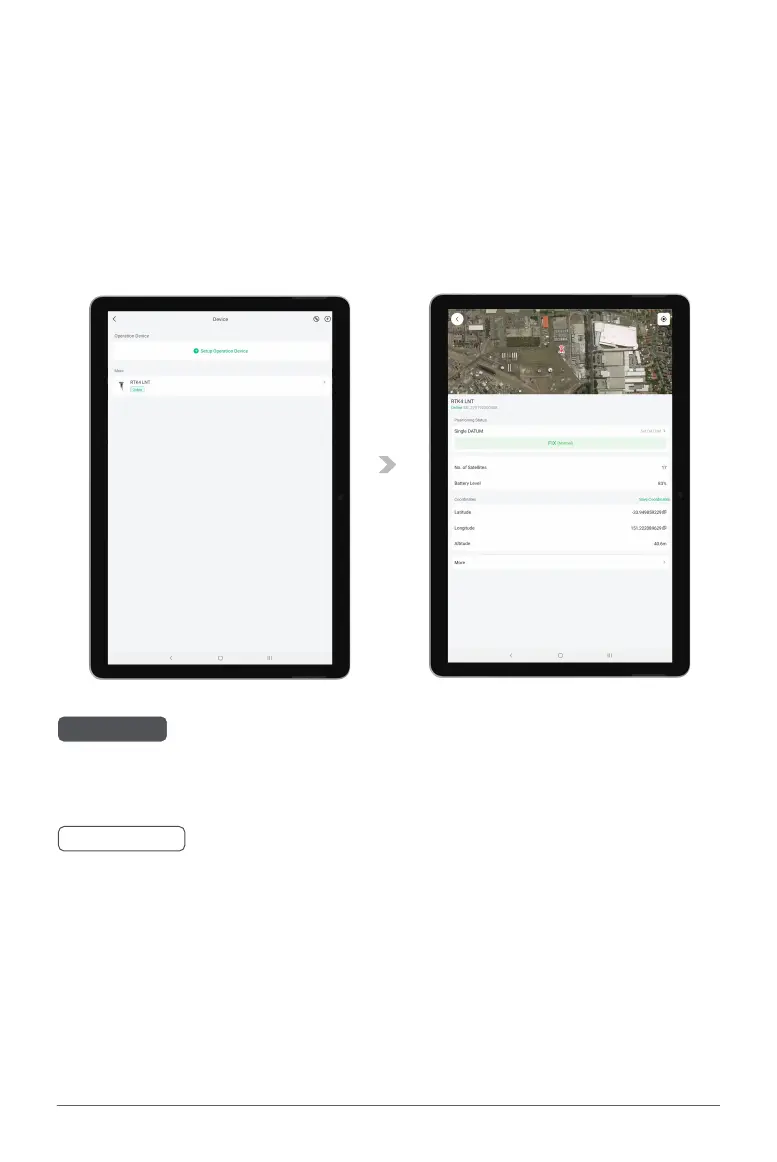
06. Turn ON the RTK Mobile Station & Open the APP Device Menu.
07. Tap on the RTK Module to open DATUM Settings.
The RTK Mobile Station will automatically start capturing coordinates, and may take a few
minutes searching and linking with the available satellites. When sufficient satellites had been
found and linked, Positioning Status will refresh and display as FIX (Normal).
08. RTK Mobile Station is now ready for USE.
CHECK
Check & Ensure the Positioning Status of the RTK Module Console is in RTK Mode (Solid Blue).
Check & Ensure the Positioning Status on the APP is now displaying as FIX (Normal).
🧷
IMPORTANT
• Please be patient, the device may take up to 30 seconds before coming ONLINE.
• XAG GNSS RTK Mobile Station provides Low Precision accuracy as default, there may be a
margin of error between the coordinates captured with Low Precision accuracy and the actual
coordinates.



 To Next Page