VX-6E OPERATING MANUAL 69
Selecting and Correcting the Atmospheric Pressure Meter
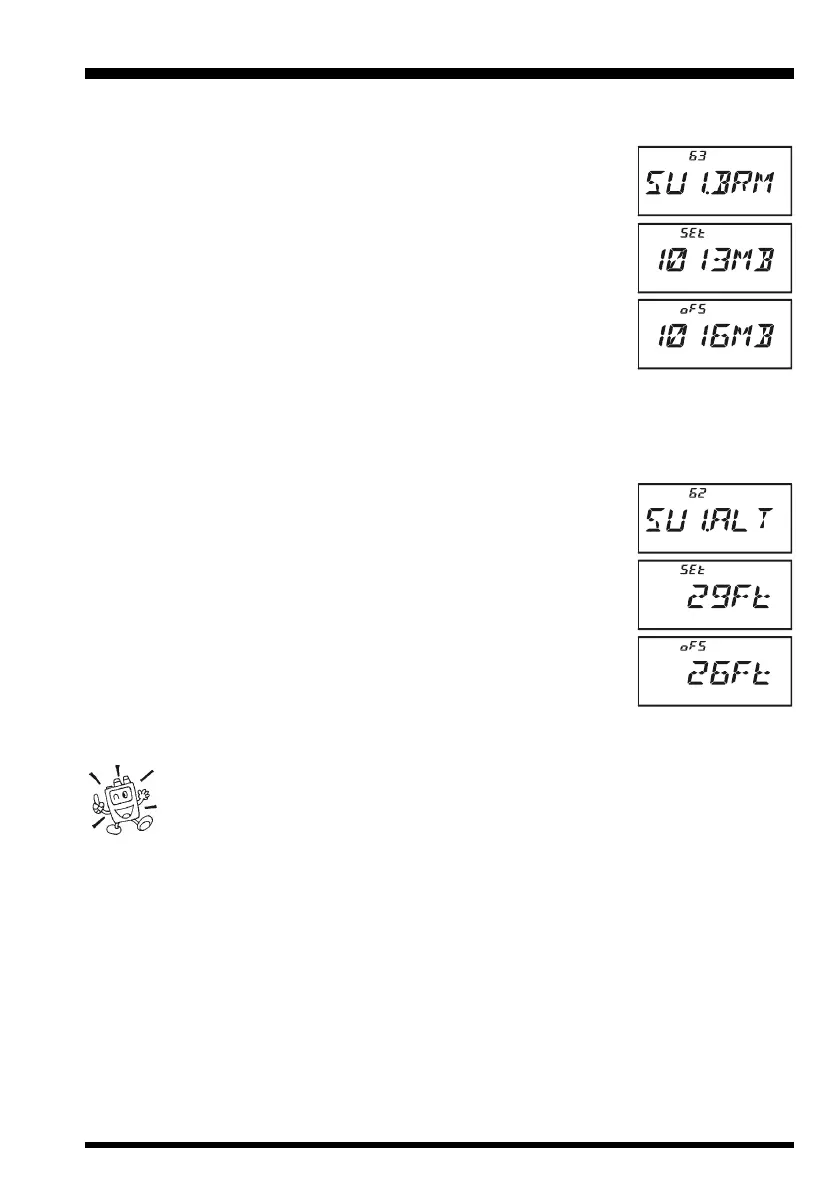
1. Press the
[
F/W
]
key, then press the
[
0
(
SET
)]
key to enter the Set mode.
2. Rotate the DIAL knob to select Set Mode Item 63:
SU1.BRMSU1.BRM
SU1.BRMSU1.BRM
SU1.BRM.
3. Press the
[
0
(
SET
)]
key momentarily to enable adjustment of
this Set Mode Item.
4. Press the
[
MODE
(
SP S
)
SQ TYP
]
key to select the preferred
units of measure (
HPHP
HPHP
HP (hpa),
MBMB
MBMB
MB (mbar),
HGHG
HGHG
HG (mmHg), or
ICIC
ICIC
IC
(inches of Mercury)).
5. Press the
[
F/W
]
key momentarily to enable correction of the
Atmospheric Pressure Meter.
6. Rotate the DIAL knob to adjust the VX-6E display to the read-
ing on your calibrated barometer.
7. Press the PTT switch to save the new setting and exit to normal operation.
Selecting and Correcting the Altimeter
1. Press the
[
F/W
]
key, then press the
[
0
(
SET
)]
key to enter the Set mode.
2. Rotate the DIAL knob to select Set Mode Item 62:
SU1.ALTSU1.ALT
SU1.ALTSU1.ALT
SU1.ALT.
3. Press the
[
0
(
SET
)]
key momentarily to enable adjustment of
this Set Mode Item.
4. Press the
[
MODE
(
SP S
)
SQ TYP
]
key to select the preferred
units (
MM
MM
M, or
FtFt
FtFt
Ft).
5. Press the
[
F/W
]
key momentarily to enable correction of the
Altimeter.
6. Rotate the DIAL knob to adjust the VX-6E display to the true
altitude at your current location.
7. Press the PTT switch to save the new setting and exit to normal
operation.
The Barometer and Altimeter will only track correctly in the short term. That is,
if you calibrate the Barometer and altitude at the beginning of a day hike, the
altitude will be correctly measured during your hike. But if the radio is not used
for several weeks, you will need to check the altitude correction again, because pressure
changes associated with changing weather may be mis-interpreted as a change in altitude.
SENSOR MODE


 To Next Page