EasyManua.ls Logo

Yaesu VX-6E - Keypad Functions Overview; Left Side Keypad Functions

Yaesu VX-6E
111 pages
Print Icon
To Next Page IconTo Next Page
To Previous Page IconTo Previous Page
Loading...
VX-6E OPERATING MANUAL6
CONTROL & CONNECTIONS
(
KEYPAD
)
Third Function
(
P
RESS & HOLD KEY
)
Secondary Function
(
P
RESS
[
F/W
]
+ KEY
)
Primary Function
(
PRESS KEY
)
Third Function
(
P
RESS & HOLD KEY
)
Secondary Function
(
P
RESS
[
F/W
]
+ KEY
)
Primary Function
(
P
RESS KEY
)
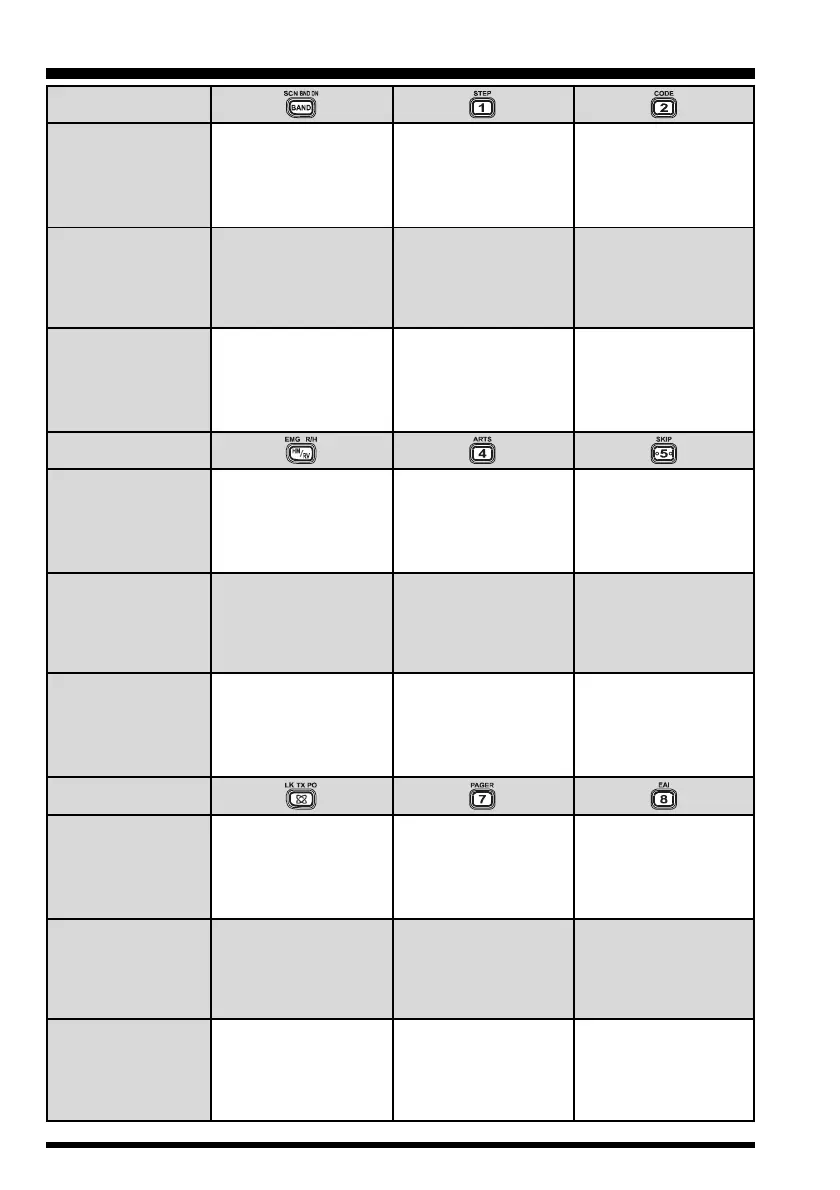
Frequency entry digit
“1”
Frequency entry digit
“2”
Selects the CTCSS
tone or DCS code
number
Frequency entry digit
“4”
Activates the EMER-
GENCY function
Frequency entry digit
“5”
Activates the EPCS
(Enhanced Paging &
Code Squelch) feature
Selects the Memory
Scan “Skip” channel-
selection mode
Third Function
(
P
RESS & HOLD KEY
)
Secondary Function
(
PRESS
[
F/W
]
+ KEY
)
Primary Function
(
P
RESS KEY
)
Moves operation to the
next-highest frequency
band
Moves operation to the
next-lowest frequency
band
Stores the current
setting into Direct
Memory Recall
Channel “1”
Frequency entry digit
“8”
Frequency entry digit
“7”
Selects the synthesizer
steps to be used during
VFO operation.
Activates the ARTS
TM
feature
Activates the EAI
TM
(Emergency Automatic
ID) feature
Selects the desired
transmit power output
level
Activates the Key
Lockout feature
Reverses the transmit
and receive frequencies
while working through a
repeater
Switches to the “Home”
(favorite frequency)
Channel
Activates the Internet
Connection feature
Starts the scanner
upward
(toward a higher
frequency or
a higher channel number)
Stores the current
setting into Direct
Memory Recall
Channel “2”
Stores the current
setting into Direct
Memory Recall
Channel “4”
Stores the current
setting into Direct
Memory Recall
Channel “5”
Stores the current
setting into Direct
Memory Recall
Channel “7”
Stores the current
setting into Direct
Memory Recall
Channel “8”

Table of Contents

Related product manuals