Setup
12
DTX700 Owner’s Manual
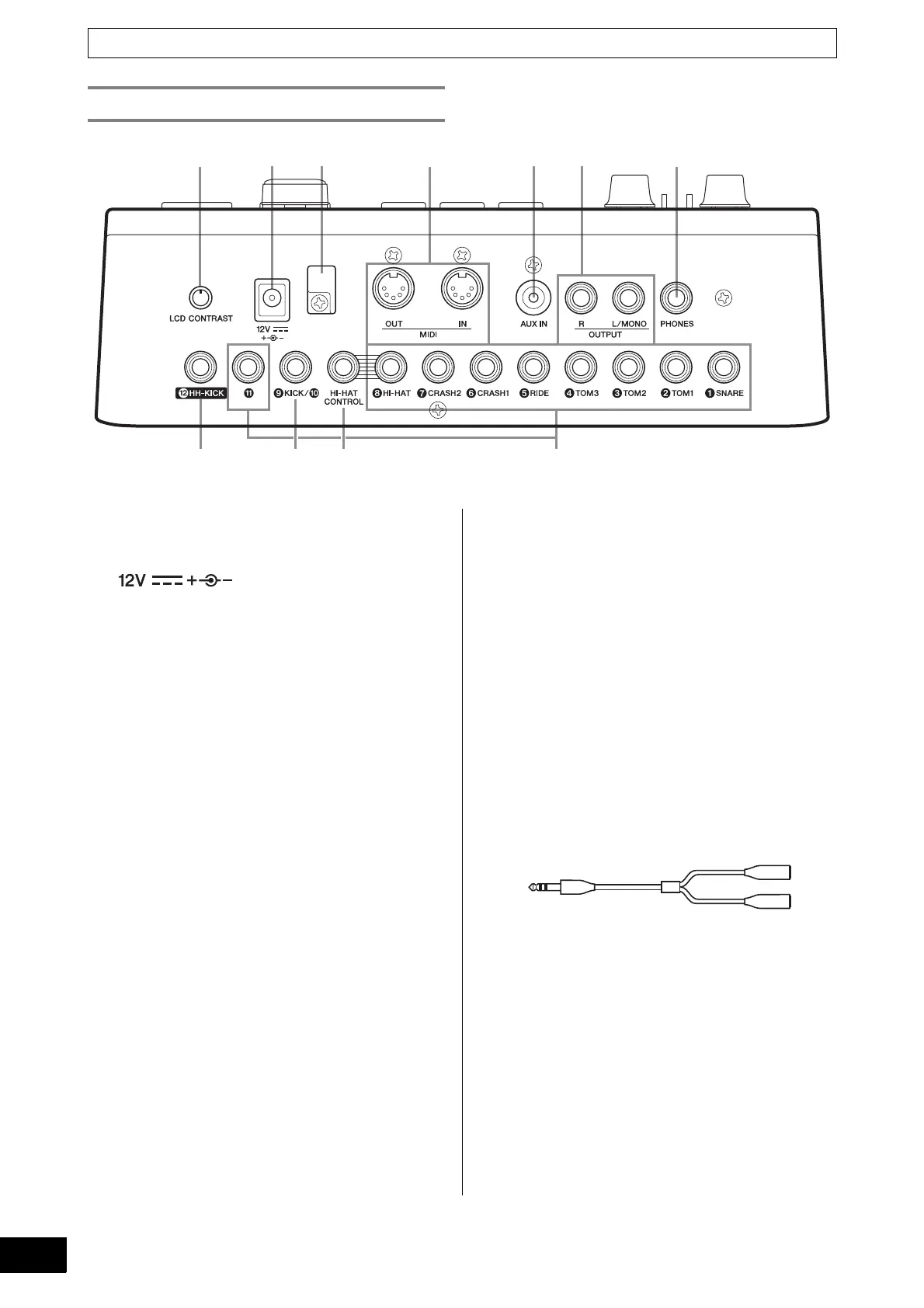
Component Names & Functions
q [LCD CONTRAST] knob (page 19)
This knob is used to set the display contrast for opti-
mum legibility.
w [ ] connector (page 13)
Use this connector for the power adaptor that came
with your DTX700.
e Cord clip (page 13)
Wrap the power adaptor cord around this clip to pre-
vent accidental unplugging during operation.
r MIDI [IN] and [OUT] connectors (page 13)
The MIDI [IN] connector is used to receive control or
performance data from another MIDI device, such as
an external sequencer, via a MIDI cable. When con-
nected in this way, you can play the DTX700’s internal
tone generator and control many of its parameters
using another MIDI device. Meanwhile, the MIDI [OUT]
connector is used to send performance data from the
DTX700 to other devices in the form of MIDI mes-
sages.
t [AUX IN] (auxiliary input) jack (page 13)
External audio signals can be input via this stereo
mini-jack. Using [AUX IN], you can connect a portable
music player, a CD player, or another similar device to
play along with your favorite tunes.
y OUTPUT [L/MONO] and [R] jacks (page 13)
Use these jacks to output line-level stereo mixes from
your DTX700. For example, you can connect each of
the jacks to the left and right inputs of an external ste-
reo amplifier or mixer using mono audio-jack cables.
For mono output, use the [L/MONO] jack only.
u [PHONES] jack (page 13)
Use this standard audio jack to connect a pair of ste-
reo headphones.
i Trigger input jacks [qSNARE] to [i HI-HAT],
and [!1]
These trigger-input jacks are used to connect stereo-
type pads (two- and three-zone). They also support
standard mono-output pads. In addition, these trigger-
input jacks are compatible with pad controllers.
o [HI-HAT CONTROL] jack
This jack is used to connect an HH65 Hi-hat Controller
or an RHH135 Real Hi-hat Pad via its control output.
!0 Trigger input jack [oKICK/!0]
This trigger-input jack is used to connect mono-type
pads such as the KP65 Kick Pad. If using a KP65, fur-
thermore, you can use the input jack on its rear sur-
face to connect an additional mono-type pad.
Meanwhile, you could also use a Y-shaped cable (sold
separately) with this jack in order to connect a pair of
mono-type pads.
!1 Trigger input jack [!2HH-KICK]
This jack is used to connect an HH65 Hi-hat Controller
(sold separately) for use as an alternative kick pad or
as part of a double bass drum configuration (page 50).
Rear Panel



 To Next Page