Basic Operation
26
DTX700 Owner’s Manual
Performing on Many Different Kits
With electronic drums, sensitivity is often set for each individ-
ual pad. However, doing so before each performance can be
extremely time consuming. As a solution, your DTX700 con-
tains a number of trigger setups that define the sensitivities of
all pads in a kit.
These trigger setups have been carefully designed to suit a range
of different playing situations and pad sets, and they can be
selected as follows.
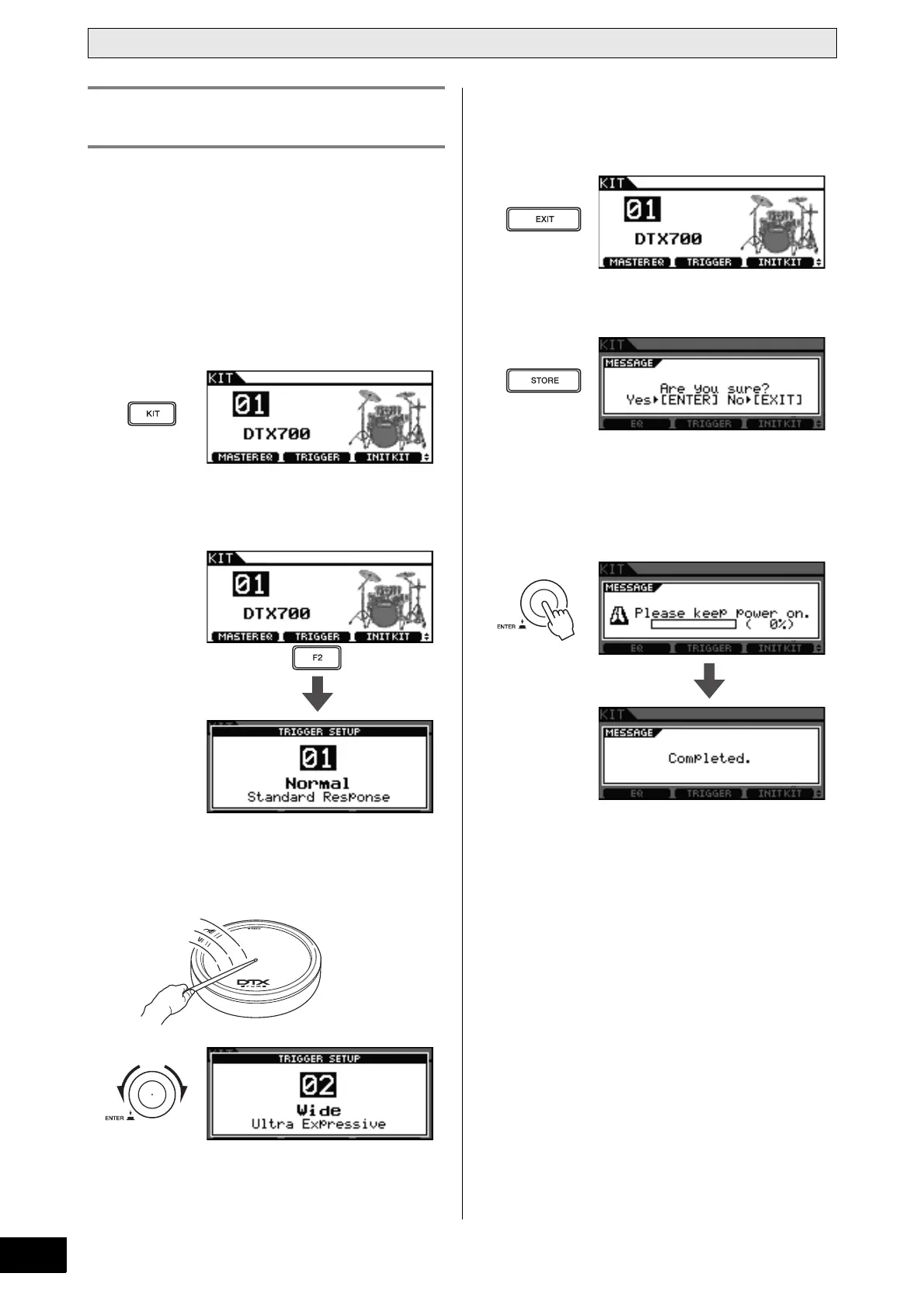
1 Press the [KIT] button.
2 Press the [F2] button.
The Trigger Setup page will open.
3 Turn the dial to choose a trigger setup.
Playing your DTX700’s pads as you turn the dial makes it
easier to notice the differences in sensitivity levels.
4 When you have found a trigger setup you like,
press the [EXIT] button to return to the Kit
page.
5 Press the [STORE] button.
If you do not wish to store your setting, press the [EXIT]
button to return to the previous page.
6 Press the dial to store your new setting.
Selecting a Sensitivity for the
Entire Kit



 To Next Page