Basic Operation
44
DTX700 Owner’s Manual
Turning On the Click-Track
Your DTX700’s timer can be used to specify how long the
click-track is to play. This function is useful when you want to
practice for a set period of time.
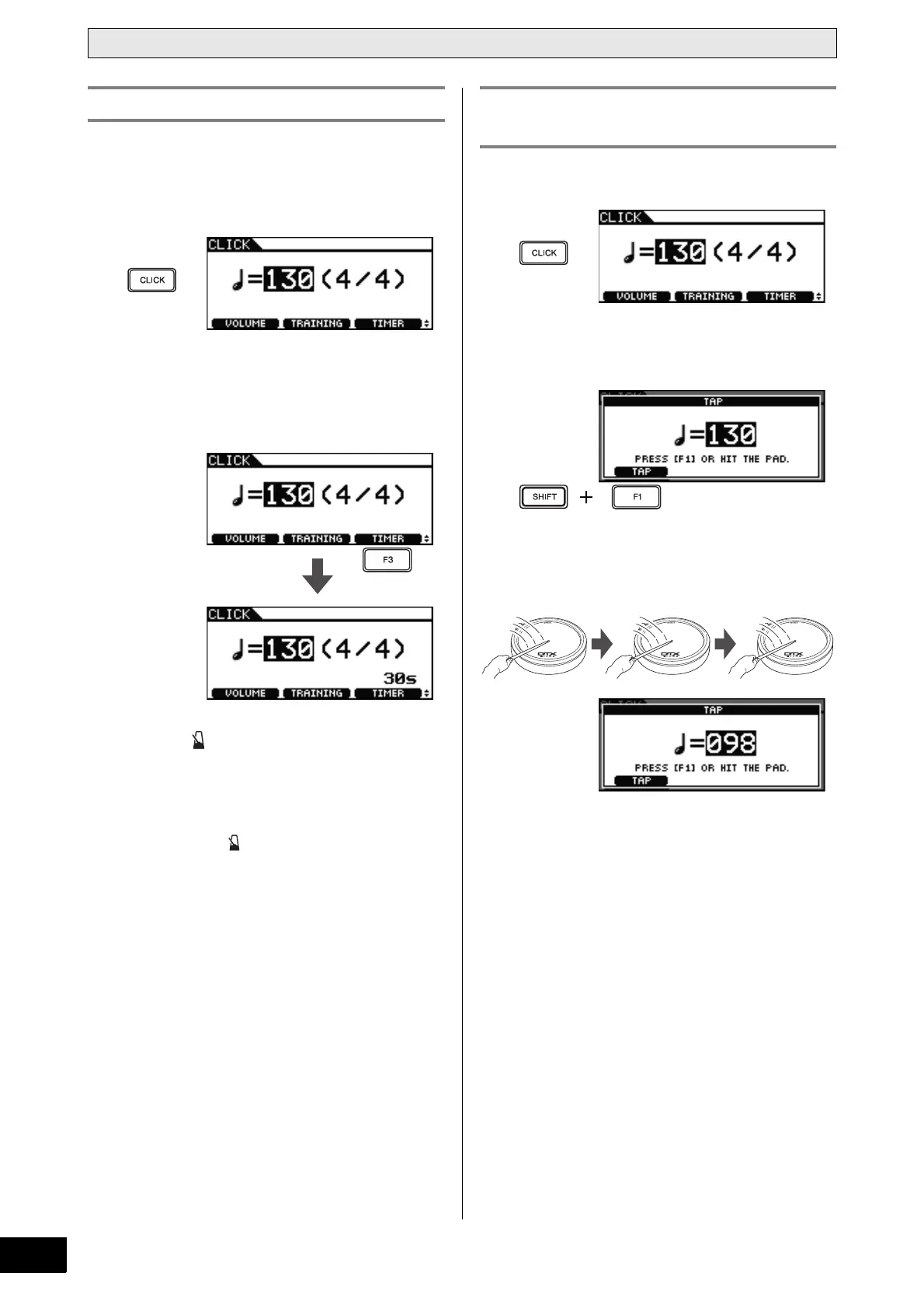
1 Press the [CLICK] button.
2 Press the [F3] button.
Each time you press this button, the timer setting increases
by 30 seconds. The longest time that can be set is 600 sec-
onds.
3 Press the [ ] button.
The timer will now begin to count down as the click-track
plays. When it reaches zero, the click-track will automati-
cally stop playing.
NOTE
• If you press the [ ] button a second time while the click-
track is playing, the click-track will stop and the timer will
be reset to zero.
1 Press the [CLICK] button.
2 Hold down the [SHIFT] button and press the
[F1] button.
3 Hit one of your pads at least three times at
the tempo you wish to set.
The new tempo will be displayed on-screen.
NOTE
• As an alternative to playing a pad, you can also press
the [F1] button at least three times to set the tempo.
• If you select a song (page 36) after setting the tempo in
this way, the selected song’s tempo will be used for the
click-track.
Using the Timer Tap Tempo – Setting the Tempo by
Playing Pads



 To Next Page